

Logitech today announced a follow-up to its popular Circle home camera, debuting the Circle 2. The Circle 2 builds on the features built into the original Circle camera, with Logitech introducing HomeKit support and two separate models, both wired and wire-free for different uses around the house.
For those unfamiliar with the Logitech Circle, it is an in-home camera designed to let you keep an eye on what's going on in your house when you're not there. It's great for keeping an eye on pets and kids, with cloud storage, two-way communication, and more. In our review of the Circle, we questioned its usefulness compared to other home security solutions on the market, and that's a specific area Logitech addressed in the Circle 2.
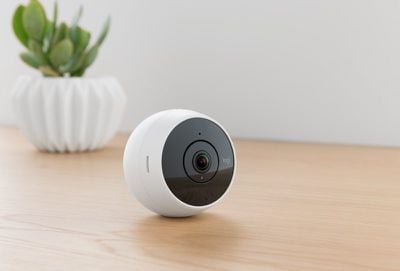
Logitech found that many people who purchased the original Circle camera were interested in it for home security, and the company has doubled down on those features in the second-generation version. Along with wired and wire-free models that offer more options for in-home placement, Logitech is also shipping the Circle 2 with a variety of mounting accessories. There's also more granular control over things like motion zones and person detection in the revamped app that will be offered alongside Circle 2, so you can choose what your camera records and doesn't record, and when and how it alerts you.
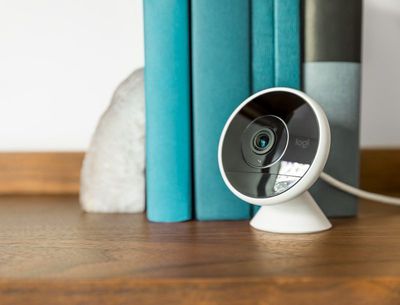
The wired Circle 2 model is meant to be plugged in all the time and offers continuous recording, while the wire-free model runs on a battery and records video when motion is detected, allowing the battery to last for weeks or months at a time. Both models feature the same camera hardware, offering high-quality 180-degree video, night vision support, and a ball joint so it can be adjusted to any angle. Both models are weatherproof and can be placed outside for outdoor use.
Multiple accessories, priced from $29.99 to $49.99, expand the range of places where the Circle 2 can be placed. Accessory options are outlined below:
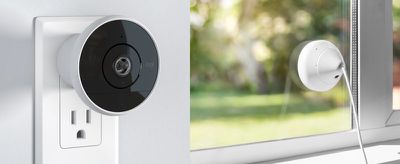
- Circle 2 Window Mount - The window mount allows the Circle 2 to be attached directly to a window pane with an adhesive ring.
- Circle 2 Plug Mount - With the Plug Mount, the Circle 2 can be plugged directly into and powered by any home wall outlet, which is ideal for kitchen or garage placement.
- Circle 2 Weatherproof Extension - The Weatherproof Extension is designed for the Circle 2 Wired Camera and protects cables from outside weather conditions.
- Circle 2 Rechargeable Battery - Designed for the Circle 2 Wire-Free Camera, the backup battery allows you to swap out batteries and keep one charged at all times.
With HomeKit support, the Circle 2 video feed will be available in the Home app, and it will also be able to integrate and work with other HomeKit-connected products. Logitech plans to enable HomeKit compatibility to the Wired version through a software update following the launch of the Circle 2. Circle 2 also works with Amazon Alexa and the Logitech POP Smart Button.

"People want the peace of mind that comes with a simple security solution," said Vincent Borel, director of new ventures at Logitech. "Circle 2 gives people just that - you can place the camera wherever you need it, inside or out, and rest assured that you'll be alerted of any changes in your home while you're away."
Like the original Circle, Circle 2 will offer 24 hours of free encrypted cloud storage. Logitech also offers Circle Safe plans for a fee, which offer 14 to 31 days of storage.
Circle 2 is available for pre-order from the Logitech website starting today. The wired version of the Circle 2 is available for $179.99, while the wire-free version is available for $199.99. A range of mounts and accessories can also be purchased for $29.99 to $49.99.
Logitech plans to begin shipping Circle 2 orders to customers in July.



































![Apple Watch Ultra 3 Hits New Low Price With Amazon's $299 Discount [Updated]](https://images.macrumors.com/t/BXKI27vT0hWfumJQpYzf41rH3Mw=/112x112/article-new/2026/10/apple-watch-ultra-3-milanese.jpeg)










Top Rated Comments
1. HomeKit compatible
2. Offer local storage options (either to SD card or home computer)
3. Has good reviews
Seems like most of these companies want to sell you cloud storage to make their device useable. No thanks.