Music Memos for iOS: Recording, Editing, Tuning, Exporting and More

Music-Memos-app-iconApple today released Music Memos, an all-new iPhone and iPad app that is essentially an enhanced version of the stock Voice Memos app for songwriters.

Music Memos is designed for musicians and songwriters to quickly and easily capture their impromptu song ideas on the fly, whenever inspiration strikes.

The app has a simple user interface at first glance, with nothing but a small recording button, but tucked away behind tiny icons are several useful features.

Recording
Music-Memos-Recording
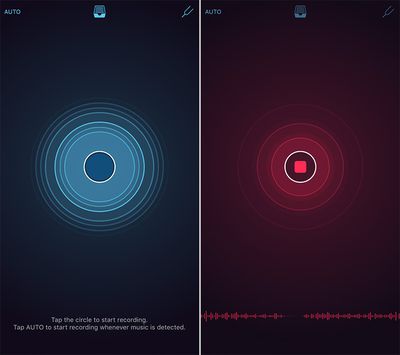
To begin recording, simply open the Music Memos app and tap on the blue circle button. The user interface will turn red while recording. Alternatively, you can tap on the "Auto" label in the top-left corner and the app will automatically start and stop the recording based on your voice.

As you are recording, the circle will pulsate to your voice, or musical instruments, and there is a waveform at the bottom of the screen. To finish recording, simply tap the red circle button and the snippet will appear at the bottom with a title, playback button, pitch notation, and other options.
Music-Memos-edit
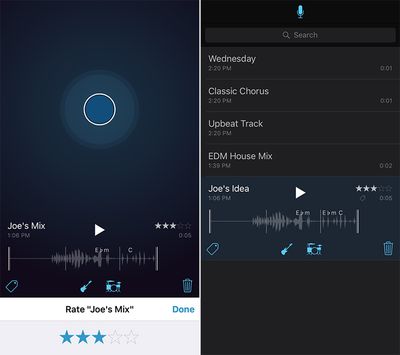
Tapping on the guitar or drum set icons overlays the music recording with drums and a bass line to provide a virtual, customizable backing band. Moreover, your snippet can be renamed, deleted, tagged, or rated on a five-star scale. The app also provides visual warnings if it detects your recording is too quiet or too loud.

Editing
Music-Memos-Editing copy
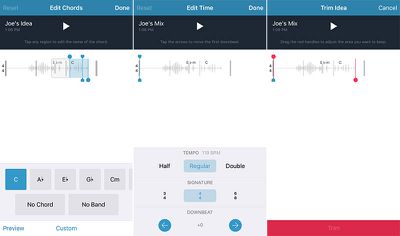
Music Memos saves a list of your recordings, accessible by tapping the tray button at the top of the app. Tapping on a snippet's waveform brings up various editing options for tempo, time signature, downbeat, tuning and length.

The app automatically analyzes your recording and displays musical measures and suggested chord names. Any chord names throughout your song can be renamed or provided further detail by tapping on them.

There are also the options to trim the beginning and end of your recording, adjust the tempo, time signature and downbeat, and keep track of comments, lyric ideas, alternate guitar tunings, or capo position.

Tuning
Music-Memos-Tuner
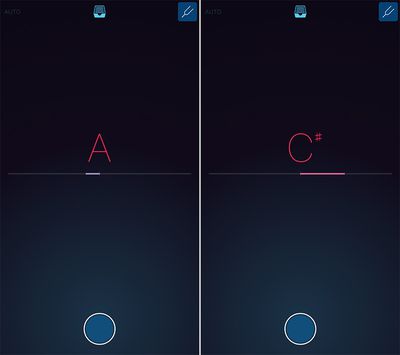
Music Memos includes a built-in tuner for chromatic pitch notation, accessible by tapping the tuning fork button in the top-right corner. The tuner automatically shows a letter note once it detects sound.

There are already several existing tuner apps on the App Store, including Guitar Tuna and Cleartune, but this is a convenient, all-in-one option that songwriters can use to both record musical ideas and tune their guitars.

Exporting and Sharing
Music-Memos-Sharing
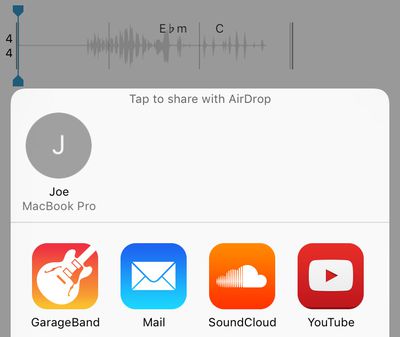
Music Memos snippets, which are 24-bit 44.1kHz audio files, can be saved to iCloud Drive, exported to Logic Pro X and GarageBand for iOS or Mac, or shared directly on Apple Music Connect, SoundCloud, and YouTube. Simply tap on the tray button at the top, expand a recording from the list and tap the share button.

Music Memos is free on the App Store for iPhone, iPad, and iPod touch.

Popular Stories

iOS 26

iOS 26.2 Coming Soon With These 8 New Features on Your iPhone

Thursday December 11, 2025 8:49 am PST by
Apple seeded the second iOS 26.2 Release Candidate to developers earlier this week, meaning the update will be released to the general public very soon. Apple confirmed iOS 26.2 would be released in December, but it did not provide a specific date. We expect the update to be released by early next week. iOS 26.2 includes a handful of new features and changes on the iPhone, such as a new...

iOS 26

iOS 26.4 and iOS 27 Features Revealed in New Leak

Friday December 12, 2025 10:56 am PST by
Macworld's Filipe Espósito today revealed a handful of features that Apple is allegedly planning for iOS 26.4, iOS 27, and even iOS 28. The report said the features are referenced within the code for a leaked internal build of iOS 26 that is not meant to be seen by the public. However, it appears that Espósito and/or his sources managed to gain access to it, providing us with a sneak peek...
iOS 26

Apple Releases iOS 26.2 With Alarms for Reminders, Lock Screen Changes, Enhanced Safety Alerts and More

Friday December 12, 2025 10:10 am PST by
Apple today released iOS 26.2, the second major update to the iOS 26 operating system that came out in September, iOS 26.2 comes a little over a month after iOS 26.1 launched. ‌iOS 26‌.2 is compatible with the ‌iPhone‌ 11 series and later, as well as the second-generation ‌iPhone‌ SE. The new software can be downloaded on eligible iPhones over-the-air by going to Settings >...
AirPods Pro Firmware Feature

Apple Releases New Firmware for AirPods Pro 2 and AirPods Pro 3

Thursday December 11, 2025 11:28 am PST by
Apple today released new firmware designed for the AirPods Pro 3 and the prior-generation AirPods Pro 2. The AirPods Pro 3 firmware is 8B30, up from 8B25, while the AirPods Pro 2 firmware is 8B28, up from 8B21. There's no word on what's include in the updated firmware, but the AirPods Pro 2 and AirPods Pro 3 are getting expanded support for Live Translation in the European Union in iOS...
macOS Tahoe 26 Thumb

Apple Releases macOS Tahoe 26.2 With Edge Light

Friday December 12, 2025 10:08 am PST by
Apple today released macOS Tahoe 26.2, the second major update to the macOS Tahoe operating system that came out in September. macOS Tahoe 26.2 comes five weeks after Apple released macOS Tahoe 26.1. Mac users can download the macOS Tahoe update by using the Software Update section of System Settings. macOS Tahoe 26.2 includes Edge Light, a feature that illuminates your face with soft...
AirTag 2 Mock Feature

Apple AirTag 2: Four New Features Found in iOS 26 Code

Thursday December 11, 2025 10:31 am PST by
The AirTag 2 will include a handful of new features that will improve tracking capabilities, according to a new report from Macworld. The site says that it was able to access an internal build of iOS 26, which includes references to multiple unreleased products. Here's what's supposedly coming: An improved pairing process, though no details were provided. AirTag pairing is already...
ipados 26 1 slide over

Apple Releases iPadOS 26.2 With Multitasking Improvements

Friday December 12, 2025 10:09 am PST by
Apple today released iPadOS 26.2, the second major update to the iPadOS 26 operating system released in September. iPadOS 26.2 comes a month after iPadOS 26.1. The new software can be downloaded on eligible iPads over-the-air by going to Settings > General > Software Update. iPadOS 26.2 continues with the multitasking improvements that were added with iPadOS 26.1. You can now drag and...
iphone fold text

'iPhone Fold' Arrival Expected to Cement Book-Style Era for Foldables

Friday December 12, 2025 3:55 am PST by
Foldable smartphone panel shipments are projected to jump 46% year-over-year in 2026, with Apple's entry into the market serving as the main catalyst, according to Counterpoint Research's latest Foldable-Rollable Display Shipment Tracker. "Apple is the key driver as it starts to procure panels for its first foldable iPhone," said Counterpoint's Guillaume Chansin. The research firm expects...

Top Rated Comments

iLive Avatar
129 months ago
"This app will be integrated into iOS 10 and cannot be deleted. You're welcome." - Apple 2016
Score: 12 Votes (Like | Disagree)
iLunar Avatar
129 months ago
What a great concept from Apple.

And the app icon is gorgeous.
Score: 9 Votes (Like | Disagree)
amirite Avatar
129 months ago
Wow, this looks amazing. This is all I use voice memos for anyway.
Score: 7 Votes (Like | Disagree)
sdjones121 Avatar
129 months ago
Except Hum has been in the AppStore for quite some time.
Except that video seems to indicate the two products are quite different. Automatic key and time signature detection, uncompressed audio, and automated accompaniment mean Music Memos goes well beyond the more basic premise of Hum.
Score: 6 Votes (Like | Disagree)
anthonyjr Avatar
129 months ago
Hoping someone will find a way to convert old Voice Memos to drop into iCloud and load up in this new app.
Score: 5 Votes (Like | Disagree)
Rogifan Avatar
129 months ago
What a great concept from Apple.

And the app icon is gorgeous.
Not possible. Anything post iOS 7 is complete garbage. /s
Score: 5 Votes (Like | Disagree)