

Second-screen app Duet Display received a significant update today, introducing a new resolution option to support Apple's 12.9-inch iPad Pro and bringing significant performance improvements for both iPads and Macs that run the accompanying software.
For those unfamiliar with Duet Display, it's an app that is designed to turn the iPad or iPhone into a secondary display for a Mac. Duet Display was the first app to use a Lightning cable to allow an iPad or iPhone to interface with a Mac, thereby drastically cutting down on the lag that's typically present when an iOS device is used as a secondary display for a Mac over Wi-Fi.
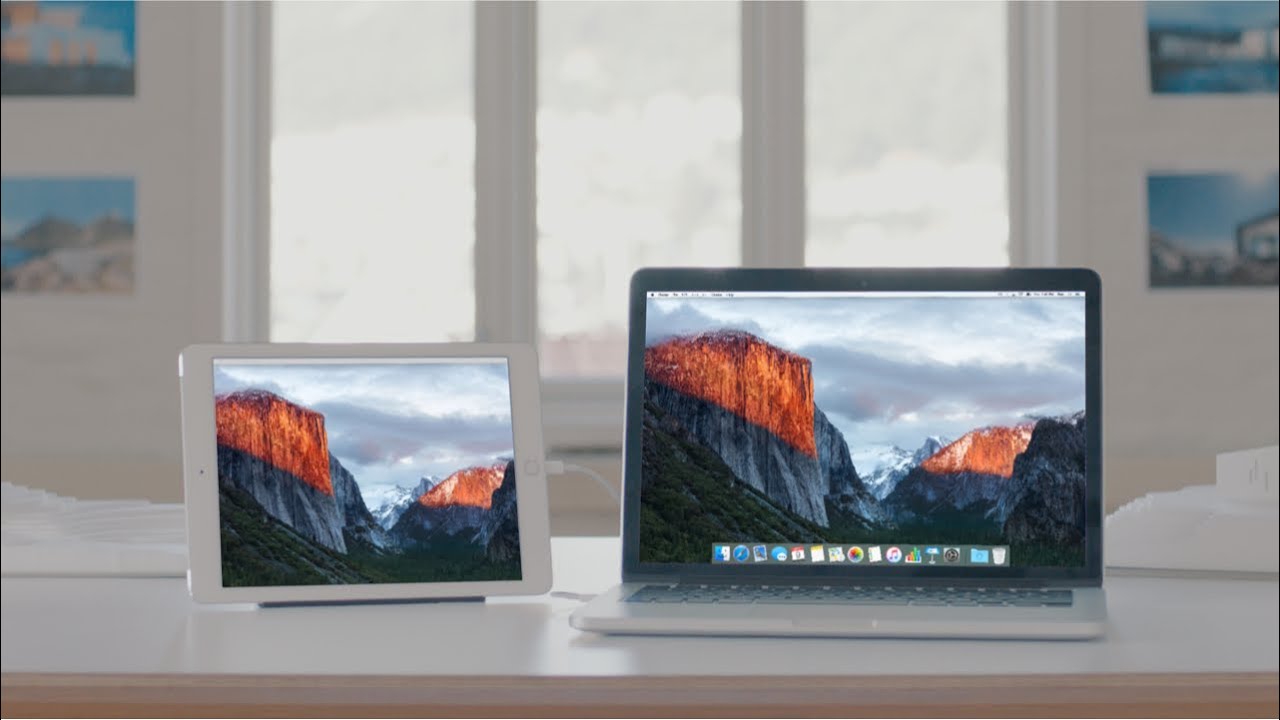

Since its late 2014 launch, Duet Display has been updated several times to improve performance on a wide range of iPads and iPhones, but according to Duet Display developer Rahul Dewan, today's update brings "massive performance improvements." Improving performance was necessary to allow a Mac or PC to drive the high-resolution display of the iPad Pro while maintaining a lag-free connection, but the improvements also apply to all older iPads.
With the latest version of Duet Display, CPU usage has been reduced by over 80 percent on iPad and Mac or PC, thanks to a new algorithm that's more efficient and an intelligent refresh feature that's similar to the iPad Pro's own faster refresh technology, but on the software end. Extremely high CPU usage was one of our major complaints with Duet Display when it was first released and it's been a customer concern for some time, so this update should go a long way towards fixing one of the major pain points in the app.
Duet Display has proven to be a popular app with iPad owners as it gives the iPad the versatility to be used as a second display for a Mac. iPad Pro owners may find Duet Display to be especially useful given the large screen real estate of the device.
Duet Display can be downloaded from the App Store for $9.99 (reg. $15.99). [Direct Link]





































![Apple Pulls Keynote, Pages and Numbers From App Store [Update: Back]](https://images.macrumors.com/t/Okb7kitB_gNr6qe5Pex9nQIysD8=/112x112/article-new/2026/01/Apple-Creator-Studio-iWork-suite.jpg)







Top Rated Comments