

How to Uninstall a 3rd Party App - MacRumors
Skip to Content

How to Uninstall a 3rd Party App

by

142020 uninstall 250

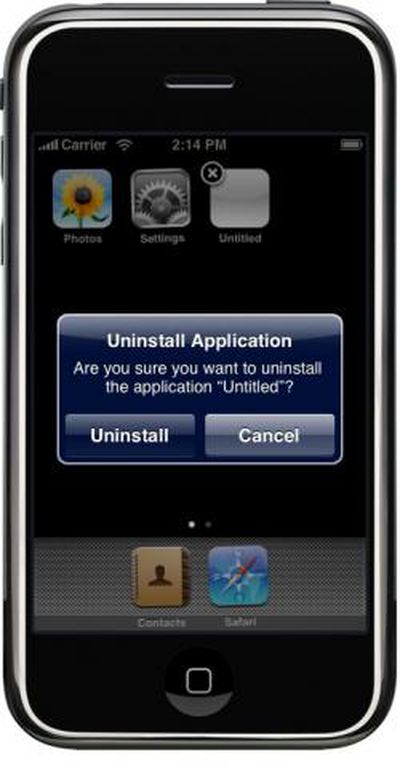
Not surprisingly, in the upcoming iPhone release you will be able to uninstall a 3rd party application the same way you remove Web Applications from the iPhone Home Screen.

- Press and hold on any application icon
- the icons will then start wobbling
- 3rd party applications and Web Applications will show a small "X" on the top left.
- Tap on that, and you are asked if you would like to Uninstall the Application.

These findings are from the iPhone Simulator. We don't know yet if a copy of the application is somehow kept synced with iTunes or if you can re-download a purchased application again from the iTunes App Store.

Related Forum: iPhone

Popular Stories

WWDC26 MR Live Coverage Article

WWDC 2026 Apple Event Live Keynote Coverage: iOS 27, Revamped Siri, and More

Monday June 8, 2026 9:15 am PDT by

Apple's Worldwide Developers Conference (WWDC) starts today with the traditional keynote kicking things off at 10:00 a.m. Pacific Time. MacRumors is on hand for the event and we'll be sharing details and our thoughts throughout the day. We're expecting to see a number of software-related announcements today, headlined by a reset on Apple's push into AI that should see a significant overhaul...

Aston Martin CarPlay Ultra Screen

Apple Says CarPlay Ultra is Coming to These Vehicle Brands

Thursday May 21, 2026 11:53 am PDT by
Last year, Apple launched CarPlay Ultra, the long-awaited next-generation version of its CarPlay software system for vehicles. Nearly a year later, CarPlay Ultra is still limited to Aston Martin's latest luxury vehicles, but that should change fairly soon. In May 2025, Apple said many other vehicle brands planned to offer CarPlay Ultra, including Hyundai, Kia, and Genesis. CarPlay Ultra...
macOS Golden Gate Mac

Apple Announces macOS Golden Gate

Monday June 8, 2026 10:19 am PDT by
Apple today announced that macOS 27 is named macOS Golden Gate. Much like Mac OS X Snow Leopard in 2009, Apple said it focused on improving macOS's performance and dozens of underlying technologies this year. Apple says macOS Golden Gate offers quicker AirDrop transfers, faster network file browsing, improved syncing in the Messages app, better Spotlight search suggestions, and other...







































