How to Get a List of Directions in Apple Maps - MacRumors
Skip to Content

How to Get a List of Directions in Apple Maps

by

After several years of iterations and improvements, Apple Maps has become a solid app and a viable Google Maps alternative for getting GPS-based directions to navigate journeys by car, public transport, bicycle, and on foot.
apple maps icon ios 15 beta 2
Depending on the journey though, you may want to print off a list of turn-by-turn directions to refer to instead of relying on your iPhone and draining the battery. Or you might just want to see the list of directions onscreen to familiarize yourself with them ahead of time. This article shows you how it's done.

Directions Between Your Current Location and a Destination

  1. Launch the Maps app on your iPhone and enter the destination you want turn-based guidance for.
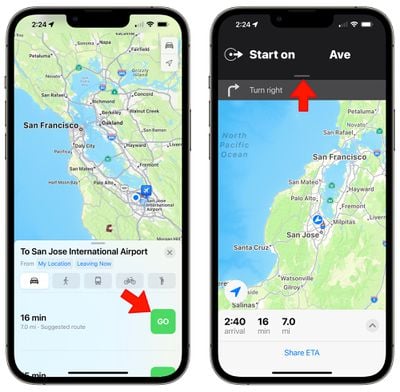
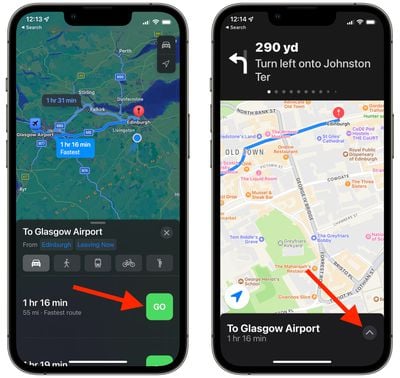
  2. Select a method of transport using the icons at the top of the route card, then tap Go on one of the routes that interests you. maps directions list 1
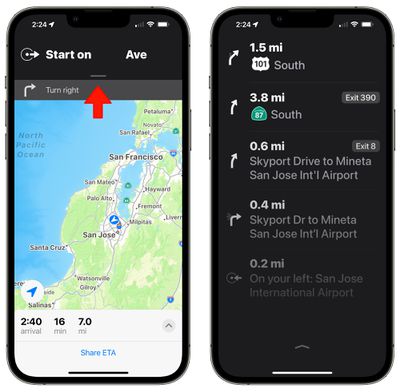
  3. On the next screen, tap on the black bar at the top of the display. maps directions list 2
  4. You'll see the full list of turn-based directions. Tap again to clear it and go back to the turn-by-turn directions view.

Directions Between a Separate Location and a Destination

If you're routing between two locations and one of those locations is not your current location, the interface looks a little bit different. Rather than pulling down to get to the directions, you can tap up on the arrow to see full details and get an option to print the directions.

  1. Launch the Maps app on your iPhone and enter the destination you want turn-based guidance for.
  2. Select a method of transport using the icons at the top of the route card, then tap Go on one of the routes that interests you.
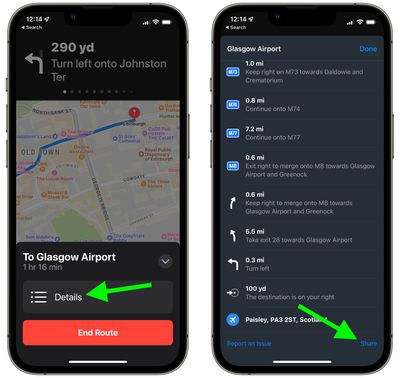
  3. On the next screen, tap the upward-facing chevron at the bottom-right corner of the screen.maps

  4. Tap the Details button that appears in the card.

  5. You'll see the full list of turn-based directions. To print the list, scroll to the bottom and then select Share.
  6. Select Print in the actions menu, or alternately, AirDrop it to a nearby device that's connected to a printer.
    maps

In iOS 15, has brought several major improvements to the Maps app, with better driving directions, improved transit directions, and more immersive AR-based walking directions. For more information on what's new, be sure to check out our dedicated Maps guide.


Popular Stories

Apple Creator Studio iWork suite

Apple Pulls Keynote, Pages and Numbers From App Store [Update: Back]

Thursday October 22, 2026 11:01 am PDT by
Apple has temporarily removed Keynote, Pages, and Numbers from the App Store, just after releasing an update that added iPhone Duo support and a new Intelligent Assistant. It is not clear if the apps were removed intentionally, or if it is a bug. Apple has not said when the apps will be reinstated, but if it was in error, they should return soon. Update: The Mac versions are back without...
iphone duo screen crack in store

Crackgate? iPhone Duo Owners Report Screens Breaking Along the Hinge

Friday October 23, 2026 11:05 am PDT by
Some iPhone Duos are already experiencing hinge issues that cause display cracks, based on photos shared on Reddit and the MacRumors forums. Almost all of the display faults are right along the hinge, and most result in a line of bright pixels across one side of the screen. An iPhone Duo owner in Australia said his device cracked after being opened fewer than 20 times, and there was no...
Apple Music iPod Page Not Found

Apple Music Has a Hidden iPod You Can Play With

Friday October 23, 2026 7:11 am PDT by
Apple Music has a 404 page easter egg on the web: a functional iPod that appears when you load a page that does not exist, such as music.apple.com/macrumors. "Page Not Found," says Apple. "Give this a spin instead." Apple is clever with this. If you navigate to music.apple.com/ipod instead, the page says "Looking for something?" instead of "Page Not Found." The easter egg is only...


Latest Stories
'Arguably Better Than Face ID': the iPhone Duo Touch ID Tip to Try
1 hour ago
Verizon Apologizes for iPhone Duo Pre-Order Delays, Giving Customers $100 Gift Card
7 hours ago
Skip the Touch ID Scan: Unlock iPhone Duo With Apple Watch
7 hours ago
iPhone Duo Fails JerryRigEverything's Dusty Durability Test
7 hours ago
Make iPhone Duo Volume Buttons Follow Screen Rotation
9 hours ago
iPhone Duo Teardowns Reveal Two Batteries and More
10 hours ago
M5 MacBook Air Returns to Prime Day Low With $200 Amazon Discount
11 hours ago
Top Stories: Apple 'Pro and Tell' Debut, iPhone Duo Launch, and More
12 hours ago
Apple Store Pickup System for iPhone Duo Just Went Live Again in U.S. and Canada
13 hours ago
Apple Closes French Stores Ahead of Further Protests
20 hours ago
Apple Pushes Back on DOJ Request for More Evidence
21 hours ago
The iPhone Duo Can Be a Tiny Mac, a Toaster, and a Nintendo DS
1 day ago
Using an Apple Pencil With the iPhone Duo: What to Know
1 day ago
Apple Store Pickup for iPhone Duo Starting to Resume But Very Limited
1 day ago
iPhone Duo Jailbroken on Launch Day
1 day ago
Apple Seeds Updated watchOS 27.2 Release Candidate
1 day ago
Apple Store in UK Reopens With New Design on iPhone Duo Launch Day
1 day ago
Crackgate? iPhone Duo Owners Report Screens Breaking Along the Hinge
1 day ago
iPhone Duo Brings Back Long Lines at Apple Stores
1 day ago
The MacRumors Show: iPhone Duo Arrives, Touchscreen MacBooks Next
1 day ago
Apple Released iOS 27.1 for iPhone Duo Only
1 day ago
iPhone Duo: Open Two Apps Side by Side and Lock Them As an App Pair
1 day ago
iPhone Duo Launches With Carrier and Accessory Discounts Available
1 day ago
Apple Music Has a Hidden iPod You Can Play With
1 day ago
iPhone Duo Says 'Hello' to You Personally
2 days ago
iPhone Duo: How to Skip the Swipe Up After Touch ID
2 days ago
Where to Buy iPhone Duo Today: Stores, Pickup, and Wait Times
2 days ago
MacBook Neo Helps Apple Outpace Rivals as Market Declines
2 days ago
Happy 25th Anniversary, iPod
2 days ago
iPhone Duo Demand Reportedly Exceeds Apple's Expectations
2 days ago