How to Install iOS 26 Public Beta 6 on Your iPhone - MacRumors
Skip to Content

How to Install iOS 26 Public Beta 6 on Your iPhone

by

Apple has made available the sixth public beta of iOS 26, bringing a more stable version of the software to a wider audience following lengthy testing by developers. Keep reading to learn how to prepare your device for the beta software and how to install it.
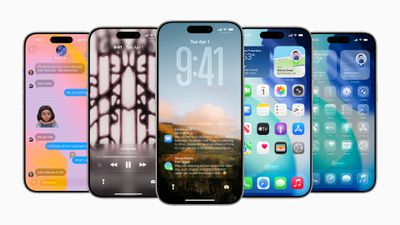
Apple WWDC25 iOS 26 hero 250609
Signing up to get the ‌iOS 26 or ‌iPadOS 26 public beta is simple, and can be done by enrolling an iPhone or iPad in Apple's free Apple Beta Software Program. The steps you need to complete to install the software on your device are provided towards the end of this article, but before you jump ahead, here are a few things worth considering.

Is My iPhone Compatible With iOS 26?

iOS 26 is compatible with the iPhone 11 series and newer. In other words, the following models are supported:

  • iPhone 16e
  • iPhone 16
  • iPhone 16 Plus
  • iPhone 16 Pro
  • iPhone 16 Pro Max
  • iPhone 15
  • iPhone 15 Plus
  • iPhone 15 Pro
  • iPhone 15 Pro Max
  • iPhone 14
  • iPhone 14 Plus
  • iPhone 14 Pro
  • iPhone 14 Pro Max
  • iPhone 13
  • iPhone 13 mini
  • iPhone 13 Pro
  • iPhone 13 Pro Max
  • iPhone 12
  • iPhone 12 mini
  • iPhone 12 Pro
  • iPhone 12 Pro Max
  • iPhone 11
  • iPhone 11 Pro
  • iPhone 11 Pro Max
  • iPhone SE (2nd generation and later)
  • Note that this compatibility list does not mean that all iOS 26 features will work with the above models. Several of the update's features are exclusive to iPhone 15 Pro and iPhone 16 models, since they rely on Apple Intelligence. You can learn more about them here. Note that iOS 26 will come pre-installed on new iPhone 17 models when they launch in September 2025.

Should I Install iOS 26 Public Beta?

Great question! Before downloading the update, it's worth noting that Apple does not recommend installing iOS 26 beta updates on your main iPhone, so if you have a secondary device, use that. This is beta software, which means there are often bugs and issues that pop up that can prevent software from working properly or cause other problems. Apple still has fixes to make before the final release later this month.

Make an Archived Backup of Your Device First

Before installing the beta, make sure to back up your iOS device before installing the software using the following method, otherwise you won't be able to revert back to iOS 18 if things go wrong.

  1. Plug your iPhone into your Mac using the supplied cable.
  2. Allow the accessory to connect by clicking Allow in the dialog prompt.
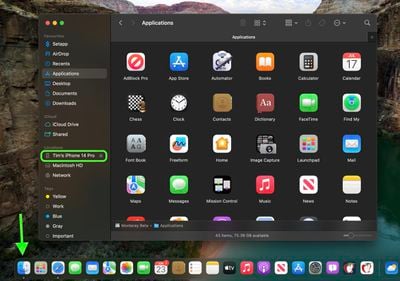
  3. Open a Finder window by clicking the Finder icon in the Dock.
  4. Click your iOS device's name in the sidebar.
    finder

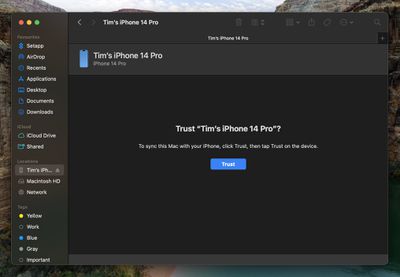
  5. If this is the first time connecting your device to your Mac, click Trust in the Finder window.
    finder

  6. Tap Trust on your device when prompted, then enter your passcode to confirm.
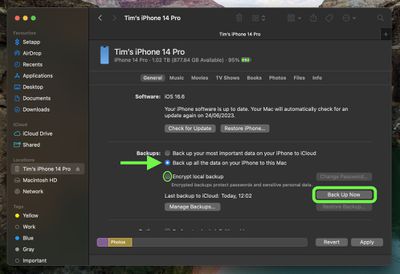
  7. In the General tab, click the circle next to where it says Back up all of the data on your iPad to this Mac.
  8. If you want to encrypt the backup, check the box next to Encrypt local backup, then enter a password to protect your data.
  9. If you don't want to create an encrypted backup, or you've already set up encrypted backups, click Back Up Now.
    finder

When the backup is finished, you can find the date and time of the last backup in the General tab, just above the Manage Backups button. Remember that this backup will not be overwritten when you manually or automatically back up your iPhone in the future, so you can restore it at any time by using the Restore Backup... option in the same Finder screen.

How to Download iOS 26 Public Beta

Downloading and install the iOS 26 Public Beta is very straightforward. Simply follow these steps:

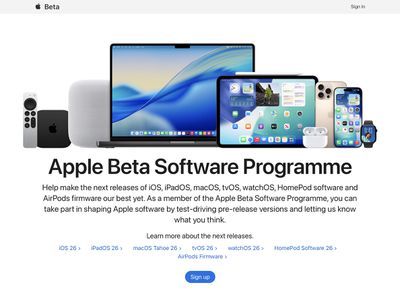
  1. Head over to Apple's Beta Software Program website and sign up using your Apple Account credentials.
    apple public beta program

  2. Now go to Settings ➝ General ➝ Software Update on your iPhone.
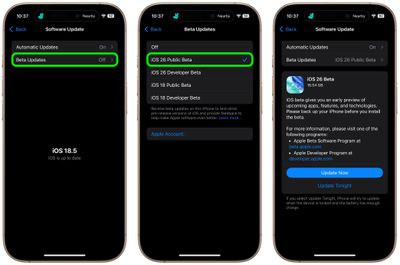
  3. Tap Beta Updates. If you don't see the option, try switching off Download iOS Updates (Automatic Updates ➝ Download iOS Updates), then tap Back and it should appear.
  4. Select iOS 26 Public Beta in the list, then tap Back.
  5. Wait for the Software Update screen to check Apple's servers. When the iOS 26 Public Beta appears, tap Download and Install, then follow the instructions and wait for installation to complete.
    settings

iOS 26 Features

iOS 26 introduces a striking system-wide redesign built around Liquid Glass, a translucent material that reflects and refracts ambient content and dynamically responds to user input. The new aesthetic applies across the Lock Screen, Home Screen, toolbar controls, navigation elements, app icons, and widgets.

The update also brings new Apple Intelligence features. With Live Translation available in Messages, FaceTime, and Phone, conversations across languages are now seamless and entirely on-device to ensure privacy. New Visual Intelligence capabilities mean you can ask questions about screen content. There are also smarter Shortcuts with intelligent actions to make automation easier.

Communication apps gain smart upgrades too. The revamped Phone app now combines Favorites, Recents, and Voicemails in one view, adds Call Screening, and includes a clever Hold Assist feature. Messages gains filtered inboxes for unknown senders, typing indicators in group chats, custom backgrounds and polls, and Apple Cash transfers.

CarPlay gets a visual refresh aligned with the Liquid Glass design and now includes compact call notifications, tappable Message reactions, pinned conversations, widgets, and Live Activities support.

Apple has also updated some of its key apps: Apple Music adds Lyrics Translation and Pronunciation plus AutoMix DJ-style transitions; Maps introduces privacy-protected "Visited Places" and smarter route preferences; Wallet supports installment/rewards payments, refreshed boarding passes with Live Activities, and deeper integrations with Maps and Find My. Lastly, a new Games app debuts as a central hub for mobile gaming, featuring a unified library, Apple Arcade support, event tracking, and friend status updates.

A general release of iOS 26 is expected in the coming weeks, likely during or shortly after Apple's "Awe dropping" event on Tuesday, September 9, when the new iPhone 17 lineup will be revealed. For a full breakdown of what's new, be sure to check out our dedicated iOS 26 roundup.


Top Rated Comments

Piplodocus Avatar
15 months ago
The real version will be out next week won't it (or the week after at the latest)? So doesn't seem much point this late in the game.

Score: 7 Votes (Like | Disagree)
AusMness Avatar
15 months ago
PSA: for anyone not already using the beta, it probably isn’t worth it this late in the cycle to go to and from a beta. Puts a lot of extra strain on that device for only a week of extra use.
Score: 7 Votes (Like | Disagree)
Rogifan Avatar
15 months ago
I said this in the iOS 26 forum, the Liquid Glass Apple showed off in the WWDC developer sessions feels like vaporware. Sadly it seems Liquid Glass in its current sorry state is what will ship to customers. The first impressions of it will definitely turn people off.

Here’s an example from the current public beta where the Safari address bar renders differently and I have no idea why. Is this a bug or is Liquid Glass so complicated and fussy that it gets confused on what UI it should render?


Attachment Image

Attachment Image
Score: 3 Votes (Like | Disagree)
15 months ago
Functionally the latest beta is good and also battery life is fine.

But there still is a lot of work in the visual department. Lots of UI inconsistencies and also lagging animations skipping frames with lockscreen and app drawer while swiping homescreens. This is especially very noticeable on my iPad Pro
Score: 3 Votes (Like | Disagree)
cesar527 Avatar
15 months ago
I have 0 enthusiasm on installing iOS26 on my daily devices.
I have the last beta on my 2nd iPhone and iPad and I really really dislike it. I have never been less interested on updating my devices
Score: 3 Votes (Like | Disagree)
TechRunner Avatar
15 months ago
Looking forward to checking it out, but definitely waiting until after the official release.
Score: 3 Votes (Like | Disagree)

Popular Stories

Apple TV 4K HomeView HomePod Mini tweaked

New Apple TV 4K, HomeView, and HomePod Mini: 16 Details Just Leaked

Sunday October 11, 2026 12:56 pm PDT by
Just two days before Apple's "Welcome home" experience in New York, Bloomberg's Mark Gurman has leaked several details about the new products set to be unveiled, including an all-new smart home hub, a HomePod mini 2, and a new Apple TV 4K. Here is an all-in-one summary of the details shared by Gurman:Apple's home hub with a touch-enabled display will be named HomeView, seemingly confirming a ...
Apple HomeView lineup feature1

Apple Announces 'HomeView' Smart Home Hub

Tuesday October 13, 2026 6:00 am PDT by
Apple today announced the "HomeView," an all-new kind of smart home hub featuring a 7-inch Liquid Retina display and Siri AI. Apple's senior vice president of Worldwide Marketing Greg Joswiak said: Apple HomeView is designed to be shared by everyone in the home yet feel completely personal to each user. It recognizes your face to shift from a household screen to your own experience,...
Apple TV 4K 4th Generation feature4

New Apple TV 4K Announced With A19 Chip, Updated Siri Remote, More

Tuesday October 13, 2026 6:08 am PDT by
Apple today announced the fourth-generation Apple TV 4K, with key features including an A19 chip, Siri AI support, an updated Siri Remote that has Find My support with Precision Finding, built in far-field microphones, support for surround sound with four HomePods in front and rear pairs, and more. The A19 chip in the new Apple TV 4K delivers up to 50% faster CPU performance and up to twice...
Latest Stories
OpenAI Says Ex-Employee Showed Its Device Plans to Apple
1 hour ago
Discover the Best Cases and Screen Protectors for Your New iPhone Duo
1 hour ago
Apple Store Near Los Angeles Closed Due to 'Events Beyond Our Control'
3 hours ago
No, HomePod Mini 1 Won't Support Siri AI as CNET Reported
3 hours ago
iPhone Duo Compromises: Everything You Have to Give Up
4 hours ago
Apple HomeView Has These 15 Apps, Some CarPlay Apps and Widgets Also Supported
4 hours ago
iPhone Duo: Apple Charging $49 for New Cover Layer, $229 for Battery
5 hours ago
iPhone Duo: Skipping AppleCare+ Could Be $1,499 Mistake
5 hours ago
Ready for HomeView? Don't Miss These Smart Home Accessory Deals
6 hours ago
Apple Says HomePod 2 Also Works as Default Speaker With Select Macs
6 hours ago
HomePod Mini 2: All the New Features
6 hours ago
WhatsApp Now Lets Anyone Join Calls, No Account Needed
6 hours ago
AppleCare+ Launched 15 Years Ago Today
6 hours ago
Apple Reportedly Planning Large iPhone 18 Production Run
6 hours ago
Apple Says These Products Are Now Obsolete
6 hours ago
First Pre-Order Discounts Now Available for HomeView
1 hour ago
Apple Launched iPhone 4S With Siri 15 Years Ago Today
7 hours ago
Apple HomeView Includes Temperature and Humidity Sensors
8 hours ago
HomePod Mini vs. HomePod Mini 2 Buyer's Guide: All Differences Compared
8 hours ago
Apple Watch Sleep Apnea Notifications Launch in China
9 hours ago
HomeView's Faces Include Snoopy, Photos, and Interactive Artwork
9 hours ago
Apple's HomeView Repair Fees Revealed
19 hours ago
Everything Apple Still Has Coming in October
20 hours ago
Welcome Home: Everything Apple Announced on October 13
22 hours ago
Will the Full-Sized HomePod Get Siri AI? Apple's Website Offers a Clue
22 hours ago
Apple Releases Third Public Betas of iOS 27.2 and macOS Golden Gate 27.2
22 hours ago
iOS 27.2 Adds New Apple Music Icon
22 hours ago
HomePod Mini 2 Works as Default Speaker With Select Macs
23 hours ago
Elevation Lab Pulls AirTag Silencer After Stalking Concerns
23 hours ago
iOS 27.2 Beta 4 Removes New Health App
23 hours ago