How to Fix Mail Notification Sounds in iOS 15 - MacRumors
Skip to Content

How to Fix Mail Notification Sounds in iOS 15

by

After updating to iOS 15, a number of users have discovered that they are no longer hearing notification sounds for the Mail app. To fix this issue, you may need to adjust your Mail notification settings.

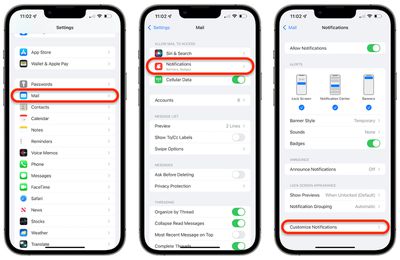
  1. Open the Settings app, tap Mail, and then tap Notifications.
  2. At the bottom of the Notifications screen, tap Customize Notifications.
    ios 15 mail notification alerts 1
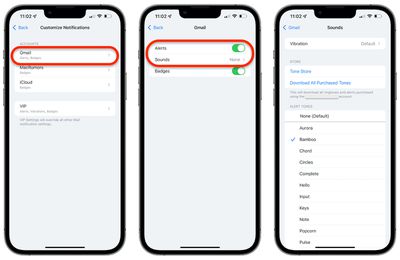
  3. Tap the desired email account.
  4. Turn on or off the settings for Alerts and Badges.
  5. If you turn on Alerts, a new Sounds section will appear. Tap that to choose which alert tone or ringtone you want to use for alerts on that email account.
    ios 15 mail notification alerts

Back up to the Customize Notifications screen and repeat steps 3 through 5 for each email account you wish to configure, and then you should then start receiving notification sounds for incoming emails once again.

Related Forum: iOS 15

Popular Stories

airpods pro 3 design

'AirPods Ultra' Rumored to Feature a Major Upgrade Over AirPods Pro

Thursday April 30, 2026 8:40 am PDT by
In a social media post this week, Bloomberg's Mark Gurman reiterated that Apple is planning to release new AirPods with cameras "for Siri." Last month, Gurman said these AirPods will likely be priced above the current AirPods Pro 3, which Apple sells for $249. As a result, he said Apple is likely considering using "AirPods Ultra" branding for the camera-equipped AirPods. "AirPods Ultra"...
Four iPhone 18 Pro Colors Mock Feature

iPhone 18 Pro to Launch in September With These 10 New Features

Tuesday April 28, 2026 9:35 am PDT by
While the iPhone 18 Pro and iPhone 18 Pro Max are not launching until September, there are already plenty of rumors about the devices. It was initially reported that the iPhone 18 Pro models would have fully under-screen Face ID, with only a front camera visible in the top-left corner of the screen. However, the latest rumors indicate that only one Face ID component will be moved under the...
Apple MacBook Pro M4 hero

Why You Might Want to Wait to Buy a MacBook Pro

Friday May 1, 2026 3:43 pm PDT by
Apple refreshed the 14-inch and 16-inch MacBook Pro with M5 Pro and M5 Max models in March 2026, but depending on your needs and interests, you might want to skip this generation because there's something better in the works. The M5 Pro and M5 Max MacBook Pro models have faster chips, but the same design that Apple has used since 2021. An updated design with new display technology and faster ...