How to Enable Time-Synced Lyrics in Apple Music on Your Apple TV - MacRumors
Skip to Content

How to Enable Time-Synced Lyrics in Apple Music on Your Apple TV

by

If you're an Apple Music subscriber and own an Apple TV, you have everything you need to host a karaoke party. Thanks to Apple's time-synced lyrics feature, you can sing along as you listen to your favorite songs. This article explains how.
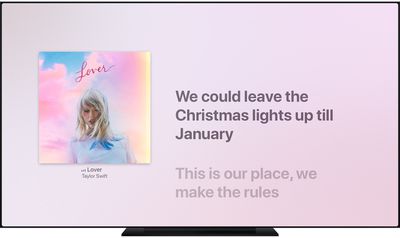
tvos music now playing lyrics synced
In September of 2020, Apple released the tvOS 14 update, which can be installed on the ‌Apple TV‌ 4K and ‌Apple TV‌ HD. If you own either model, you can follow these steps to listen to songs on ‌Apple Music‌ with perfectly timed lyrics showing on screen.

  1. Open the Music app on your ‌Apple TV‌.
  2. Play a song from the ‌Apple Music‌ catalog.
  3. Press the Menu/Back button on your ‌Apple TV‌ Remote.
  4. Select the Lyrics option (the speech bubble icon) in the top-right corner of the screen.
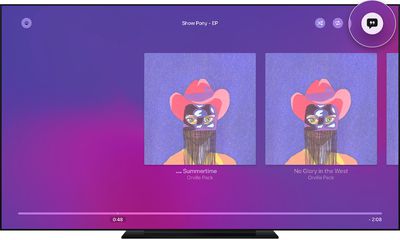
tvos14 music lyrics

If you don't see time-synced lyrics appear when you select the Lyrics option, then sadly time-synced lyrics aren't available for that particular song. Select another song to play and try again.

You can also see the full lyrics for a song when it's playing by pressing the Menu/Back button on your ‌Apple TV‌ Remote, selecting the More option (the ellipsis icon), then choosing View Full Lyrics.

Related Roundup: Apple TV
Buyer's Guide: Apple TV (Don't Buy)

Popular Stories

Where is the New Apple TV Feature

Next Apple TV's Chip Revealed in Latest Leak

Tuesday September 8, 2026 10:19 am PDT by
The next Apple TV 4K will be equipped with an A19 or A19 Pro chip, according to evidence in Apple's code uncovered by MacRumors contributor Aaron Perris. In particular, the device's model identifier points towards the A19 generation of chips. Accordingly, the next Apple TV would have 8GB or 12GB of RAM, up from 4GB in the current 2022 model with the A15 Bionic chip. Other rumored upgrades for...
iOS 27 Feature Cool

Apple Releases New iOS 27, iPadOS 27, macOS 27, and tvOS 27 Public Betas

Monday August 31, 2026 2:13 pm PDT by
Apple today released the sixth public betas of iOS 27, iPadOS 27, tvOS 27, and macOS Golden Gate, allowing anyone with a compatible device to download and test the new software. The sixth betas come a week after Apple seeded the fifth betas and a few hours after the eighth developer betas. You can get started by signing up on Apple's beta website and then opting in to the public beta by...
Apple TV Remote Icon

iOS 27 to Upgrade Apple TV Remote App in Two Ways

Thursday September 10, 2026 2:33 am PDT by
Apple has updated the design of the virtual Apple TV Remote for the iOS 27 Release Candidate, which was released yesterday, and there are two new features that have been added to the iPhone app's interface. First up, Apple has added a new button to the top-right corner of the Remote UI with a glyph showing four squares. Pressing the button pops out an app menu similar to the Apple TV home...