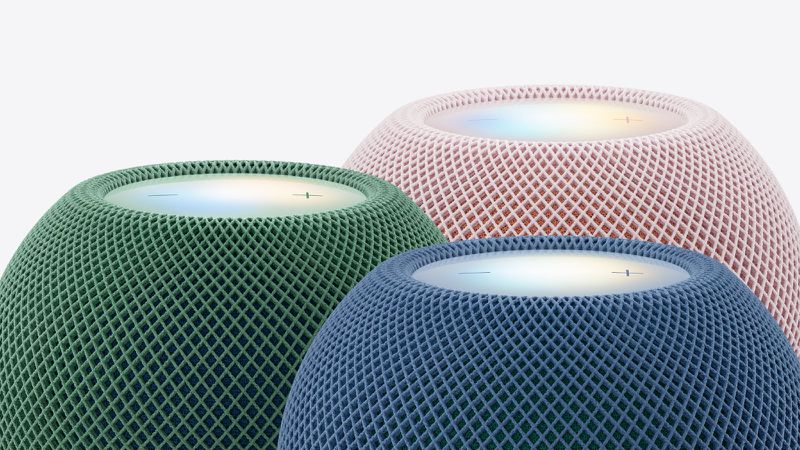
Ask MacRumors
Should You Buy the HomePod mini 2?
The HomePod mini 2 is Apple's smaller smart speaker, featuring a round design, an updated S10 chip, 360-degree audio, a U1 chip, and Wi-Fi 6E for $149. The original HomePod mini used to be priced at $99, but Apple raised the price to $129 in June 2026 and then increased it again with the second-generation launch.
The HomePod mini 2 was introduced in October 2026, so it is brand new and now is the best time to buy.
Though the HomePod mini is more expensive than it was before, the new model has faster processing and support for Siri AI. It can be used to control Apple smart home products, it works with Apple Music, and it can be paired with other HomePods and the Apple HomeView for multiroom audio and Apple TV surround sound. It is the best compact speaker option for the Apple ecosystem.
The HomePod mini 2 is a smaller speaker that may not be appropriate for a large room. If you need a bigger speaker, Apple sells the $349 HomePod. For a speaker that's more versatile, Apple has the $299 HomeView, a smart home hub with a 7-inch display and a speaker base.
HomePod mini 2
Contents
Apple introduced the HomePod mini 2 in October 2026, marking the first real refresh to the speaker since its 2020 debut.
The HomePod mini 2 is a smaller version of the HomePod, measuring in at 3.3 inches tall compared to the HomePod's 6.6-inch height. Compared to the HomePod mini, the HomePod mini 2 has no exterior design changes, but there are new color options. The HomePod mini is available in white, pink, green, blue, and midnight.
The HomePod mini 2 has a fabric-covered spherical design with a flat top that has a backlit touch interface with Sound Glow. Sound Glow is a visual canvas that glows and pulses in sync with music that's playing, pulling colors from the song album's artwork. Colors are unique to each song, and Apple says soundscapes like rain have bespoke animations. The HomePod mini 2 supports gestures like tap to play, double-tap to skip, and touch and hold to activate Siri, plus it has volume buttons.
Like the HomePod, HomePod mini 2 works with Apple Music, but it also supports podcasts, news briefings, Apple Music Radio, radio stations from iHeartRadio, Audacy, and TuneIn, and some third-party music services such as Pandora, Spotify, and Amazon Music. Content can also be AirPlayed to the HomePod mini from any iPhone, iPad, Mac, or Apple TV 4K.
Two HomePod minis can be paired together to create a stereo pair with left and right channels for rich sound, and with the latest Apple TV 4K, four HomePod minis can be combined for surround sound and multiple HomePod minis can work together throughout the home to stream music to multiple rooms. The HomePod mini 2 can be used as a native speaker for the Mac, with two offering stereo sound.
Inside, the HomePod mini 2 is equipped with an S10 chip, which is the same chip that was first used in the Apple Watch Series 10. The S10 chip uses computational audio to analyze the music that's playing and optimize loudness, adjust dynamic range, and control driver and passive radiator movement in real time.
The HomePod mini 2 is equipped with a full-range driver and two force-cancelling passive radiators for what Apple says results in deep bass and crisp high frequencies. It uses a custom acoustic waveguide for a 360-degree sound field and acoustically transparent fabric.
A far-field three-microphone array listens for Siri commands and can isolate sound coming from the speaker for voice detection even when music is playing. Support for Sound Recognition lets the HomePod mini 2 listen for smoke and carbon monoxide alarm sounds and send alerts.
Siri AI is coming to HomePod mini 2, with personal context available through a connected iPhone, iPad, or Mac. Siri can identify the different voices of up to six members of a family, matching music and podcasts to their preferences and responding to personal requests that draw from iPhone and iPad. Siri AI requires a connected Apple Intelligence-capable device for processing power.
The HomePod mini 2 features Wi-Fi 6E, Bluetooth 6, and Thread, plus it has a built-in U1 Ultra Wideband chip that allows it to interface with iPhones that have an Ultra Wideband chip. Bringing an iPhone close to the HomePod mini 2 allows the music that's playing on the iPhone to be handed off to the HomePod mini.
The HomePod mini 2 supports visual, audible, and haptic effects when sound transfers from one device to another. Personalized listening suggestions show up on the iPhone when it's next to HomePod mini, and controls are available even when the iPhone isn't unlocked.
HomePod mini 2 can activate Find My to help you find a lost iPhone, iPad, iPod touch, Mac, or Apple Watch in the home by triggering a sound. Like the HomePod, the HomePod mini is able to control HomeKit-compatible smart home accessories and it serves as a home hub to enable access to HomeKit devices when you're away.
There are humidity and temperature sensors in the HomePod mini 2 that can be used to trigger automations. The HomePod mini requires continual power and it has a color-matched USB-C power cord that plugs into a power adapter.
Note: See an error in this roundup or want to offer feedback? Send us an email here.
How to Buy
HomePod mini 2 is priced at $149 in the United States and it can be ordered from Apple and other retailers.
Design
The HomePod mini 2 looks identical to the original HomePod mini, with no major design changes. It has the same mesh-covered acoustic fabric design as the larger HomePod, but it features a rounded, bulbous body with a display at the top. The top display has physical controls and a Sound Glow feature with lights that respond to music.
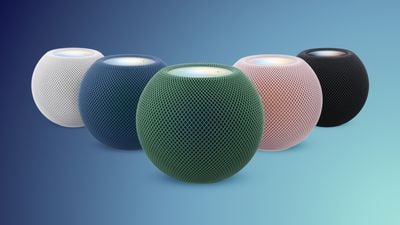
Apple added new colors for the HomePod mini 2, and it is available in white, midnight, blue, pink, and green. Apple is using a two-tone mesh, adding some color variability.

HomePod mini measures in at 3.3 inches tall and 3.9 inches wide, and it weighs 0.74 pounds (0.2 pounds lighter than the prior version), so it's small enough to fit just about anywhere. There's a silicone base at the bottom of the HomePod mini that keeps it in place.
HomePod mini is powered by a non-detachable power cable that has a USB-C connector at the end, which is designed to work with an included 20W power adapter. Because the HomePod mini features a USB-C connector instead of a plug like the HomePod, it can be powered by a battery pack. The power cord is made from a woven material and is color-matched to the HomePod mini.
Touch Gestures
HomePod mini supports several touch gestures using the touch-based interface at the top of the device. A tap pauses or plays music, and a double tap swaps to the next track. A triple tap goes back to the previous track, and a touch and hold brings up Siri.
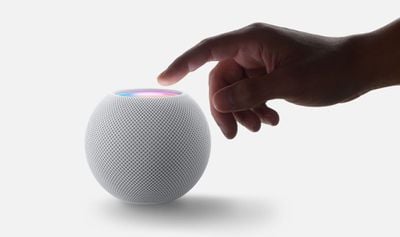
Tapping and holding on the "+" button raises the volume, and tapping and holding on the "-" button lowers the volume.
Sound Glow
Sound Glow is a light at the top of the HomePod mini that changes color and pulses in sync with the music or audio that's playing. It draws colors from album artwork, and is compatible with songs, podcasts, and Apple's ambient music feature.
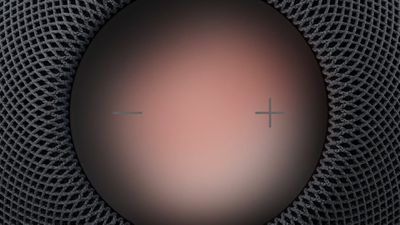
Sound Glow is available on both the original HomePod mini and the HomePod mini 2.
Sound Quality and Hardware
The HomePod mini 2 is equipped with the S10 chip that was first used in the Apple Watch Series 10. It's built on TSMC's N4 4nm process and is based on the A16 Bionic chip from the iPhone 14 Pro. It is a more powerful chip than the S5 that was used in the original HomePod mini.
Apple uses the S10 for improved computational audio. The chip analyzes music to apply tuning models to optimize for loudness, adjust dynamic range, and control the driver and passive radiators.
The HomePod mini 2 has the same internal setup as the first HomePod mini. There's a full-range driver that's powered by a neodymium magnet, two force-cancelling passive radiators, and 360-degree sound delivered through an acoustic waveguide that directs sound out of the bottom of the speaker.
There are three far-field microphones for listening to "Hey Siri" commands, with the HomePod mini 2 offering one fewer microphone than the original HomePod mini.
The HomePod mini also has a U1 Ultra Wideband chip for music handoff from an iPhone to a HomePod mini and vice versa.
Stereo Pairing
Music can be played to multiple HomePod minis, HomePods, and AirPlay 2 speakers throughout the home at the same time, but two HomePod minis in a single room can also work together as a stereo pair with left and right channels to fill a space with sound.
Though two HomePod mini 2 speakers can be paired, the HomePod mini cannot be paired with the full-size HomePod. Two paired HomePod mini speakers can be set as the default sound output on a compatible device, and they will show up as a single selectable speaker. The iPhone, iPad, Mac, and Apple TV all support HomePod stereo pairs.
Four-Speaker Surround Sound
Four HomePod mini 2 speakers can be used to create a surround sound system with the fourth-generation Apple TV 4K. The speakers and the Apple TV 4K recognize each speaker's position in the room to automatically calibrate timing and levels to the home theater space.
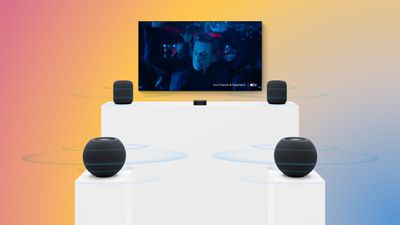
The four-speaker setup requires four HomePod mini 2 speakers or two HomePod mini 2 speakers and two second-generation HomePods. Front and rear speaker pairs have to match with a mixed setup.
With four speakers, there's also a Whole Room Audio option that spreads sound evenly across four HomePods in a room. Apple says it's useful for parties or watching sports games. Whole Room Audio is distinct from surround sound, and it assigns the same left or right stereo channels to HomePods positioned diagonally across from one another for a more consistent stereo listening experience.
Mac Speaker
The HomePod mini 2 works as a default speaker for a Mac. A Mac can use a single speaker, or a pair for stereo sound. A Mac with Wi-Fi 6E or later is required.

Music Playback
HomePod mini works with Apple Music, Apple's streaming music service that's available starting at $11.99 per month. It connects directly to Apple Music in the cloud over Wi-Fi, so it is able to access a user's music library with playlists, music mixes, and preferences.

There's multi-user support, with HomePod mini able to recognize the voices of up to six members of the family, so each person can access their own Apple Music content along with things like personal calendars, reminders lists, and more.
HomePod mini also works with iTunes Store purchases, iCloud Music Library with an Apple Music or iTunes Match subscription, Apple Music Radio, Podcasts, and AirPlay content from iPhone, iPad, Apple TV, and Mac.
SharePlay
Multiple people can add songs to a HomePod playlist using SharePlay with Apple Music. Joining a SharePlay session can be done by bringing an iPhone close to another iPhone that controls the HomePod or scanning the QR code in the Apple Music SharePlay window on the iPhone. Anyone can add songs to the playlist and control playback even if they don't have an Apple Music subscription. Note that the main HomePod user needs to subscribe to Apple Music.
Supported Third-Party Music Services
HomePod mini works with third-party music services like iHeartRadio, Deezer, TuneIn, Pandora, and Amazon Music. Other streaming services like Spotify must be played on the HomePod with AirPlay.
AutoMix
The HomePod mini supports AutoMix, which is Apple's AI music mixing feature that blends songs by matching key and tempo during transitions.
Siri AI
Siri AI support is coming to the HomePod mini 2 in the near future. Most music playback is controlled through Siri voice commands, and Siri can make music recommendations based on personal tastes, aiding in music discovery.
Siri AI can answer questions about a wide range of topics, getting up-to-date information from the web. Siri supports back-and-forth conversations, and can tap into personal context to send messages, schedule reminders, add ingredients to a shopping list, make calendar appointments, place phone calls, and set timers.
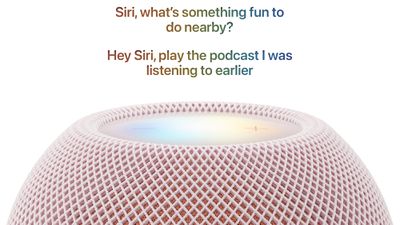
Siri AI requires an Apple Intelligence-supported iPhone or iPad for personal context. It can recognize up to six users in a household by their voice and connect to their apps like Messages while also playing their favorite music.
Activating Siri AI requires the owner of the home in the Home app to have an Apple Intelligence-compatible device, but once Siri AI is activated, users without an Apple Intelligence-compatible iPhone or iPad can access world knowledge for getting answers to questions and get improved music recommendations.
Apple Intelligence is available on the iPhone 15 Pro and later and all iPads with M-series chips, plus the A17 Pro and A20 Pro iPad mini models. Siri AI will initially be available in English only in U.S., Australia, Canada, India, New Zealand, Singapore, South Africa, and the UK.
Phone Calls
With Siri's ability to place phone calls, the HomePod mini can serve as a speaker and a microphone for voice-based conversations. Anyone in the home is able to start a call and then swap the call over to HomePod mini with the built-in continuity features.
Smart Home Control
The HomePod mini serves as a Home Hub, allowing remote access for HomeKit devices so they can be controlled even when a user is away from home.
Through Siri, the HomePod mini also serves as a control point for all of your HomeKit devices, with HomeKit-enabled accessories able to be controlled through Siri voice commands.
There are also a few other neat integrations, like a feature that lets the HomePod announce that someone is at the door when paired with a HomeKit-compatible doorbell.
HomePod mini supports Wi-Fi 6E and Bluetooth 6, along with low-power Thread networking technology, which is a secure, mesh-based system that connects to Internet of Things devices. It a Thread border router and a Matter controller.
The HomePod mini 2 has built-in humidity and temperature sensors so that it can give climate readouts right in the Home app.
Other Siri Features
- Shortcuts - Shortcuts created on the iPhone or iPad can be activated by voice on the HomePod mini.
- Ambient Sounds - Siri can play ambient noise like rain, a fireplace, a stream, and more, and can set a sleep timer so the sound stops playing automatically after a certain period.
- Find My - Asking Siri to find a lost device causes the missing device to play a sound so it can be located within the home. This feature works with iPhone, iPad, Mac, and Apple Watch.
- Maps - Siri suggestions appear in Maps on iPhone when asking HomePod for information about a location.
- Music Alarms - With a music alarm, users can wake up to a song or radio station from Apple Music.
- AirPlay - Siri can be asked to AirPlay content from an iPhone or iPad that's logged in to the same Apple Account that's used on the HomePod.
Privacy
Apple built privacy protection in the HomePod mini 2. Siri is activated through a "Siri" or "Hey Siri" command, and until those words are spoken, HomePod mini does not listen to the conversations in the room. Once the Siri wake word is said aloud, data is sent to Apple's servers using an encrypted and anonymous Siri ID.
Intercom
Intercom on the HomePod mini lets family members communicate with one another throughout the household using the HomePod mini, HomePod, HomeView, and other devices.
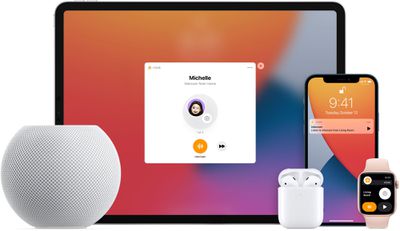
Intercom allows one person in the family to send an Intercom message from one Apple device to another, including the HomePod mini. Messages can be sent to a HomePod in a specific room, in a zone, or in multiple rooms at one time.
With Intercom messages relayed to HomePod, the HomePod automatically plays the voice of the person that's speaking. Messages can be sent to and from HomePod, HomePod mini, iPhone, iPad, Apple Watch, AirPods, and CarPlay. A HomePod is required for Intercom to work, and the feature is controlled through the Home app.
Sound Recognition
The HomePod mini 2 supports Sound Recognition and is able to recognize certain sounds. Sound Recognition can detect an alarm from a smoke detector or carbon monoxide detector, sending an alert to let you know that there's an emergency.
The feature is useful for those who do not have smart smoke alarms able to send their own alerts, because it lets users know about a potential fire even when they're away from home.
iPhone Handoff
If you're listening to a song on your iPhone and bring the phone near the HomePod mini, there are visual, audio, and haptic effects when the song transfers. As the iPhone gets closer to the HomePod mini's location, it begins a soft haptic touch rhythm that gets faster and faster as the iPhone continues to approach the HomePod mini. Eventually, the song transfer interface pops up, and the song transitions from the iPhone to the mini.
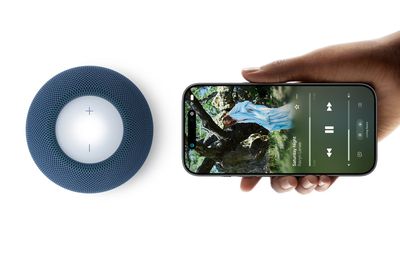
When you hold an iPhone next to the HomePod mini, the iPhone displays playback controls that you can access without unlocking your phone, giving you a quicker way to manually control content playing on the HomePod mini.
Software