Skip to Content

macOS 27.3 Warns Against Giving AI Apps Full Mac Control

With the latest macOS 27.3 beta, Apple is giving Mac users more control over the data they share and the access they give to apps, including apps that use AI agents. Apple today informed developers about upcoming changes to the Full Disk Access API and the Device Control and Data Access API.
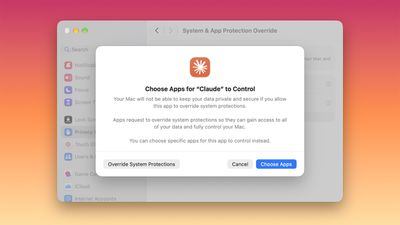
claude warning
Here's what Apple says is changing:

  • The current Device Control and Data Access setting will be split into two options that make it clearer to users what they're permitting. The setting is becoming System & App Protection Override and Accessibility.
  • There will be a single method for granting permissions by selecting the app requesting access from a list.
  • Apple will encourage users to grant access to just the specific apps (in System & App Protection Override) or folders (for Full Disk Access) required for workflows.
  • Apple will better inform users about the data apps will receive access to or control over if full permissions are given.
  • Users will have an option to configure apps to ask each time for required access rather than granting an app unrestricted access.
  • There will be a transparency indicator when a requesting app is controlling another app with System & App Protection Override. The indicator will be displayed in the Mac menu bar.

Apple says developers will need to adjust user onboarding and make sure apps can "gracefully handle" access to a limited set of folders or apps when using the APIs being overhauled.
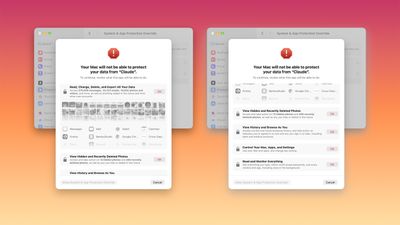
claude warning 2 2
Apps that use Full Disk Access for disk backup or the new Accessibility settings for assistive technologies can request entitlements to offer the same experience for new installations that they offered before macOS 27.3.

Right now, known apps keep their current experience without an entitlement, and app permissions granted by users prior to macOS 27.3 will remain in effect. Mac users will see these changes when approving new app permission requests, and entitlement details are coming soon.

Last month, Apple said it would add "additional controls" for Full Disk Access on Macs because of the risks posed by AI agents. Apple warned that some developers are using Full Disk Access in ways that can put users at risk, exposing files, mail, messages, browsing history, and more.

Popular Stories

MacBook Neo 2 on Yellow Feature

Apple Reportedly Plans to Release These Products in February or March

Sunday November 22, 2026 7:32 am PST by
Apple plans to unveil an iPhone 18e, iPhone 18, updated entry-level iPad, and new MacBook Neo and MacBook Air models around February or March next year, according to the latest word from Bloomberg's Mark Gurman. In his Power On newsletter today, Gurman said Apple has some additional products planned for the first half of 2027, including the iPhone Air 2 and new iPad Air and iPad Pro models,...
1password deal blue

1Password Security Breach: What Was Accessed and What Wasn't

Wednesday November 25, 2026 1:09 pm PST by
Popular password management app 1Password today said it experienced a security breach earlier this month. 1Password says some customer names and email addresses were accessed, but no customer vault contents were compromised. On November 19, 1Password saw indications that an employee's GitHub account had been breached and began investigating. The company says the breached GitHub account was...
ipad pro prime

Apple Has iPads Running macOS Internally, Says Gurman

Wednesday November 25, 2026 4:55 am PST by
Apple has iPads running macOS internally and has had them "for some time," according to Bloomberg's Mark Gurman, although he says no work is currently being done to bring the Mac operating system to iPads. Speaking on his latest Power On podcast, Gurman said there is "no work being done to consumerize macOS on the iPad." Rather, Apple will continue to bring Mac features and apps like Final Cut ...

Top Rated Comments

boswald Avatar
1 week ago
Good for Apple for raising awareness of the dangers of allowing AI to infiltrate your Mac.
Score: 25 Votes (Like | Disagree)
1 week ago
But yet we still have to download gigabytes of the stuff even if we have no interest in using it.
Score: 24 Votes (Like | Disagree)
ratspg Avatar
1 week ago


I remember when macOS wasn't Windows. Sigh. I miss those days. Now I have to allow and accept just like Windows years ago. Oh how times have changed.
Score: 22 Votes (Like | Disagree)
1 week ago
Good to see this. Making users aware of what data is exactly given to these AI apps is a good move.
Score: 12 Votes (Like | Disagree)
waydabber Avatar
1 week ago
It is not just AI apps - it is all apps that previously required Accessibility Permissions for anything, the article title is somewhat misleading.

UPDATE: The original article was updated with more info and context so it is now better understood that this affects all kinds of apps, not just AI tools - thanks to the Editor for the clarification).

UPDATE #2: I have to admit that my righteous indignation was maybe a bit pre-mature. The new warning actually forced me as a developer to re-evaluate what is actually needed to provide the functionality and it seems like I found a way that requests a much narrower scope of permissions, avoiding both the "FUD page" permissions sheet and even the blue Access Indicator in the Live Activity section. It may be that some other developers will find a way too (not all), and hopefully Apple will provide a proper entitlement solution for those who need it.



The menu bar lights like a Christmas Tree whenever any of my usual third party apps do anything meaningful, with a blue "transparency indicator" live activity which cannot be removed or at least acknowledged. Looks especially atrocious on the new PROLED MBP's dynamic island.

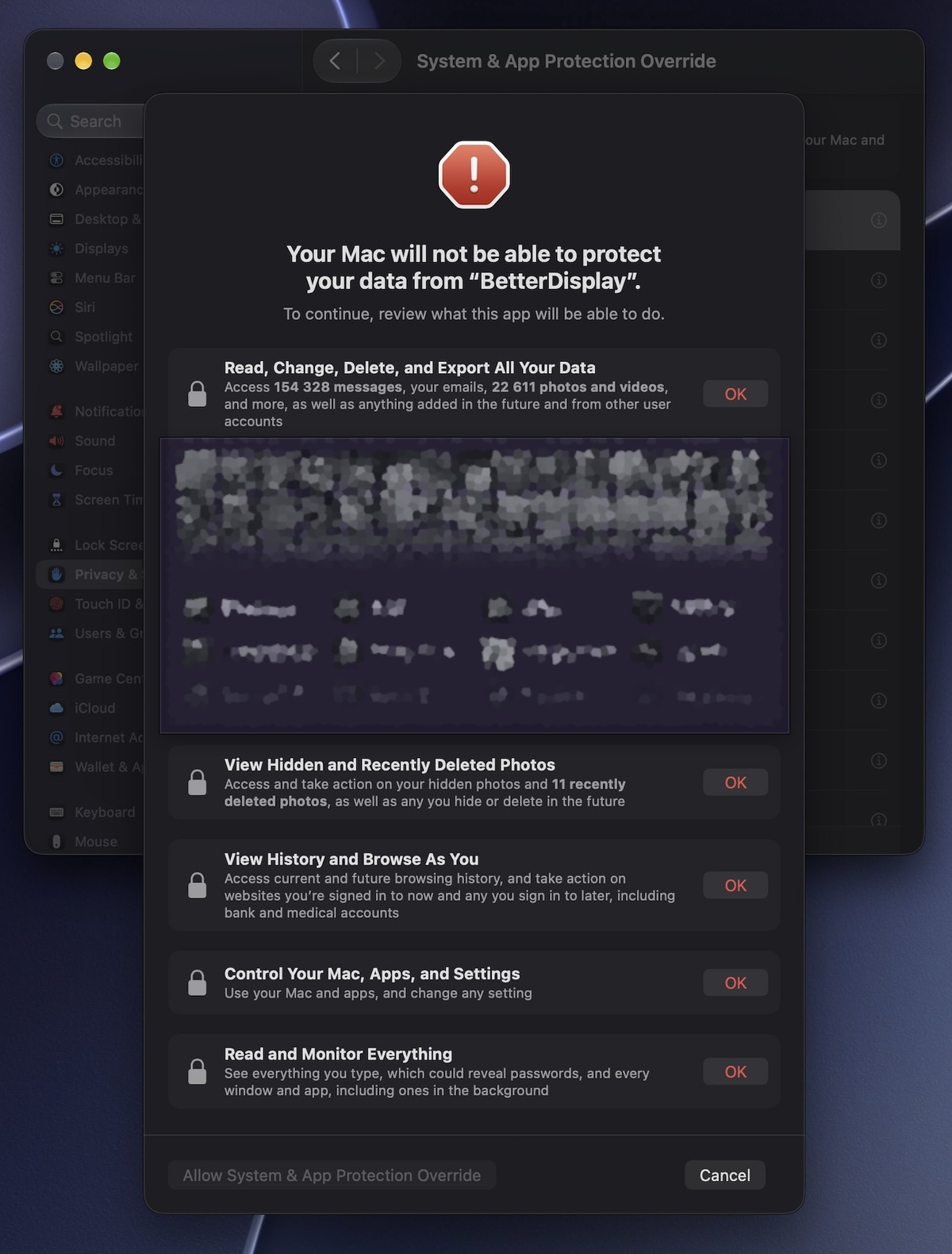
To let my apps work, I need to go to a FUD page in System Settings, one-by-one click on dangerous looking, red OK buttons :eek: to then allow access by entering the admin password or authorize using Touch ID.


This is how the new prompt looks like that replaced the good old Accessibility Permissions (or "Data Access, and Full Disk Access" permissions in previous macOS 27 versions).

Just to clarify - BetterDisplay does or requires none of the things the user is asked to give consent or permission to in this new System Settings page (actually it just needs some access to the brightness and volume keys to control brightness and volume for various displays). The screenshot shows BetterDisplay as example trigger, but I have many of my other frequently used third party apps listed like this and triggering the indicator.

I am sure developers will be thrilled because of this change (for sure I am) and users will find it great too! 🤣

The intent and idea is understandable, but this should be executed better, have an option to at least acknowledge an app permanently so the user does not have to stare at the bright blue indicator in the dynamic island continuously + there should be an easy way for developers to clarify what their app actually does or show some info/explanation on this permissions page what is happening.


Apple promises some way to get entitlements (will it work for non app-store apps?) and supposedly "known apps aren’t affected and will keep the same experience without an entitlement" (this does not seem to work either right now, as I am using "known apps" and they still have this warning and indicator).

More info:

https://developer.apple.com/news/?id=oqng0zjk

Attachment Image

Attachment Image
Score: 10 Votes (Like | Disagree)
adrianlondon Avatar
1 week ago

Good for Apple for raising awareness of the dangers of allowing AI to infiltrate your Mac.
Luckily, Siri is still too stupid to know what it's looking at 😁
Score: 7 Votes (Like | Disagree)
Latest Stories
Apple's Official 2026 Black Friday Offer Starts Rolling Out
31 minutes ago
Halide Adds Fill Light Feature for iPhone Duo
51 minutes ago
MacBook Air Black Friday Deals Now Live With Massive $399 Savings
2 hours ago
Amazon Discounts All MacBook Neo Models by $99 for Black Friday
2 hours ago
Kodak Launches Unique AirTag Rival With E-Ink Display
3 hours ago
Here's Why the Apple Store is Going Down
3 hours ago
Apple Still Working on Giant Foldable iPad That Could Cost $5,000
4 hours ago
iPhones Dominate China's Weak Singles' Day Smartphone Sales
4 hours ago
iPhone 20 Pro Could Feature Ceramic in Limited-Edition Model
5 hours ago
Apple Faces Korean Regulator Review Over iPhone 16 AI Advertising
6 hours ago
Apple Watch Ultra 4 Hits New Best-Ever Price of $649.99 for Black Friday
6 hours ago
New Apple Store Opening in India, Download the Special Wallpaper Now
13 hours ago
Redesigned OLED MacBook Air Could Launch in 2027 or 2028
18 hours ago
AirPods Pro 3 for $149 is One of The Best Black Friday Deals This Year
18 hours ago
1Password Security Breach: What Was Accessed and What Wasn't
20 hours ago
WhatsApp Finally Adds Scheduled Messages
20 hours ago
Get Apple's Cheapest iPad for $379 During Amazon's Black Friday Sale
21 hours ago
Rumor: iOS 28 to Revamp Notifications
21 hours ago
iPhone 18 Pro Max Battery Exhausts a Toy Cyclops in New Apple Ad
1 day ago
$799 Smart Glasses Promise Vision Pro-Style Controls in a 45g Frame
1 day ago
How To Get an iPhone Duo or iPhone 18 Pro at No Cost Through T-Mobile for Black Friday
1 day ago
Apple Has an iPhone Notifications Problem
1 day ago
Amazon Sweetens Black Friday Deals on PROLED MacBook Pro
1 day ago
Apple Has iPads Running macOS Internally, Says Gurman
1 day ago
Apple Is Far From Done With 2026: Here's What's Still Coming
1 day ago
Threads App for iPad Now Available
1 day ago
Claude Now Lets You Install Artifacts as Desktop Apps
1 day ago
Tidal Bans AI Music, While Apple Music Sticks to Labels
2 days ago
Add Holiday Lights and Snow to Your Mac With Festivitas
2 days ago
Meta's Muse AI Agent Comes to Instagram DMs
2 days ago