iOS 18.4 Adds Apple Intelligence Priority Notifications Feature
With the iOS 18.4 and iPadOS 18.4 betas, Apple is introducing a new Priority Notifications feature that can show you your most important notifications first.
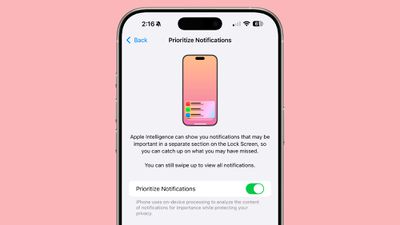
Apple first announced Priority Notifications when showing off Apple Intelligence in June, but it wasn't implemented until now. Priority Notifications is disabled by default, but it can be turned on by going to Settings > Notifications > Prioritize Notifications and tapping the toggle.
With the feature enabled, Apple Intelligence will show notifications that may be important in a dedicated section of the Lock Screen.
Popular Stories
Apple's long-rumored smart home hub will have an iMac G4-style design and a host of unique features, Bloomberg's Mark Gurman reports.
The smart home hub is said to feature a square 6-inch display, with variants that can be placed on a countertop or mounted on a wall. It features a single FaceTime camera on the front, with microphones and speakers in its connected base. Gurman described the...
Apple plans to introduce a series of new smart home products on Tuesday, October 13, according to Bloomberg's Mark Gurman.
Apple reportedly plans to debut its long-awaited smart home hub device, a new HomePod mini, and a new Apple TV on the date. The new HomePod mini and Apple TV are set to retain their existing designs, but tout faster chips to support Siri AI. The new HomePod mini will...
MacRumors contributor Aaron Perris has uncovered an image file from Apple for an unreleased Apple TV 4K, suggesting that a new model will finally be released soon. The image is specifically for an "Apple TV 4K (4th generation)" model.
Apple TV 4K (4th generation) image (on a gradient)
The image reveals that the Apple TV will have the same external design as the current model, with all of its...

















































