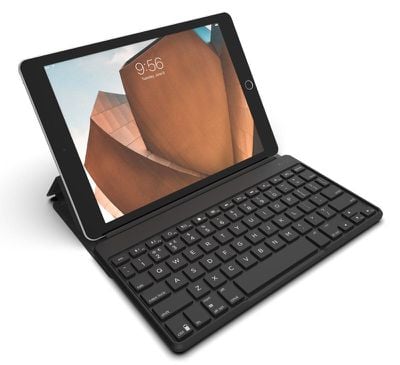
Zagg today announced the launch of the Zagg Flex Universal Keyboard and Stand, which is designed to work with any Bluetooth device. It can be paired to the iPhone, iPad, Apple TV, and more, along with smart TVs, other tablets, and other smartphones.

The Flex Universal Keyboard features a slim protective cover that keeps it safe when in a bag or a purse. When in use, the cover turns into a built-in stand that can hold any-sized smartphone or tablet at an ideal viewing angle.
zaggflexkeyboard
Zagg has included support for multi-device pairing so the keyboard can be connected simultaneously to two devices, with a toggle available to switch between them.

Laptop-like keys offer a comfortable typing experience while on the go and backlighting for the keys allows the keyboard to be used in low-light conditions. A built-in battery lasts for up to one year before needing to be recharged.

According to Zagg, the Flex keyboard and cover have been designed to be detachable so it can also be used sans cover with devices that don't require a stand.

Zagg's Flex Universal Keyboard can be purchased from the Zagg website for $79.99. It will ship out to customers starting on September 19.


Tag: Zagg

Top Rated Comments

noraa Avatar
96 months ago
Sad day when an aftermarket iPad keyboard is probably more “laptop-like” than the one built into Apple’s currently laptops.

Have you ever actually spent any consistent amount of time with the MBP keyboard? It took me a little bit to get used to, but I actually really like it at this point.

I honestly wonder how many people who bitch about the butterfly keyboard have actually used it...
Score: 3 Votes (Like | Disagree)
ignatius345 Avatar
96 months ago
Have you ever actually spent any consistent amount of time with the MBP keyboard? It took me a little bit to get used to, but I actually really like it at this point.

I honestly wonder how many people who bitch about the butterfly keyboard have actually used it...
Yeah, I have. I spent a month with the butterfly keyboard and it sucked the whole time. I didn't even get to the part where it starts jamming two years into its life like my daughter's has started to. Not sure how long I was supposed to "get used to" the keyboard to earn the right to "bitch" (as you so eloquently put it), but a month was enough for me and I got rid of the machine. First Mac in 25 years of buying Macs that I've gotten rid of immediately after buying it. And I've typed on some mushy old PowerBook and iBook keyboards.

Sorry, but a keyboard that people spend a lot of time "getting used to" and which turns off a significant percentage of users is a design fail, period. You remember how many people had split opinions about the previous generation of MacBook keyboards, how there were tons of threads with people complaining they didn't like it, or rushing to defend it? Oh right -- you don't. Because nobody had **** to say about it. It was a normal keyboard, basically invisible to the user, because it met people's expectations of what a keyboard feels like.
Score: 3 Votes (Like | Disagree)
ignatius345 Avatar
96 months ago
Laptop-like keys offer a comfortable typing experience while on the go
Sad day when an aftermarket iPad keyboard is probably more “laptop-like” than the one built into Apple’s currently laptops.
Score: 2 Votes (Like | Disagree)
ignatius345 Avatar
95 months ago
I never thought about using the Apple keyboard. Does the keyboard also adjust brightness and sound?
It does! Very handy. The media playback buttons work as well.
[doublepost=1535951887][/doublepost]
I think it does yeah. I haven't used it with my ipad in a while but I seem to remember it doing that. Needs verification from someone else, or pop into an apple store and ask staff for a try.

I should have mentioned my broken delete key remapping to the power key for my old Apple Wireless Keyboard only works when connected to a Mac. When connected to iphone or ipad, delete doesn't work, and remapping I dont think is possible. However control-h works for delete, as does the various other command key combos.

TBH though I liked the concept, I never really liked the reality of using external keyboards with ipad / iphone - too few words on screen; too awkward to step through emails etc without a mouse or touchpad; and editing / selecting text via touch is a pain in the neck; & I always forget the key combos for selecting text. It's just never worked for me.
Agreed. I’d generally rather be using a Mac. Those keyboard shortcuts are super useful on Mac or iOS. If you get used to using them you can really fly through editing much faster. I clipped this at some point and you might find it useful:

⇧ + ← select left one letter
⇧ + → select right one letter

⌥ + ← move cursor left one word
⌥ + → move cursor right one word

⌥ + ⇧ + ← select backward one word
⌥ + ⇧ + → select forward one word

⌥ + ⌫ delete backward one word
⌥ + ⌦ delete forward one word
Score: 2 Votes (Like | Disagree)
michelepri Avatar
96 months ago
They should make a keyboard for Macbooks.
Score: 1 Votes (Like | Disagree)
RedTomato Avatar
95 months ago
It does! Very handy. The media playback buttons work as well.
[doublepost=1535951887][/doublepost]
Agreed. I’d generally rather be using a Mac. Those keyboard shortcuts are super useful on Mac or iOS. If you get used to using them you can really fly through editing much faster. I clipped this at some point and you might find it useful:

⇧ + ← select left one letter

⇧ + → select right one letter

⌥ + ← move cursor left one word

⌥ + → move cursor right one word

⌥ + ⇧ + ← select backward one word

⌥ + ⇧ + → select forward one word

⌥ + ⌫ delete backward one word

⌥ + ⌦ delete forward one word
Awesome shortcuts - thanks!
Score: 1 Votes (Like | Disagree)

Popular Stories

top stories 2025 12 20

Top Stories: iOS 26.3 Beta, Major Apple Leaks, and More

Saturday December 20, 2025 6:00 am PST by
You'd think things would be slowing down heading into the holidays, but this week saw a whirlwind of Apple leaks and rumors while Apple started its next cycle of betas following last week's release of iOS 26.2 and related updates. This week also saw the release of a new Apple Music integration with ChatGPT, so read on below for all the details on this week's biggest stories! Top Stories i...
iPhone Top Left Hole Punch Face ID Feature Purple

iPhone 18 Pro Features Leaked in New Report, Including Under-Screen Face ID

Tuesday December 16, 2025 8:44 am PST by
Next year's iPhone 18 Pro and iPhone 18 Pro Max will be equipped with under-screen Face ID, and the front camera will be moved to the top-left corner of the screen, according to a new report from The Information's Wayne Ma and Qianer Liu. As a result of these changes, the report said the iPhone 18 Pro models will not have a pill-shaped Dynamic Island cutout at the top of the screen....
ios 18 security update

Don't Want to Upgrade to iOS 26? Here's How to Stay on iOS 18 [Update: Now Unavailable]

Friday December 19, 2025 10:37 am PST by
Since the beginning of December, Apple has been pushing iPhone users who opted to stay on iOS 18 to install iOS 26 instead. Apple started by making the iOS 18 upgrades less visible, and has now transitioned to making new iOS 18 updates unavailable on any device capable of running iOS 26. If you have an iPhone 11 or later, Apple is no longer offering new versions of iOS 18, even though there...
airpods pro 3 new blue

AirPods Pro 3's Static and Noise Issues Haven't Been Resolved

Thursday December 18, 2025 3:44 pm PST by
Since the AirPods Pro 3 launched, there have been complaints from users who have noticed a static-like sound or a crackling issue when using the earbuds, particularly when Active Noise Cancellation is on but no media is playing. Users have also run into strange high-pitched whistling sounds that happen intermittently. We shared the issues back in late October, and despite two subsequent...
apple music chatgpt

ChatGPT's Apple Music Integration Is Now Live

Wednesday December 17, 2025 3:50 pm PST by
There's now a dedicated Apple Music app for ChatGPT, which allows ChatGPT to make music recommendations and build playlists. Apple Music can be added to ChatGPT through the Settings section in the Mac app, website, or iOS app. Apple Music is listed under the apps option, and connecting to it requires signing in with your Apple Account for authorization purposes. ChatGPT can be used to...
samsung exynos 2600 2nm%402x

Samsung Announces World's First 2nm Mobile Chip Ahead of Apple

Friday December 19, 2025 3:59 am PST by
Samsung has officially unveiled the Exynos 2600, the world's first 2 nanometer mobile system-on-a-chip (SoC), built on the company's Gate-All-Around (GAA) process. The 10-core ARM-based design aims to deliver improved performance and efficiency for flagship devices like the upcoming Galaxy S26 series. The chip uses Arm's latest cores and supports new instructions for improved CPU speed and...
apple beta 26 lineup

Apple's 2026 and 2027 Product Roadmap: Foldable iPhone, iPhone 18 Pro, M5 Macs, and More

Tuesday December 16, 2025 4:42 pm PST by
There has been a whirlwind of rumors over the last few days, sourced from leaked internal software designed for the iPhone and the Mac, and news sites like The Information. Below, we have a quick recap of everything we've heard this week, which serves as a guide to Apple's product plans in 2026 and beyond. We've organized the info by likely release date, though there are some products that...
iOS 26 Maps Glass

Apple Quietly Discontinued Flyover City Tours in Apple Maps

Thursday December 18, 2025 1:31 pm PST by
Apple Maps no longer offers a Flyover feature that provides users with automated tours of notable landmarks in major cities. The Flyover option appears to have been nixed around when iOS 26 launched, but its removal went largely unnoticed. Flyover city tours were introduced in 2014 with iOS 8 and OS X Yosemite, using Flyover imagery to generate an aerial tour. Most cities with Flyover...