

iOS 8 Beta 5 Tidbits: SMS Relay, New iCloud Icons, Health App Updates, and More

Apple today released the fifth beta of iOS 8, which brings a number of improvements, tweaks, and bug fixes to the beta software that was first introduced on June 2.

iOS 8 beta 5, like previous betas, includes several minor interface modifications designed to make iOS 8 feel faster and more polished. We've gathered up a comprehensive list of all the enhancements that have been bundled into the new beta release below, and to find out about all of the under-the-radar changes in iOS 8 so far, make sure to check out our iOS 8 Hidden Features Roundup.

Health: According to the beta's release notes, Apple's Health app now collects Spirometry data. Spirometry tests measure lung function, tracking the volume and flow of air when inhaling and exhaling. The app has gained several new icons, the ability to export Health data, and a "Show When Logged" option to display Medical ID on the lock screen. There are also privacy settings for Health in the Settings app.

SMS Relay: iOS 8 users are getting a popup that asks them to use their phone numbers for SMS Relay on their MacBooks, one of the new Continuity features between OS X Yosemite and iOS 8.
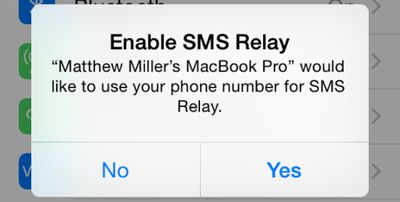
smsrelay
Photos: Photos now displays a "Last Updated" notification to let users know when images were last synced to iCloud. There's also an iCloud Photo Settings option to store full resolution photos solely in iCloud while keeping device-optimized versions available on the iPhone to save storage space.
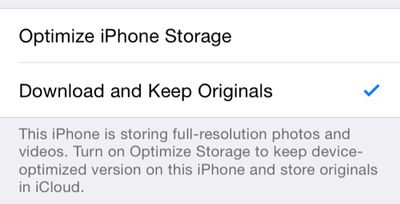
photosoptimize
iCloud icons: iCloud Drive, Backup, and Keychain have new icons in the iCloud section of the Settings app. The overall iCloud icon has also been updated, featuring a white cloud on a field of blue.
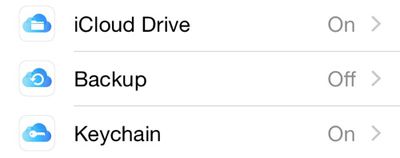
newicloudsettingsicons
WiFi Calling: When WiFi calling is enabled, it's now labeled T-Mobile WiFi at the top of the iPhone screen.
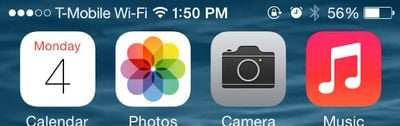
tmobilewifi
Predictive text: There's now an option on the keyboard to toggle on predictive text.
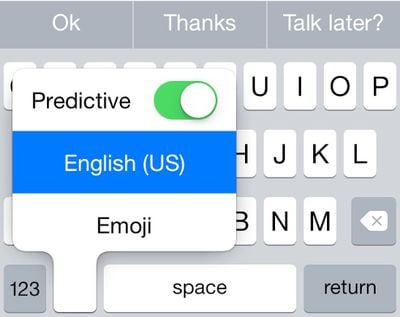
predictive
Wallpaper Settings: The Brightness toggle has been removed from the Wallpaper section of the Settings app. Changing screen brightness can now be done via the Display & Brightness section of the Settings app that was added in a previous iOS 8 beta.

Additional features in iOS 8 beta 5 will be added here as they are discovered. Apple is likely to continue pushing regular updates to iOS 8 at two or three-week intervals to bring minor performance boosts and changes ahead of the operating system's launch. For more information on iOS 8's features, major and minor, make sure to check out our roundups.


Related Forum: iOS 8

Popular Stories

iOS 26

iOS 26.2 Coming Soon With These 8 New Features on Your iPhone

Thursday December 11, 2025 8:49 am PST by
Apple seeded the second iOS 26.2 Release Candidate to developers earlier this week, meaning the update will be released to the general public very soon. Apple confirmed iOS 26.2 would be released in December, but it did not provide a specific date. We expect the update to be released by early next week. iOS 26.2 includes a handful of new features and changes on the iPhone, such as a new...
Google maps feaure

Google Maps Quietly Added This Long-Overdue Feature for Drivers

Wednesday December 10, 2025 2:52 am PST by
Google Maps on iOS quietly gained a new feature recently that automatically recognizes where you've parked your vehicle and saves the location for you. Announced on LinkedIn by Rio Akasaka, Google Maps' senior product manager, the new feature auto-detects your parked location even if you don't use the parking pin function, saves it for up to 48 hours, and then automatically removes it once...
AirPods Pro Firmware Feature

Apple Releases New Firmware for AirPods Pro 2 and AirPods Pro 3

Thursday December 11, 2025 11:28 am PST by
Apple today released new firmware designed for the AirPods Pro 3 and the prior-generation AirPods Pro 2. The AirPods Pro 3 firmware is 8B30, up from 8B25, while the AirPods Pro 2 firmware is 8B28, up from 8B21. There's no word on what's include in the updated firmware, but the AirPods Pro 2 and AirPods Pro 3 are getting expanded support for Live Translation in the European Union in iOS...
Foldable iPhone 2023 Feature 1

Apple to Make More Foldable iPhones Than Expected [Updated]

Tuesday December 9, 2025 9:59 am PST by
Apple has ordered 22 million OLED panels from Samsung Display for the first foldable iPhone, signaling a significantly larger production target than the display industry had previously anticipated, ET News reports. In the now-seemingly deleted report, ET News claimed that Samsung plans to mass-produce 11 million inward-folding OLED displays for Apple next year, as well as 11 million...
iOS 26

iOS 26.4 and iOS 27 Features Revealed in New Leak

Friday December 12, 2025 10:56 am PST by
Macworld's Filipe Espósito today revealed a handful of features that Apple is allegedly planning for iOS 26.4, iOS 27, and even iOS 28. The report said the features are referenced within the code for a leaked internal build of iOS 26 that is not meant to be seen by the public. However, it appears that Espósito and/or his sources managed to gain access to it, providing us with a sneak peek...
AirTag 2 Mock Feature

Apple AirTag 2: Four New Features Found in iOS 26 Code

Thursday December 11, 2025 10:31 am PST by
The AirTag 2 will include a handful of new features that will improve tracking capabilities, according to a new report from Macworld. The site says that it was able to access an internal build of iOS 26, which includes references to multiple unreleased products. Here's what's supposedly coming: An improved pairing process, though no details were provided. AirTag pairing is already...
iOS 26

Apple Releases iOS 26.2 With Alarms for Reminders, Lock Screen Changes, Enhanced Safety Alerts and More

Friday December 12, 2025 10:10 am PST by
Apple today released iOS 26.2, the second major update to the iOS 26 operating system that came out in September, iOS 26.2 comes a little over a month after iOS 26.1 launched. ‌iOS 26‌.2 is compatible with the ‌iPhone‌ 11 series and later, as well as the second-generation ‌iPhone‌ SE. The new software can be downloaded on eligible iPhones over-the-air by going to Settings >...
iOS 26

15 New Things Your iPhone Can Do in iOS 26.2

Friday December 5, 2025 9:40 am PST by
Apple is about to release iOS 26.2, the second major point update for iPhones since iOS 26 was rolled out in September, and there are at least 15 notable changes and improvements worth checking out. We've rounded them up below. Apple is expected to roll out iOS 26.2 to compatible devices sometime between December 8 and December 16. When the update drops, you can check Apple's servers for the ...
maxresdefault

iOS 26 Code Leak Reveals Apple Smart Home Hub Details

Thursday December 11, 2025 4:02 pm PST by
Apple is working on a smart home hub that will rely heavily on the more capable version of Siri that's coming next year. We've heard quite a bit about the hub over the last two years, but a recent iOS 26 code leak provides additional insight into what we can expect and confirms rumored features. Subscribe to the MacRumors YouTube channel for more videos. Macworld claims to have access to an ...
studio display purple

Apple Studio Display 2 Code Hints at 120Hz ProMotion, HDR, A19 Chip

Thursday December 11, 2025 4:19 am PST by
Apple's next-generation Studio Display is expected to arrive early next year, and a new report allegedly provides a couple more details on the external monitor's capabilities. According to internal Apple code seen by Macworld, the new external display will feature a variable refresh rate capable of up to 120Hz – aka ProMotion – as well as support for HDR content. The current Studio...

Top Rated Comments

AngerDanger Avatar
148 months ago
It's interesting to think that an actual human designed the menu area here:


I hope Apple innovates a method of consolidating those dots into, say, thin vertical rectangles. They could even be called something like poles… or… bars. :rolleyes:
Score: 21 Votes (Like | Disagree)
iBlazed Avatar
148 months ago
I like the new icloud icons. Actually the whole OS is just great. Beta 5 is already a solid upgrade over iOS 7 and this really puts the final touches on the aesthetics.
Score: 13 Votes (Like | Disagree)
dlewis23 Avatar
148 months ago
The T-Moible Wi-Fi is a little big for the status bar.

I'm trying to understand? Is this so messages can relay ALL types of messages not just iMessage or is this something different?
It means it will forward SMS messages (the green ones) to your iPad or mac.
Score: 10 Votes (Like | Disagree)
w00master Avatar
148 months ago
It's interesting to think that an actual human designed the menu area here:

Image (https://cdn.macrumors.com/article-new/2014/08/tmobilewifi.jpg)

I hope Apple innovates a method of consolidating those dots into, say, thin vertical rectangles. They could even be called something like poles… or… bars. :rolleyes:
Agreed with this. Btw... why does the carrier name need to even appear on the top? Makes no sense to me. As an example, my work Android phone does not have this at all, so I know it can't be a "carrier mandated" thing.

Apple, please get rid of the carrier name in the menu bar. It's totally unnecessary and redundant. The user *already knows* what carrier he/she belongs to!

w00master
Score: 5 Votes (Like | Disagree)
dav465 Avatar
148 months ago
I really like the idea of icloud drive but 5GB is stingy. With all of the other major companies offering around 15gb for free, do you think Apple may change their minds and offer 15gb as well? Let alone flickr give 1TB for free storage and auto upload!
Granted their prices for extra storage aren't extortionate but 5GB really is a bit mean IMO.
Score: 3 Votes (Like | Disagree)
Dan70 Avatar
148 months ago
I've just seen another update, the AirDrop icon when selecting pictures has been re-done to fit in with the buttons at the button. Not a big change but looks nicer I think.
Score: 3 Votes (Like | Disagree)









































