

Apple Launches $49 Mac Pro Security Lock Adapter in Online Store - MacRumors
Skip to Content

Apple Launches $49 Mac Pro Security Lock Adapter in Online Store

by

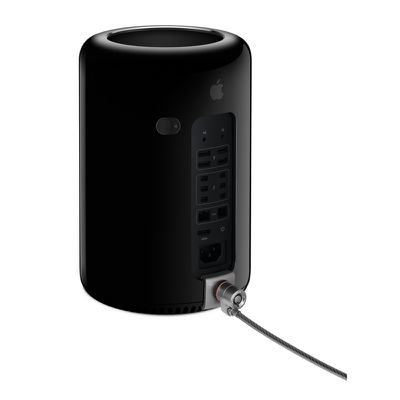
Apple today launched a new $49 Mac Pro Security Lock Adapter in its online store, offering users of the new Mac Pro a way to easily secure their machines using existing Kensington locks. Previously, users had to resort to custom building their own locks or ordering more expensive third-party solutions.

Apple's lock adapter is a simple metal bracket that secures the lift-off cover of the Mac Pro to the base of the machine with a security cable, preventing access to the machine's internals. The cable lock can then of course be secured to a bulky object or dedicated security ring found on some desks to make it difficult for thieves to steal the machine.
MF858

The Mac Pro Security Lock Adapter lets you use a compatible Kensington or similar style third-party lock (sold separately) to keep your Mac Pro secure. The adapter attaches without tools and does not modify or damage the Mac. With a compatible lock connected, the Mac Pro Lock Adapter secures the housing to the enclosure, preventing access to internal components.

Since the Mac Pro's appearance in its retail stores, even Apple has had to use alternate methods to secure the machines, opting for an Ethernet-based alarm system that simply sets off an alarm when the Mac Pro is removed rather than securing it in place.

The Mac Pro Security Lock Adapter is available now in the Apple Online Store for $49. The adapter is not yet being offered for immediate pickup in Apple's retail stores, but will presumably be making its way to the company's stores around the world in the coming days.


Buyer's Guide: Mac Pro (Don't Buy)
Related Forum: Mac Pro

Top Rated Comments

AngerDanger Avatar
157 months ago
My heart skipped a beat before reading the last six words of the title. :p
Score: 21 Votes (Like | Disagree)
157 months ago


Love :apple: but i couldn't resist.
Score: 17 Votes (Like | Disagree)
Mr. Gates Avatar
157 months ago
Hmmmmm, if I were a criminal ....

Score: 16 Votes (Like | Disagree)
157 months ago


Love :apple: but i couldn't resist.

You really should've tried harder. That is really tired.
Score: 9 Votes (Like | Disagree)
PowerBook-G5 Avatar
157 months ago
And so the best product pipeline in 25 years continues.... :rolleyes:
Score: 7 Votes (Like | Disagree)
157 months ago
No security cable, bracket, or whatever prevents theft. Anyone who believes that they do is deluding themselves. All they are is a deterrent. Okay lock systems will just deter the opportunistic thief; better lock systems will deter the more determined thief. But either way, with the right tools and enough time, any security mechanism will be able to be bypassed.


Score: 5 Votes (Like | Disagree)

Popular Stories

Apple TV Thumb 3

Everything Coming in the 2026 Apple TV 4K

Wednesday July 8, 2026 4:51 pm PDT by
The Apple TV 4K hasn't been updated since 2022, and it's due for a refresh. An update is planned for 2026, but Apple is likely going to wait to launch it after Siri AI launches in iOS 27. Design Apple TV design updates don't happen often, and that's not changing. The next Apple TV is going to have the same squircle shape as the current model, and it'll continue to be made from a black...
iphone 16 teal

'Siri AI' Lawsuit Update: Apple to Pay Owners of These iPhone Models

Thursday July 9, 2026 7:08 am PDT by
In May, Apple agreed to pay $250 million to settle a U.S. class action lawsuit over Siri AI's delayed launch, and eligible iPhone users could receive up to a $95 payout. This week, the California court overseeing the case held a hearing regarding preliminary approval of the settlement, but the judge has not yet issued a ruling. It will likely be at least a few more months before eligible...
apple wallet drivers license feature iPhone 15 pro

Apple Says iPhone Driver's Licenses Will Expand to These 6 U.S. States

Thursday July 9, 2026 7:29 am PDT by
In select U.S. states, residents can add their driver's license or state ID to the Apple Wallet app on the iPhone and Apple Watch, and then use it to display proof of identity or age at select airports and businesses, and in select apps. To set up the feature, open the Wallet app on the iPhone and tap on the plus sign in the top-right corner. Next, tap on Driver's License and ID Cards,...









































