Wacom Announces Pressure-Sensitive Intuos Creative Stylus for iPad - MacRumors
Skip to Content

Wacom Announces Pressure-Sensitive Intuos Creative Stylus for iPad

by

Wacom today debuted its Intuos Creative Stylus (via Engadget), which uses Bluetooth 4.0, integrated shortcut buttons, and 2,048 levels of pressure sensitivity to create "a realistic pen-on-paper feel" when drawing on an iPad. It's designed for sketching, drawing, and painting and aims to deliver "professional-grade performance" to iPad users.
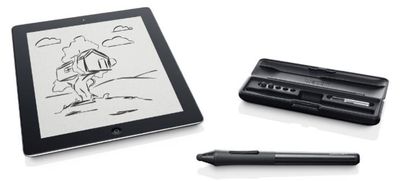
WACOM INTUOS CREATIVE STYLUS
The pen comes in blue or black brushed aluminum with a case, extra nibs, and a replacement AAA battery. It is compatible with the third generation iPad, the fourth generation iPad, and the iPad mini. While it is meant to work with the company's Bamboo Paper app, it will apparently be compatible with other apps as well, including SketchBook Pro, ArtRage, and ProCreate.

Providing the power to produce professional results on an iPad, the Intuos Creative Stylus's advanced technology comes in form of a best-in-class pen experience and pressure sensitivity of 2048 pressure levels. This means that it can reproduce the feel and artistic control of traditional brushes and markers, so it's ideal for sketching, illustrating and image editing. It is also highly responsive, even reacting to light strokes, while rejecting unintentional touches when used with compatible creative apps that integrate Wacom's industry-leading technology.

In addition to announcing the stylus, Wacom has released a new version of its Bamboo Paper app. Version 2.0 of the app includes Tumblr and Dropbox sharing, along with premium notebooks, improved palm rejection software, new color palettes, and new tools.

Wacom's Intuos Creative Stylus will be available in Best Buy Stores for $99 beginning in October.

Bamboo Paper is an iPad app that can be downloaded for free from the App Store. [Direct Link]

Top Rated Comments

Renzatic Avatar
172 months ago
Fat nib. Fail.

p.s. It may be hardware related, but Samsung's Note phablet and tablet seem to get the fine nib thing down just fine.

That's because they have a Wacom digitizer built into the screen alongside the capacative.

I'm still holding out hope Apple eventually goes this route with the iPad line.
Score: 7 Votes (Like | Disagree)
172 months ago
my gf thinks my pen is too sensitive to pressure. :(
Score: 6 Votes (Like | Disagree)
ThunderSkunk Avatar
172 months ago
It was easy to understand Jobs' & Apples initial refusal to include a stylus and digitizer in the original ipad line. It established that iOS is first & foremost about touch-selecting things from preprogrammed menus, and forced devs to write apps to that effect, not just port over their existing cluttered UI's and make people hunt and peck for commands with a stylus and magnifying glass.

But Good. Great! You've established that. Everybody gets it. Now, can we please have our dang digitizer so we can write words and draw sketches quickly and legibly? I mean it's ridiculous.

But it feels like Apple is just going to milk cycle upgrades with little performance bumps as long as they can, instead of expanding the hardware functionality or intended use. Like they've reached the innovative cul-de-sac that paralyzes so many inventive companies.

...but hey, we get a fingerprint scanner on the home button. How incredibly useful.
Score: 3 Votes (Like | Disagree)
macduke Avatar
172 months ago
I'm finally upgrading from the iPad 2 when the iPad 5th gen comes out this autumn and I'm definitely getting a pressure sensitive Bluetooth stylus. I do wish that Apple would build-in pressure sensitivity. I want an 11" or 12" iPad Pro with pressure sensitive display, quad-core A7, 4GB ram, 128GB SSD, and USB port for $999. Then I want either Apple's Pro apps ported over or some of Adobe's CC apps like Lightroom, Illustrator, and a more advanced Photoshop Touch. I want to design stuff while in my big brown comfy chair.
Score: 2 Votes (Like | Disagree)
172 months ago
Too little too late

I already broke down and bought the Galaxy Note 8 for my artistic and note-taking needs a few months ago. I still use my iDevices for everything else, but I'm tired of kidding myself when it comes to precision. Android still feels like beta and the apps just aren't there--I miss Procreate and Art Studio, but it meets my needs where Apple doesn't.

Unfortunately, Fat nibs don't offer the precision I need, and the disk on the jots aren't quite the same as a 'real' stylus. They're annoying in a different way. Plus, two of them scratched my moshi protectors. I don't like that, and I don't like having to turn off global settings to get palm rejection. It's just silly to have to keep jumping through hoops. I also don't have to worry about the charge running out on my Galaxy's stylus and I'm tired of waiting for Apple to pull the heads out of their arses.

Wacom has always made excellent products, and kudos to them for creating this stylus. I'm sure it will be up to their standards, but this is nothing more than a bandaid for a bigger problem that Apple continuously ignores.

I'll be passing this one by and wait for a newer version of the Galaxy 10, or pigs to fly, whichever comes first.
Score: 1 Votes (Like | Disagree)
JohnGrey Avatar
172 months ago
I really do not understand Apple's reluctance to incorporate pen-sensitive technology into their tablet products, be it Wacom (preferable) or proprietary. Something like the retina mini, yes, you can argue about cannibalizing sales from the iPad, but there are no competing products in Apple's lineup that would be hurt by the addition.

I've seen the iPad touted as a platform for media content creation. To be taken seriously, it needs to provide the some version of the tools used for the Desktop. Maybe then Adobe would euthanize Ideas and give us a full-throated tablet version of Illustrator. If Apple were to do this, in the rumored 12", and release a retina mini, all of my tablet needs would be met. As it stands, I'm giving serious thought to the Galaxy Note 12.2 due in October.
Score: 1 Votes (Like | Disagree)

Popular Stories

iphone duo screen crack in store

Crackgate? iPhone Duo Owners Report Screens Breaking Along the Hinge

Friday October 23, 2026 11:05 am PDT by
Some iPhone Duos are already experiencing hinge issues that cause display cracks, based on photos shared on Reddit and the MacRumors forums. Almost all of the display faults are right along the hinge, and most result in a line of bright pixels across one side of the screen. An iPhone Duo owner in Australia said his device cracked after being opened fewer than 20 times, and there was no...
Apple Music iPod Page Not Found

Apple Music Has a Hidden iPod You Can Play With

Friday October 23, 2026 7:11 am PDT by
Apple Music has a 404 page easter egg on the web: a functional iPod that appears when you load a page that does not exist, such as music.apple.com/macrumors. "Page Not Found," says Apple. "Give this a spin instead." Apple is clever with this. If you navigate to music.apple.com/ipod instead, the page says "Looking for something?" instead of "Page Not Found." The easter egg is only...
jerryrigeverything iphone duo dust

iPhone Duo Fails JerryRigEverything's Dusty Durability Test

Saturday October 24, 2026 11:27 am PDT by
Apple's iPhone Duo has failed JerryRigEverything's latest durability test. Despite its IP68 dust-resistance rating, dust entered the hinge through several ingress points, overwhelming the magnets that hold the phone shut. The bend test then left a permanent green line across the inner display, before the screen became unresponsive. The outer screen with Ceramic Shield 2 scratched at level 7...
Latest Stories
Apple Display Veterans Step Back as New Leaders Take Over
5 hours ago
OLED MacBook Air and iMac Remain in Testing
6 hours ago
Apple Addresses Web Security Threat, Working on macOS Update With Additional Fix
10 hours ago
iPhone Duo Can Run Automations When You Open or Close It
11 hours ago
Adjust iPhone Duo's Outer Display to Accommodate Your Case
11 hours ago
iFixit iPhone Duo Teardown Points to Possible Cause of Screen Cracks
12 hours ago
Apple Stores Reportedly Rolling Out New Anti-Theft System for iPhones
18 hours ago
AirTag 2 Drops to New Low Price of $23 on Amazon
19 hours ago
New iMac and 14-Inch MacBook Pro With M6 Chip Expected This Week
19 hours ago
Apple Reportedly Announcing New MacBook Pro With OLED Touchscreen on Wednesday
19 hours ago
Apple Wants to Fix Safari's Cramped Layout on iPhone Duo
1 day ago
Instagram Launches Apple TV App With Reels and More
1 day ago
Apple's 'Servant' Copyright Lawsuit Win Upheld on Appeal
1 day ago
'Arguably Better Than Face ID': the iPhone Duo Touch ID Tip to Try
1 day ago
Verizon Apologizes for iPhone Duo Pre-Order Delays, Giving Customers $100 Gift Card
2 days ago
Skip the Touch ID Scan: Unlock iPhone Duo With Apple Watch
2 days ago
iPhone Duo Fails JerryRigEverything's Dusty Durability Test
2 days ago
Make iPhone Duo Volume Buttons Follow Screen Rotation
2 days ago
iPhone Duo Teardowns Reveal Two Batteries and More
2 days ago
M5 MacBook Air Returns to Prime Day Low With $200 Amazon Discount
2 days ago
Top Stories: Apple 'Pro and Tell' Debut, iPhone Duo Launch, and More
2 days ago
Apple Store Pickup System for iPhone Duo Just Went Live Again in U.S. and Canada
2 days ago
Apple Closes French Stores Ahead of Further Protests
2 days ago
Apple Pushes Back on DOJ Request for More Evidence
2 days ago
The iPhone Duo Can Be a Tiny Mac, a Toaster, and a Nintendo DS
2 days ago
Using an Apple Pencil With the iPhone Duo: What to Know
3 days ago
Apple Store Pickup for iPhone Duo Starting to Resume But Very Limited
3 days ago
iPhone Duo Jailbroken on Launch Day
3 days ago
Apple Seeds Updated watchOS 27.2 Release Candidate
3 days ago
Apple Store in UK Reopens With New Design on iPhone Duo Launch Day
3 days ago