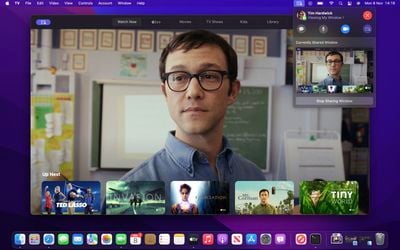
Note: The SharePlay feature in FaceTime requires macOS Monterey 12.1, which is only available to beta testers at the time of writing. Expect Monterey 12.1 to be released to all users in late fall 2021.


In macOS Monterey, FaceTime received some major enhancements on the Mac, including the ability for you to share your screen with other people on a video call.
SharePlay
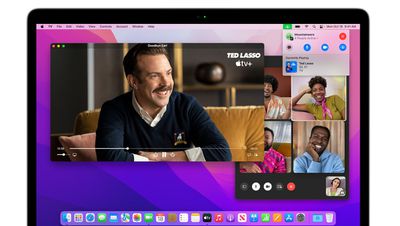
Officially called SharePlay, and previously only available on iPhone and iPad, Apple's new screen sharing feature allows you to share your Mac's screen with other people on a FaceTime call, which opens up new possibilities for sharing experiences with friends and family.

Thanks to SharePlay, you can share your screen or a specific app window on your Mac's desktop with the people you're chatting with, provided they're also using an Apple device running iOS 15.1 or later or macOS 12.1 Monterey or later. You can also watch streamed movies and TV shows together, which is the focus of this article. The following steps show you how it's done on a Mac.

  1. Launch FaceTime on your Mac.
  2. Click New FaceTime and add the contacts that you want to share your screen with, then click the FaceTime button. Alternately, select a recent contact to initiate a video call.
    shareplay

  3. When the call has connected, launch the TV app on your Mac and choose a TV show or movie to watch. You'll be notified that any content you subsequently play will SharePlay automatically, and everyone on the call will see the same synced playback and video controls.
    SharePlay

  4. When you're finished watching, close the media window and choose to either End for Everyone or – if other people on the call wish to continue watching – End Only for Me.

    SharePlay

That's all there is to it. The introduction of SharePlay on Mac also means you can listen to music together over FaceTime. Simply initiate a FaceTime call and launch the Music app, then choose your music, and everyone on the call will be able to enjoy it. The whole group will see what's next and can add songs to a shared queue with synced playback and media controls.

In addition to first-party Apple experiences like Apple TV and Apple Music, SharePlay is also compatible with third-party app experiences. Developers have already been building SharePlay experiences for iOS devices, and now they can build SharePlay features into Mac apps as well.


Related Forum: macOS Monterey

Popular Stories

iphone 17 models

No iPhone 18 Launch This Year, Reports Suggest

Thursday January 1, 2026 8:43 am PST by
Apple is not expected to release a standard iPhone 18 model this year, according to a growing number of reports that suggest the company is planning a significant change to its long-standing annual iPhone launch cycle. Despite the immense success of the iPhone 17 in 2025, the iPhone 18 is not expected to arrive until the spring of 2027, leaving the iPhone 17 in the lineup as the latest...
duolingo ad live activity

Duolingo Used iPhone's Dynamic Island to Display Ads, Violating Apple Design Guidelines

Friday January 2, 2026 1:36 pm PST by
Language learning app Duolingo has apparently been using the iPhone's Live Activity feature to display ads on the Lock Screen and the Dynamic Island, which violates Apple's design guidelines. According to multiple reports on Reddit, the Duolingo app has been displaying an ad for a "Super offer," which is Duolingo's paid subscription option. Apple's guidelines for Live Activity state that...
Clicks Communicator Feature

'Clicks Communicator' Unveiled — Will You Carry This With Your iPhone?

Friday January 2, 2026 6:35 am PST by
The company behind the BlackBerry-like Clicks Keyboard accessory for the iPhone today unveiled a new Android 16 smartphone called the Clicks Communicator. The purpose-built device is designed to be used as a second phone alongside your iPhone, with the intended focus being communication over content consumption. It runs a custom Android launcher that offers a curated selection of messaging...
Low Cost MacBook Feature A18 Pro

Low-Price 12.9-Inch MacBook With A18 Pro Chip Reportedly Launching Early This Year

Friday January 2, 2026 9:08 am PST by
Apple plans to introduce a 12.9-inch MacBook in spring 2026, according to TrendForce. In a press release this week, the Taiwanese research firm said this MacBook will be aimed at the entry-level to mid-range market, with "competitive pricing." TrendForce did not share any further details about this MacBook, but the information that it shared lines up with several rumors about a more...
Low Cost A18 Pro MacBook Feature Pink

Apple's 2026 Low-Cost A18 Pro MacBook: What We Know So Far

Friday January 2, 2026 4:33 pm PST by
Apple is planning to release a low-cost MacBook in 2026, which will apparently compete with more affordable Chromebooks and Windows PCs. Apple's most affordable Mac right now is the $999 MacBook Air, and the upcoming low-cost MacBook is expected to be cheaper. Here's what we know about the low-cost MacBook so far. Size Rumors suggest the low-cost MacBook will have a display that's around 13 ...
Apple Fitness Plus hero

Apple Announces New Fitness+ Workout Programs, Strava Challenge, and More

Friday January 2, 2026 6:43 am PST by
Apple today announced a number of updates to Apple Fitness+ and activity with the Apple Watch. The key announcements include: New Year limited-edition award: Users can win the award by closing all three Activity Rings for seven days in a row in January. "Quit Quitting" Strava challenge: Available in Strava throughout January, users who log 12 workouts anytime in the month will win an ...
Mac Pro Feature Blue

What's Happening With the Mac Pro?

Wednesday December 31, 2025 9:59 am PST by
Apple hasn't updated the Mac Pro since 2023, and according to recent rumors, there's no update coming in the near future. In fact, Apple might be finished with the Mac Pro. Bloomberg recently said that the Mac Pro is "on the back burner" and has been "largely written off" by Apple. Apple apparently views the more compact Mac Studio as the ideal high-end pro-level desktop, and it has almost...