iOS 16: How to Automate Messages Sent With Siri - MacRumors
Skip to Content

iOS 16: How to Automate Messages Sent With Siri

by

iOS 16 lets you send messages with Siri without you having to confirm each message with the voice assistant before it's sent. Keep reading to learn how it's done.
iOS 16 Siri Guide Feature
If you've ever sent a message to someone using ‌Siri‌, you'll know that ‌Siri‌ will ask you to confirm each message by reading it back to you.

Confirming each message before it is sent can be a nuisance if you're having a long conversation with someone and you don't have access to your phone to type, which is why in iOS 16, you don't have to.

Apple has added a feature that allows ‌Siri‌ to automatically send messages without the confirmation step, which streamlines the whole process. Plus, it works with CarPlay. Here's how to opt in to the feature in iOS 16.

  1. Launch the Settings app on your iPhone.
  2. Scroll down and tap Siri & Search.
  3. At the bottom of the "Ask ‌Siri‌" section, tap Automatically Send Messages.
  4. In the next menu screen, toggle on the switch next to Automatically Send Messages.
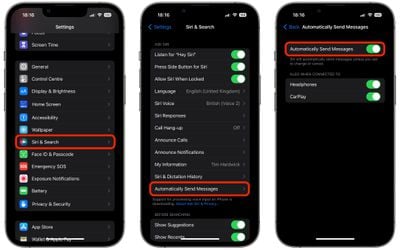
settings

That's all there is to it. ‌Siri‌ will now automatically send messages unless you ask to change or cancel. Note that the last menu provides additional options to enable or disable automatic sending of messages when connected to Headphones and ‌CarPlay‌.

Popular Stories

iphone 16 teal

'Siri AI' Lawsuit Update: Apple to Pay Owners of These iPhone Models

Thursday July 9, 2026 7:08 am PDT by
In May, Apple agreed to pay $250 million to settle a U.S. class action lawsuit over Siri AI's delayed launch, and eligible iPhone users could receive up to a $95 payout. This week, the California court overseeing the case held a hearing regarding preliminary approval of the settlement, but the judge has not yet issued a ruling. It will likely be at least a few more months before eligible...
macOS iOS 27 Siri App Feature

Apple's Secret Siri Interface Buried in macOS 27 Beta: How to Enable

Monday July 20, 2026 4:09 am PDT by
Apple appears to be testing a hidden popover interface for Siri AI in the macOS 27 Golden Gate beta that surfaces Writing Tools and contextual actions whenever the user selects some text. Spotted by a member of Reddit's r/MacOSBeta community, the floating icon appears at the top-left of the selected text, expanding when the pointer hovers over it to a compact popover of the tools and...
macOS iOS 27 Siri App Feature

macOS 27 Beta Hides Trippy Siri 'Voice Pad' Interface With 13 Voices

Thursday July 23, 2026 3:53 am PDT by
For macOS 27 Golden Gate, Apple appears to be working on an immersive new interface for choosing Siri AI's voice, based on findings in the latest beta. MacRumors forum member "mactracker" has shared what they call a hidden "voice pad" in the macOS 27 beta 4, which was released on Monday. When enabled, the interface replaces the System Settings menu for Siri's voice options with a nearly...