Skip to Content

How to Create an Apple ID on a PC

by

An Apple ID is a key part of owning an Apple device, and it is used for access to iCloud, the App Store, iTunes, Apple Music, and more. It is also necessary for syncing content across devices, making purchases, and more.

Creating an ‌Apple ID‌ is free and easy, and it's the first step to getting an Apple device set up if you're new to the Apple ecosystem. This how to walks through creating an ‌Apple ID‌ on an a Windows PC.

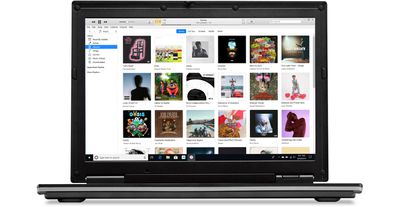
windows 10 itunes 12 9 hero

  1. Open iTunes for Windows and make sure it's up to date.
  2. Using the menu bar at the top of the iTunes window, select Account > Sign In.
  3. Choose the Create New ‌Apple ID‌ option.

From here, you'll need to agree to Apple's Terms and Conditions and Privacy Policy, and then you can fill out the form to create a new ‌Apple ID‌. Your ‌Apple ID‌ will be the email address that you use to sign up for the account.

You need to enter your first name and last name, country, a password, and a series of security questions.

Note that you may be asked to provide a credit card and billing information, but choosing "None" allows the request to be bypassed. ‌Apple ID‌ account sign ups will need to be verified, and Apple will send a verification email.

Signing Up on the Web

On a PC, you can also sign up for an ‌Apple ID‌ on the web by following these steps:

  1. Open a browser.
  2. Visit the ‌Apple ID‌ account page through this link.
  3. Scroll down to "Create your ‌Apple ID‌" and click it.appleidwebsignup
  4. Go through the steps and fill out the form.
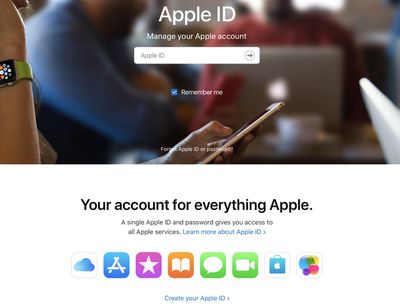
The process for signing up for an ‌Apple ID‌ on the web is identical to the sign up process through iTunes, and it will require the same verification.


Popular Stories

Multicolored Low Cost A18 Pro MacBook Feature

Apple Accidentally Leaks 'MacBook Neo'

Tuesday March 3, 2026 7:00 am PST by
Apple appears to have prematurely revealed the name of its rumored lower-cost MacBook model, which is expected to be announced this Wednesday. A regulatory document for a "MacBook Neo" (Model A3404) has appeared on Apple's website. Unfortunately, there are no further details or images available yet. While the PDF file does not contain the "MacBook Neo" name, it briefly appeared in a link...

MacBook Neo Feature Pastel 1

Apple Announces $599 'MacBook Neo' With A18 Pro Chip

Wednesday March 4, 2026 6:15 am PST by
Apple today announced the "MacBook Neo," an all-new kind of low-cost Mac featuring the A18 Pro chip for $599. The MacBook Neo is the first Mac to be powered by an iPhone chip; the A18 Pro debuted in 2024's iPhone 16 Pro models. Apple says it is up to 50% faster for everyday tasks than the bestselling PC with the latest shipping Intel Core Ultra 5, up to 3x faster for on-device AI workloads,...
MacBook Neo Feature Pastel 1

First MacBook Neo Benchmarks Are In: Here's How It Compares to the M1 MacBook Air

Thursday March 5, 2026 4:07 pm PST by
Benchmarks for the new MacBook Neo surfaced today, and unsurprisingly, CPU performance is almost identical to the iPhone 16 Pro. The MacBook Neo uses the same 6-core A18 Pro chip that was first introduced in the iPhone 16 Pro, but it has one fewer GPU core. The MacBook Neo earned a single-core score of 3461 and a multi-core score of 8668, along with a Metal score of 31286. Here's how the...