Use Emoji as Stickers in iPhone Messages - MacRumors
Skip to Content

Use Emoji as Stickers in iPhone Messages

by

In iOS 17, Apple has added several new features to its Messages app to make communicating with other Apple users more creative and fun. One such feature is the ability to use emoji as stickers. This article shows you how it's done.
iOS 17 Messages Feature
Stickers have been in the Messages app for years now, but not much has changed about them - until now. That's because in iOS 17 Apple treats all standard emoji as stickers, allowing them to be used in just the same way as actual stickers.

What that essentially means is that you are no longer limited to inserting them in a conversation. Now you can also drag them anywhere on a message bubble. You can even layer them on top of one another to create little emoji scenes.

The following steps show you how it works in iOS 17.

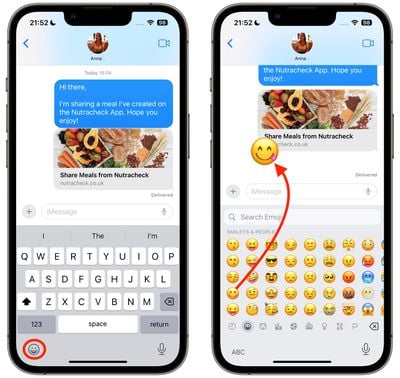
  1. In a Messages conversation, tap the Emoji button in the bottom-left corner of the screen.
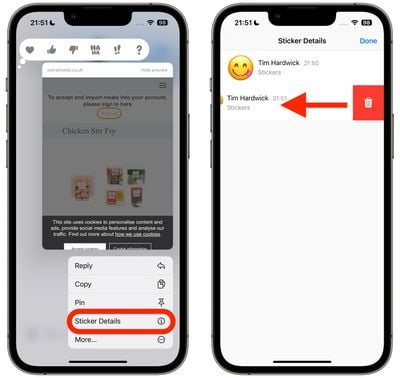
  2. Press and hold on an emoji in the list, then drag it up onto the message bubble that you want to react to and release your finger. (Note that you can drag more emoji onto the same message bubble with the same action.)
    2use emojis as stickers messages

  3. To edit emoji stickers on a message bubble, press and hold the emoji, then tap Sticker Details in the popup menu.
  4. To delete an emoji sticker, swipe left on it, then tap the red Trash button that appears.
  5. Tap Done to return to the conversation.
    1use emojis as stickers messages

That's all there is to it. Did you know that another new feature is the ability to turn Live Photos into Live Stickers? Click the link to learn how it's done.

Popular Stories

Four iPhone 18 Pro Colors Mock Feature

iPhone 18 Pro Launching Later This Year With These 10 New Features

Tuesday May 26, 2026 6:32 am PDT by
While the iPhone 18 Pro and iPhone 18 Pro Max are not launching until September, there are already plenty of rumors about the devices. It was initially reported that the iPhone 18 Pro models would have fully under-screen Face ID, with only a front camera visible in the top-left corner of the screen. However, the latest rumors indicate that only one Face ID component will be moved under the...

apple wallet drivers license feature iPhone 15 pro

Apple Just Expanded iPhone Driver's License Feature to Arkansas

Wednesday May 27, 2026 9:41 am PDT by
In select U.S. states, residents can add their driver's license or state ID to the Apple Wallet app on the iPhone and Apple Watch, and then use it to display proof of identity or age at select airports and businesses, and in select apps. Starting today, the feature is available in Arkansas, which is the 14th state to offer it. However, it may take some time to roll out to all users. To...
Apple Watch Blood Glucose Monitoring Feature 2

Apple Watch for Diabetes: The Latest on Apple's Plans for Non-Invasive Blood Sugar Monitoring

Tuesday May 26, 2026 9:30 am PDT by
For many years now, it has been rumored that the Apple Watch will eventually gain non-invasive blood sugar monitoring capabilities, which would enable millions of people with diabetes to track their blood glucose levels without needing to prick their skin with a needle or wear a dedicated continuous glucose monitor. According to Bloomberg's Mark Gurman, Apple recently shifted oversight of...