iOS 15: How to Have Siri Announce Your Notifications - MacRumors
Skip to Content

iOS 15: How to Have Siri Announce Your Notifications

by

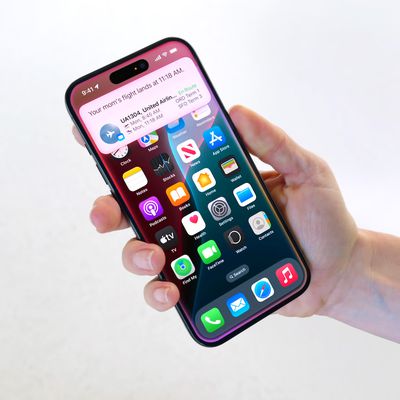
In iOS 15, Siri comes with a new Announce Notifications feature that allows you to have notifications read out to you when you're wearing connected AirPods or Beats headphones.
iOS 15 Siri Feature
‌Siri‌ has been able to announce messages for some time now, but in iOS 15, the feature has been expanded to all notifications. When enabled, ‌‌Siri‌‌ will automatically announce Time Sensitive notifications from apps when ‌AirPods/Beats‌ are connected.

You can also opt to have ‌Siri‌ announce notifications on a per-app basis if you want to hear notifications from specific apps that aren't time sensitive.

Here's how to get ‌Siri‌ to announce notifications in iOS 15.

  1. Launch the Settings app.
  2. Tap Notifications.
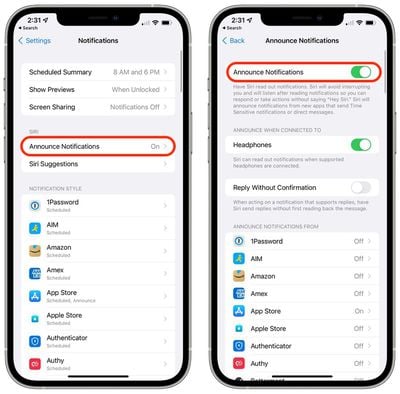
  3. Under "‌Siri‌," select Announce Notifications.
  4. Toggle the switch next to Announce Notifications to the green ON position.
  5. To get ‌Siri‌ to announce all notifications from a specific app, simply select the app in question in the list under "Announce Notifications From" and toggle on its Announce Notifications switch.
    settings

Note that if a notification supports actions, ‌Siri‌ will listen for your response after reading the notification, so you don't have to say "Hey ‌Siri‌" to follow it up.

Related Forum: iOS 15

Popular Stories

iphone 17 ceramic shield

iPhone 18 to Pack 12GB of RAM for Smarter Siri Features

Tuesday June 16, 2026 3:34 am PDT by
Next year's regular iPhone 18 will come with 12GB of RAM to support Apple's most powerful on-device AI model and related Siri features, according to South Korea's KB Securities (via DigiTimes). In its Siri AI announcement during WWDC 2026, Apple confirmed that its most powerful model enables more expressive Siri voices and major accuracy improvements for systemwide dictation. Both features...

ios 27 siri animation

Siri Uses Pill Shape to Hide the Dynamic Island in iOS 27, But iPhone 18 Could Make It a Circle

Tuesday June 16, 2026 5:10 am PDT by
In iOS 27, Siri now appears as a glowing pill-shaped orb that expands directly from the Dynamic Island, but may give way to a circle on next-generation iPhones. Instead of the glowing light effect that previously traced the edges of the display, a swirling Siri orb expands from the Dynamic Island in iOS 27, with the design hiding its true cutouts, just like other Dynamic Island animations. ...
New Siri Wave

The iPhone 17 Can't Do This With Siri. The iPhone 18 Will

Tuesday June 16, 2026 4:56 am PDT by
During WWDC 2026, Apple confirmed that its most powerful on-device AI model is currently only compatible with the latest iPhone Air, iPhone 17 Pro, and iPhone 17 Pro Max. The reason for the device limitation is that the AI model requires 12GB of RAM to run, and only the above iPhones have that amount. Unfortunately, the iPhone 17 misses out because it has 8GB of RAM. That means iPhone 17 ...