2013 08 26 09 38 25  Phone iOS7 App Icon RoundedIf you use FaceTime to frequently call certain people in your contacts, you can save time by adding them to your Favorites list.

Your iPhone's native Phone app makes it easy to call the people you talk to most by adding them to your Favorites list. This lets you tap the person's name to immediately start a ‌FaceTime‌ call.

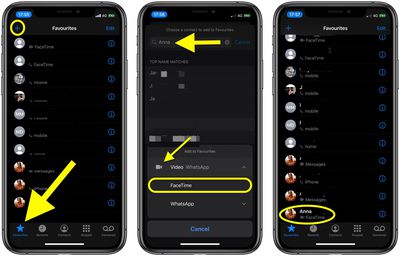
The following steps show you how to add someone to your Favorites as a ‌FaceTime‌ contact.

  1. Launch the stock Phone app on your ‌iPhone‌.
  2. Tap the Favorites tab at the bottom of the screen.
  3. Tap the plus (+) button in the top left-corner of the screen.
  4. Search a name in your contacts or select a contact from the list.
  5. Tap Video in the pop-up menu.
  6. Select FaceTime from the video options available.facetime

You'll be returned to the Favorites screen and see the new favorite listed along with ‌FaceTime‌ as the contact type just below their name. Next time you want to call them using ‌FaceTime‌, simply launch the Phone app and then tap their ‌FaceTime‌ contact in the Favorites tab.

Popular Stories

Second Generation AirTag Feature

Apple Unveils New AirTag With Longer Range, Louder Speaker, and More

Monday January 26, 2026 6:07 am PST by
Apple today introduced the second-generation AirTag, with key features including longer range for tracking items and a louder speaker. For those who are not familiar, the AirTag is a small accessory that you can attach to your backpack, keys, or other items. Then, you can track the location of those items in the Find My app on the iPhone, iPad, Mac, Apple Watch, and iCloud.com. The new...
M5 MacBook Pro

Apple Reportedly Aiming to Upgrade the MacBook Pro Twice This Year


Sunday January 25, 2026 11:46 am PST by
Apple plans to release new MacBook Pro, MacBook Air, Mac Studio, and Studio Display models in the first half of this year, according to Bloomberg's Mark Gurman. In his Power On newsletter today, Gurman added that redesigned MacBook Pro models with an OLED touch screen "should be hitting toward the end of 2026," meaning that the MacBook Pro line would be upgraded twice this year. First up...
iOS 26

What to Expect From iOS 26.4

Friday January 23, 2026 12:31 pm PST by
iOS 26.3 is shaping up to be a relatively minor update, with only a couple of notable new features, but iOS 26.4 is expected to be much more significant. We are still waiting for the iOS 26.3 Release Candidate to come out, so the first iOS 26.4 beta is likely still at least a few weeks away. Following beta testing, iOS 26.4 will likely be released to the general public at some point in March ...
Apple Logo Spotlight

Apple Expected to Unveil Five All-New Products This Year

Wednesday January 21, 2026 10:54 am PST by
In addition to updating many of its existing products, Apple is expected to unveil five all-new products this year, including a smart home hub, a Face ID doorbell, a MacBook with an A18 Pro chip, a foldable iPhone, and augmented reality glasses. Below, we have recapped rumored features for each product. Smart Home Hub Apple home hub (concept) Apple's long-rumored smart home hub should...
Apple Logo Spotlight

Apple to Launch These 20+ Products This Year

Sunday January 25, 2026 6:02 pm PST by
2026 promises to be yet another busy year for Apple, with the company rumored to be planning more than 20 product announcements over the coming months. Beyond the usual updates to iPhones, iPads, Macs, and Apple Watches, Apple is expected to release its all-new smart home hub, which was reportedly delayed until the more personalized version of Siri is ready. Other unique products rumored for ...