

How to Get Siri to Respond to Your Voice When Your iPhone's Screen is Covered - MacRumors
Skip to Content

How to Get Siri to Respond to Your Voice When Your iPhone's Screen is Covered

by

Normally your iPhone will stop listening for the "Hey Siri" command when you place your device face down on a surface or the screen is otherwise covered. In these circumstances "Hey ‌Siri‌" is automatically disabled until the situation changes.

hey siri
If you find this automated behavior inconvenient for your purposes, you'll be happy to learn that in iOS 13.4, Apple has added an option to always listen for "Hey ‌Siri‌" regardless of your phone's placement.

Simply follow the steps below to change this setting so that ‌Siri‌ is always ready to respond to your query or command:

  1. Launch the Settings app on your iPhone or iPad.
  2. Tap Accessibility.
    settings

  3. Scroll down and tap Siri.
  4. Toggle the switch next to Always Listen for "Hey Siri" to the green ON position.
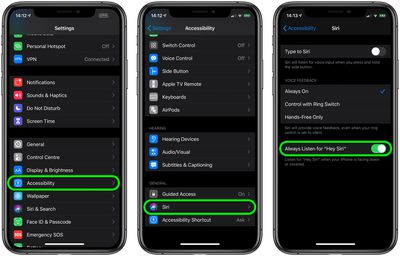
‌Siri‌ will now listen for your voice even if your device is placed face down or it's in your pocket, for example.

Here's another neat accessibility tip: In iOS 13.4 and later, you can ask ‌Siri‌ to take you back to your device's Home screen. Simply say "Hey ‌Siri‌, go to the Home screen" to exit your current app and go Home. It's a great vocal command to keep in mind if you have difficulty using your iPhone's Home button or swiping up from the bottom of the screen.

Popular Stories

WWDC26 MR Live Coverage Article

WWDC 2026 Apple Event Live Keynote Coverage: iOS 27, Revamped Siri, and More

Monday June 8, 2026 9:15 am PDT by
Apple's Worldwide Developers Conference (WWDC) starts today with the traditional keynote kicking things off at 10:00 a.m. Pacific Time. MacRumors is on hand for the event and we'll be sharing details and our thoughts throughout the day. We're expecting to see a number of software-related announcements today, headlined by a reset on Apple's push into AI that should see a significant overhaul...

Siri AI

Apple Announces 'Siri AI' at WWDC 2026

Monday June 8, 2026 10:52 am PDT by
Apple today announced a significantly revamped Siri at WWDC 2026, rebranding it as "Siri AI" and unveiling out a wave of new capabilities spanning conversational depth, system-wide integration, and a redesigned interface across platforms. Apple framed the update with the acknowledgment that "there are times when you expect more from Siri." The company is describing the redesigned assistant...
macOS Golden Gate Search or Ask

Rich Siri Conversations in macOS 27 Can Be Started in Spotlight

Monday June 8, 2026 10:53 am PDT by
In macOS 27, Siri's new chatbot capabilities can be accessed straight from Spotlight, Apple announced today. During its WWDC 2026 keynote, Apple revealed that Siri's rich conversational experience can be started right inside the Spotlight prompt, accessed via Command + Space, bringing in context and chat history on the fly. Conversation history is synced via iCloud, so you can go from...








































