In iOS 17, Apple has added several new features to its Messages app to make communicating with other Apple users more creative and fun. One such feature is the ability to add effects to your stickers. Keep reading to learn how it works.
iOS 17 Messages Feature
iMessage stickers arrived way back in iOS 10, allowing users to resize stickers, put them on top of chat bubbles, add them in photos, and stick them on top of other stickers, with simple controls for dragging.

Stickers have come a long way since then. In ‌iOS 17‌, for example, users are now able to create their own stickers from photo subjects, and even add neat little effects to individual stickers to change up their look.

There are a number of effects that can be added to stylize your stickers, including a white outline, comic-like shading, a puffy 3D look, and a shiny, holographic finish. The sticker effects will animate and reflect the light appropriately, making your self-created stickers look professionally done.

The following steps show you how sticker effects are applied in iOS 17.

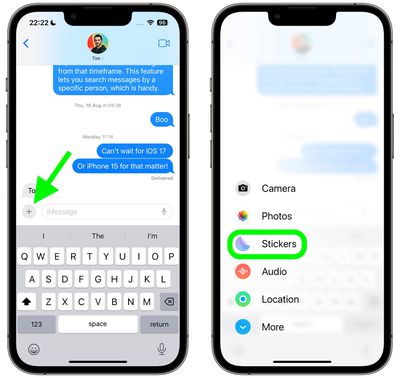
  1. In a Messages conversation, tap the + button next to the text input field.
  2. Tap the Stickers option in the vertical list that appears.
    2add effects stickers messages

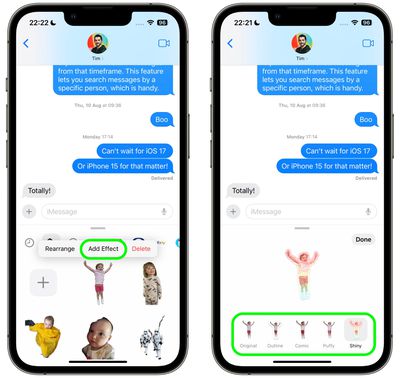
  3. Press and hold on an individual sticker until it "pops," then tap Add Effect in the popup menu.
  4. Tap one of the available effects options: Original, Outline, Comic, Puffy, or Shiny.
  5. Tap Done to finish.
    1add effects stickers messages

That's all there is to it – your stylized sticker is now ready to be shared with the world.

Did you know that another new Messages feature in iOS 17 is the ability to turn Live Photos into Live Stickers? Click the link to learn how it's done.


Popular Stories

Apple Announces Special Event in New York Feature

Apple Announces Special Event in New York, London, and Shanghai on March 4

Monday February 16, 2026 6:05 am PST by
Apple today announced a "special Apple Experience" in New York, London, and Shanghai, taking place on March 4, 2026 at 9:00am ET. Apple invited select members of the media to the event in three major cities around the world. It is simply described as a "special Apple Experience," and there is no further information about what it may entail. The invitation features a 3D Apple logo design...
CarPlay Liquid Glass Dark

iOS 26.4's New CarPlay Video Feature Shown in Action

Wednesday February 18, 2026 9:29 am PST by
Back at WWDC 2025, Apple revealed that it was planning to allow CarPlay users to watch video via AirPlay in their vehicles while they are not driving, and the first beta of iOS 26.4 suggests the feature may be nearing availability. There are several new references to CarPlay video streaming functionality within the iOS 26.4 beta's source code. The feature is not yet visible to users, but...
Apple Announces Special Event in New York Feature 1

Apple Event on March 4: Here's What to Expect

Tuesday February 17, 2026 8:08 am PST by
Apple on Monday invited selected journalists and content creators to a "special Apple Experience" on Wednesday, March 4 in New York, London, and Shanghai. At an Apple Experience, attendees are typically given the opportunity to try out Apple's latest hardware or software. Following the launch of Apple Creator Studio last month, for example, some content creators attended an Apple Experience...
iphone 16 apple intelligence

Apple Aiming to Release 'Breakthrough' New iPhone Accessory

Wednesday February 18, 2026 12:43 pm PST by
Apple is looking for a "breakthrough" with its push into wearable AI devices, including an "AirTag-sized pendant," according to Bloomberg's Mark Gurman. In a report this week, he said the pendant is reminiscent of the failed Humane AI Pin, but it would be an iPhone accessory rather than a standalone product. The pendant would feature an "always-on" camera and a microphone for Siri voice...
iphone 17 pro green

iPhone 17 Pro Max Curiously Becomes Most Traded-In Smartphone

Wednesday February 18, 2026 9:13 am PST by
New trade-in data indicates that Apple's iPhone 17 Pro Max has rapidly become the single most traded-in smartphone. According to a new report from SellCell, Apple's latest flagship iPhone has quickly risen to the top of the independent trade-in market, accounting for 11.5% of all devices appearing in the top-20 trade-in rankings just months after release. The analysis is based on SellCell...