How to Turn Off FaceTime - MacRumors
Skip to Content

How to Turn Off FaceTime

by

ios12 facetime iconAs convenient as Apple's FaceTime is, sometimes you might not want to be surprised or interrupted by a prompt asking you to accept a video or audio call on your iPhone, iPad, or Mac.

Fortunately, Apple has made ‌FaceTime‌ very easy to turn off, and if you want re-enable it in future, you won't have to set it up all over again. Simply follow the steps below.

How to Turn Off FaceTime on iPhone and iPad

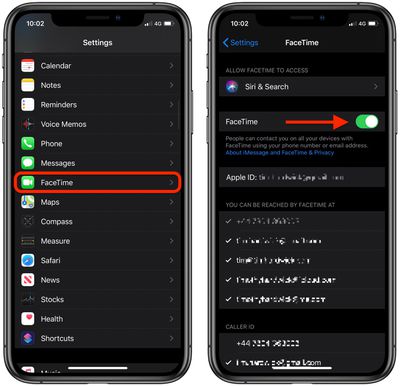
  1. Launch the Settings app on your iOS device.
  2. Scroll down and tap FaceTime.
  3. Tap the switch next to FaceTime to turn it off (the switch will become colorless).
    settings

If you ever want to re-enable ‌FaceTime‌ on your device, simply go back into Settings and tap the ‌FaceTime‌ switch again.

How to Turn Off FaceTime on Mac

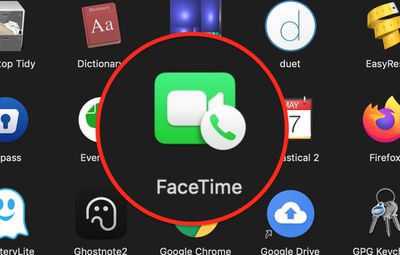
  1. Launch the FaceTime app on your Mac, from your Dock or the Applications folder.
    apps

  2. From the menu bar at the top of your screen, select FaceTime -> Turn FaceTime Off.
    FaceTime

If you ever want to re-enable ‌FaceTime‌ on your device, simply go back into settings and toggle on the ‌FaceTime‌ switch again.

Popular Stories

Four iPhone 18 Pro Colors Mock Feature

iPhone 18 Pro Launching Later This Year With These 10 New Features

Tuesday May 26, 2026 6:32 am PDT by
While the iPhone 18 Pro and iPhone 18 Pro Max are not launching until September, there are already plenty of rumors about the devices. It was initially reported that the iPhone 18 Pro models would have fully under-screen Face ID, with only a front camera visible in the top-left corner of the screen. However, the latest rumors indicate that only one Face ID component will be moved under the...
Apple Watch Ultra 2 Black Titanium

watchOS 27 Will Add These New Features to Your Apple Watch

Sunday May 24, 2026 11:53 am PDT by
Apple will unveil watchOS 27 during its WWDC 2026 keynote on Monday, June 8, and a handful of new features have been rumored already. The first developer beta of watchOS 27 should be available immediately following the keynote, and a public beta typically follows in July. The update should be released to all users with a compatible Apple Watch model in September. Below, we recap watchOS...
Apple Watch Blood Glucose Monitoring Feature 2

Apple Watch for Diabetes: The Latest on Apple's Plans for Non-Invasive Blood Sugar Monitoring

Tuesday May 26, 2026 9:30 am PDT by
For many years now, it has been rumored that the Apple Watch will eventually gain non-invasive blood sugar monitoring capabilities, which would enable millions of people with diabetes to track their blood glucose levels without needing to prick their skin with a needle or wear a dedicated continuous glucose monitor. According to Bloomberg's Mark Gurman, Apple recently shifted oversight of...