

In iOS 16, Apple has made iterative improvements to its built-in Siri voice assistant, including expanded offline support, the ability to hang up calls using Siri, and new accessibility features.
One of these new accessibility enhancements is an option to increase Siri's pause time, which causes the voice assistant to wait a longer period for you to finish speaking.
There are now three settings for Siri's pause time: Default, Longer, and Longest. You can try out these options yourself and find out which works for you by following the steps below.
- Open the Settings app on your iPhone.
- Scroll down and select Accessibility.
- Scroll down to the "General" section and select Siri.
- Under the "Siri Pause Time" section, select from the following: Default, Longer, and Longest.
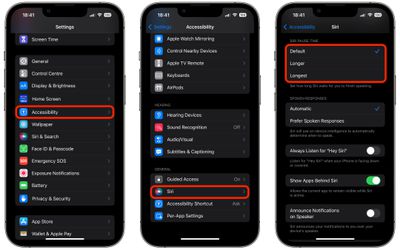
That's all there is to it. Note that there's also an option to Announce Notifications on Speaker at the bottom of the last menu screen. Turning this on will make Siri speak all notifications aloud. There's also a Prefer Spoken Responses option that when toggled on causes Siri to speak aloud in situations such as the phone being silenced.









































![Apple Pulls Keynote, Pages and Numbers From App Store [Update: Back]](https://images.macrumors.com/t/Okb7kitB_gNr6qe5Pex9nQIysD8=/112x112/article-new/2026/01/Apple-Creator-Studio-iWork-suite.jpg)



