ios12 facetime iconMaking a FaceTime call on your iPhone, iPad, or Mac costs nothing and is extremely easy to do, and if you're camera shy, you can even make an audio-only call. If you've never used ‌FaceTime‌ before to get in touch with someone, here's all you need to know to get going.

Every ‌iPhone‌, ‌iPad‌, iPod Touch, and Mac comes with a built-in ‌FaceTime‌ app, so you don't need to install anything. All you need to call someone is a Wi-Fi or cellular data connection.

Remember that the person you want to call can be located almost anywhere in the world, but they need to own an iOS device or a Mac and to have set up a FaceTime account of their own.

How to Make a FaceTime Call on iPhone and iPad

  1. Launch the FaceTime app on your ‌iPhone‌ or ‌iPad‌.
  2. Tap the plus (+) button.
  3. Type in the name, email address or number that you want to call. As you type, your Contacts list will be searched and any matching contacts will appear below. You can tap to select the person you want to call. Alternatively, tap the circled plus (+) button to select someone from your Contacts to call.
    facetime

  4. Tap the Audio button to initiate the call.
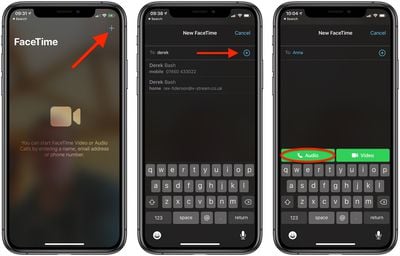
If the Audio button is greyed out, the contact you are trying to call doesn't have ‌FaceTime‌ enabled or hasn't set up a ‌FaceTime‌ account.

How to Make a FaceTime Call on Mac

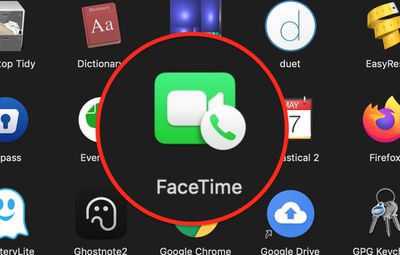
  1. Launch the FaceTime app on your Mac, from your Dock or the Applications folder.
    apps

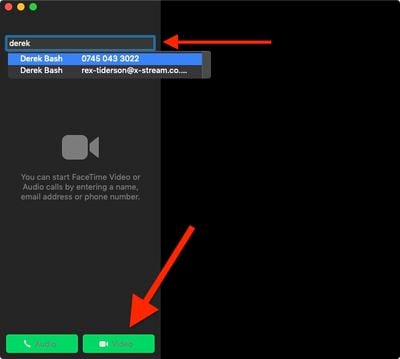
  2. Type in the name, email address or number that you want to call. As you type, your Contacts list will be searched and any matching contacts will appear in a dropdown list – you can use the Down arrow on your keyboard or click to select the person you want to call.
  3. Tap the Audio button to initiate the call.
    facetime

If the Audio button is greyed out, the contact you are trying to call has disabled ‌FaceTime‌ or hasn't set up a ‌FaceTime‌ account.

Popular Stories

Low Cost MacBook Feature A18 Pro

Apple Is Expected to Launch These Four MacBooks in 2026

Friday January 9, 2026 8:17 am PST by
2026 could be a bumper year for Apple's Mac lineup, with the company expected to announce as many as four separate MacBook launches. Rumors suggest Apple will court both ends of the consumer spectrum, with more affordable options for students and feature-rich premium lines for users that seek the highest specifications from a laptop. Subscribe to the MacRumors YouTube channel for more videos. ...
iPhone Top Left Hole Punch Face ID Feature Purple

10 Reasons to Wait for This Year's iPhone 18 Pro

Thursday January 8, 2026 2:56 am PST by
Apple's iPhone development roadmap runs several years into the future and the company is continually working with suppliers on several successive iPhone models at the same time, which is why we often get rumored features months ahead of launch. The iPhone 18 series is no different, and we already have a good idea of what to expect for the iPhone 18 Pro and iPhone 18 Pro Max. One thing worth...
iOS 18 Siri Personal Context

Apple Confirms Google Gemini Will Power Next-Generation Siri This Year

Monday January 12, 2026 7:38 am PST by
In a statement shared with CNBC today, Apple confirmed that Google Gemini will power the next-generation version of Siri that is slated to launch later this year. "After careful evaluation, we determined that Google's technology provides the most capable foundation for Apple Foundation Models and we're excited about the innovative new experiences it will unlock for our users," the statement...
iOS 26

Here's What's New in iOS 26.3 So Far

Monday January 12, 2026 1:15 pm PST by
Apple today seeded the second beta of iOS 26.3, nearly a month after the first beta. So far, the update includes a couple of new features for iPhones. iOS 15.3 through iOS 18.3 were all released in late January over the years, so it is thereby likely that iOS 26.3 will be released towards the end of this month as well. The update is compatible with the iPhone 11 series and newer. Below,...
iOS 18 Siri Personal Context

Elon Musk Reacts to Apple and Google Teaming on Gemini-Powered Siri

Monday January 12, 2026 11:38 am PST by
Elon Musk today expressed concern about Apple and Google partnering on a more personalized version of Siri powered by Google's generative AI platform Gemini. "This seems like an unreasonable concentration of power for Google, given that [they] also have Android and Chrome," wrote Musk, in a post on X. Musk serves as CEO of xAI, the company behind Gemini competitor Grok. It is unlikely...
Apple Intelligence iPhone 16

Google Gemini Partnership With Apple Will Go Beyond Siri Revamp

Monday January 12, 2026 8:48 am PST by
Apple and Google today announced that Google Gemini will help power not only a more personalized version of Siri, but a range of future Apple Intelligence features. "Apple and Google have entered into a multi-year collaboration under which the next generation of Apple Foundation Models will be based on Google's Gemini models and cloud technology," the companies said, in a statement. "These...


proposed unicode emoji 18%402x

Squinting Face, Pickle, and Lighthouse Among New Emoji Coming to iOS

Friday January 9, 2026 4:24 am PST by
The Unicode Consortium has published a draft list of emoji that could come to smartphones and other devices in the future. The list shared by Emojipedia outlines 19 emoji candidates under consideration for Emoji 18.0, which is expected to be finalized in September 2026. Among the proposed additions are a squinting face emoji, left- and right-pointing thumb gestures, a pickle, a lighthouse, a ...
iOS 26

iOS 26.2.1 Update Coming Soon for iPhones

Monday January 12, 2026 8:19 am PST by
iOS 26.3 will likely be released to the public later this month, but it appears that Apple is preparing to push out another software update in the interim. Apple's software engineers have started testing iOS 26.2.1, according to the MacRumors visitor logs, which have been a reliable indicator of upcoming iOS versions. The update will likely be released at some point this week or next week. ...