How to Create a Playlist in Apple Music - MacRumors
Skip to Content

How to Create a Playlist in Apple Music

by

In Apple Music, you can easily create playlists and combine music from your own collection with music from the ‌Apple Music‌ catalog. Here's how to do it.

Create a Playlist on iPhone and iPad

  1. Launch the Music app on your iOS device and find a song that you want to start a playlist with.
  2. Long press or 3D Touch on the song.
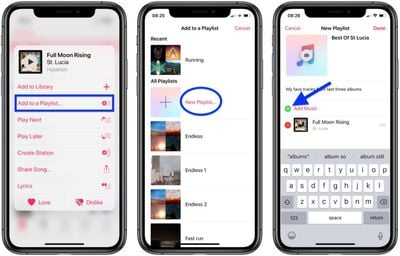
  3. Choose Add to Playlist -> New Playlist.
  4. Tap to give your playlist a name, a description, and a cover image if you want.
    create a playlist apple music

  5. Tap Add Music, and then use the search field to find songs in your library or in the ‌Apple Music‌ catalog, or browse through songs in your collection below.
  6. When you find a song that you want to include, tap the plus (+) button next to it. Note that you can do this for multiple songs.

  7. Tap Done when you're finished adding songs.

Create a Playlist on Your Computer

  1. Open iTunes on your computer and find a song that you want to start a playlist with.
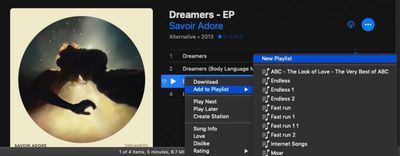
  2. Click the ellipsis button (the three dots) and choose Add to Playlist -> New Playlist.
    create a playlist apple music itunes

  3. Click the name to change the title, and click the placeholder cover image to add one. To add a description, click the blue ellipsis button and choose Add Description.
  4. Add more songs to your playlist by browsing your library or the ‌Apple Music‌ catalog, or use the search field to find the song you want.
  5. When you find a song that you want to add to the playlist, click the ellipsis button and choose Add to Playlist -> [Your New Playlist].
You can also import playlists from other people on iTunes by going to File > Library > Import Playlist.

Popular Stories

apple music

Apple Music to Label AI-Generated Songs

Thursday August 20, 2026 4:41 pm PDT by
Apple sent emails to its music industry partners about the upcoming launch of a Made With AI label that Apple will apply to AI-generated content (via The Hollywood Reporter). Content tagged as being "materially generated using AI" will have a label visible to all Apple Music users. In March, Apple announced Transparency Tags, a system that lets music creators disclose when AI has been...


Four iPhone 18 Pro Colors Mock Feature

iPhone 18 Pro: Pre-Orders and Release Date

Thursday August 20, 2026 8:00 am PDT by
Apple has yet to reveal when the iPhone 18 Pro and iPhone Ultra will be announced and released, but the dates usually follow a familiar pattern. As usual, the iPhone event is expected to take place in the first half of September. Labor Day falls on September 7 this year. The last time the holiday was on that day was in 2020, but the iPhone event that year was delayed until October due to...
macOS 27 next to MacBook Pro Running macOS 27

macOS Golden Gate Marks the End of an Era

Thursday August 20, 2026 2:19 pm PDT by
macOS 27 Golden Gate is not compatible with any Macs with Intel processors, marking the end of an era. The update, which is currently in beta ahead of a release later this year, is limited to Apple silicon Macs with an M1 chip or newer. Last year, Apple said that macOS 26 Tahoe would be the final macOS release compatible with Intel-based Macs, so this was an expected development. Intel...