Skip to Content

How to Blur Your Background on a FaceTime Call on Mac

by

In macOS Monterey, Apple brought several enhancements to FaceTime on Mac, including new visual and audio effects to improve the video call experience.
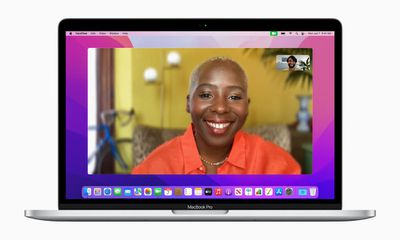
macOS Monterey FaceTime Portrait Mode
One of the new visual features is Portrait mode in calls. With this mode enabled, you can blur your background so that the focus is on you rather than what's behind you.

The feature is commonly used by other video conferencing apps like Zoom and Teams to obscure untidy domestic scenes and other sources of distraction or embarrassment. Here's how it works in ‌‌FaceTime‌‌ on macOS Monterey‌.

  1. Launch FaceTime on your Mac.
  2. Click the Control Center icon in the menu bar.
  3. Select Video Effects -> Portrait Mode.
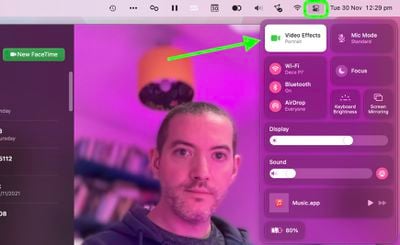
FaceTime

Once you've done that, you and the person on the other end of the next call will see your environment faintly blurred, just like in a Portrait mode photo.

Related Forum: macOS Monterey

Popular Stories

Apple MacBook Pro M4 hero

Apple Planning 'MacBook Ultra' With Touchscreen and Higher Price

Sunday March 8, 2026 8:05 am PDT by

Apple is planning to launch an all-new "MacBook Ultra" model this year, featuring an OLED display, touchscreen, and a higher price point, Bloomberg's Mark Gurman reports. Gurman revealed the information in his latest "Power On" newsletter. While Apple has been widely expected to launch new M6-series MacBook Pro models with OLED displays, touchscreen functionality, and a new, thinner design...
imac video apple feature

Apple Unveils Seven New Products

Friday March 6, 2026 11:48 am PST by
Apple this week unveiled seven products, including an iPhone 17e, an iPad Air with the M4 chip, updated MacBook Air and MacBook Pro models, a new Studio Display, a higher-end Studio Display XDR, and an all-new MacBook Neo that starts at just $599. iPhone 17e features the same overall design as the iPhone 16e, but it gains Apple's A19 chip, MagSafe for magnetic wireless charging and magnetic...
ios 26 4 yellow

Everything New in iOS 26.4 Beta 4

Monday March 9, 2026 3:50 pm PDT by
Apple is continuing to test the iOS 26.4 beta, and the latest update is now available for developers and public beta testers. As testing goes on, there are fewer new features in each beta, but today’s release adds new emoji characters and a few other changes. New Emoji Apple added new emoji characters, including trombone, treasure chest, distorted face, hairy creature, fight cloud, orca,...