Messages, one of the quintessential apps on the iPhone, iPad, and Mac, is the home of iMessages, Apple's exclusive device-to-device messaging protocol indicated by those well-known blue chat bubbles.
If you're an iPhone user you know how the Messages app works, but in iOS 14, the Messages app is getting some useful new features that are worth highlighting. Read on for a rundown of everything that's new, and make sure to check out our included how tos for instructions on how to use all of the new features.
Updated Interface
Messages in iOS 14 has an updated main interface that lets you choose to see all messages in one feed, all messages from your known senders list, or messages from unknown senders that are not in your contact list.
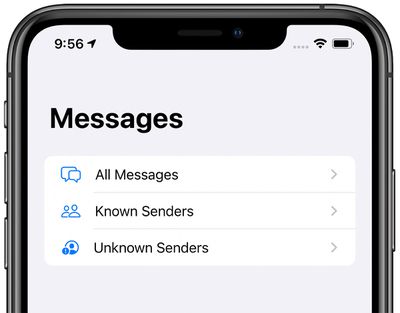
You can get to these different views by tapping on the "Filters" button in the main conversation list in the Messages app.
There's also a new feature that lets you see typing indicators in the conversation list without needing to tap into a conversation, so you can see all of your contacts who are typing at a glance.
Pinned Chats
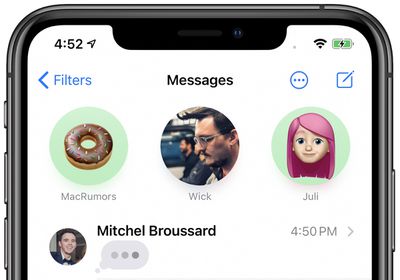
Your most important conversations can be pinned to the top of the Messages app by swiping to the right on any of the conversations in the main chat list.
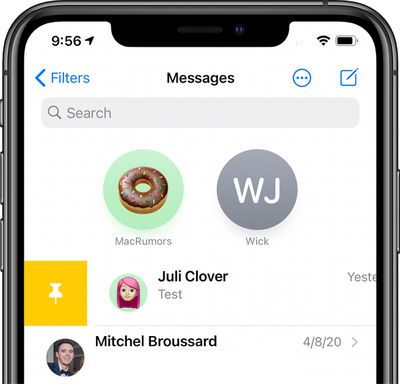
Pinning a conversation turns it into a circle at the top of the Messages app, putting it front and center. You can pin a total of nine conversations.
Icons for pinned chats are dynamic, so you can see the photo of the participant overlaid with recent unread messages, Tapbacks, and typing indicators. Fun fact: Typing indicators on pinned chats will line up with the mouths for people who have a portrait photo or a Memoji selected as their shared image.
Both single person conversations and group conversations can be pinned, and each one has the same dynamic icon feature.
The images in pinned conversations are those that the people you're chatting with have chosen to share with you. Shared profile photos are a feature that was introduced back in iOS 13. Group chats will have the photo that has been selected for the group, and iOS 14 introduces new group photo customization options.
Inline Replies
Inline replies is a feature that's designed to make it easier to organize chats that involve multiple people and/or multiple subjects.
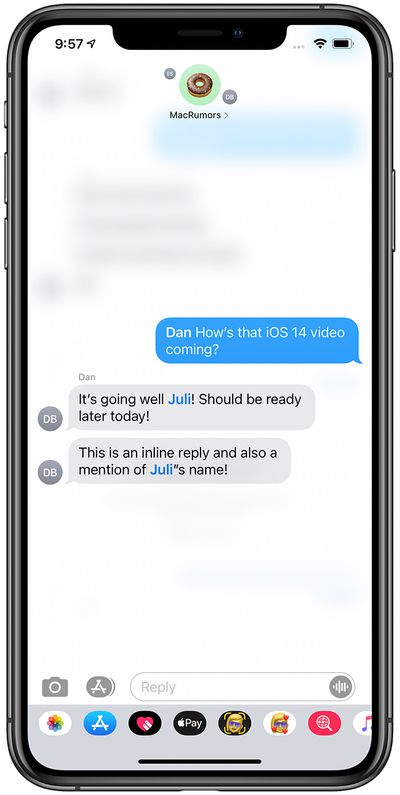
If you're in a chat with several people and there are conversations going on that cover multiple topics, you can make it clear who you want to reply to by using an inline reply.
Make an inline reply by long pressing on the message that you want to reply to and choosing the "Reply" option.
Inline replies will show up threaded under the original reply, and if you tap on one, you can see the entire conversation separate from the main chat conversation. Inline replies can be used in single person conversations or in group chats, but they're most useful in multi-person chats.
Mentions
Mentions in the Messages app are designed to let you direct a message to a specific person in a group chat to get their attention or to make it clear who you're speaking to in a multi-person conversation.
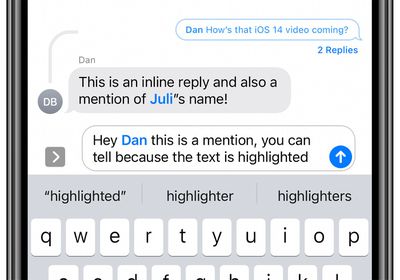
Mentions are available in both single person chats and group conversations, but are most useful in group chats.
You can mention someone by typing their specific name as it appears in contacts, so if your friend is Eric and you want to mention Eric, you'd type in his name, wait for it to turn gray, and then tap it to turn the name into a mention. The person you're mentioning needs to be in the chat with you, of course.
Names that will function as mentions turn blue, so you know that the mention feature is working. Note that you can use @eric if you want to highlight someone's name, but the @ isn't necessary. It is, however, sometimes more convenient to use @ because it turns the name into a mention automatically without the need to tap on it.
With the mentions feature, you can mute noisy group chats but then activate a setting that alerts you when someone mentions your name, so you won't miss out on important bits of the conversation that are directed specifically at you. Go to Settings > Messages > Notify Me to get a notification when your name is mentioned in a muted conversation.
- How to Use Mentions in the iOS Messages App
- How to Get Siri to Announce Incoming Messages Over AirPods
Memoji
Apple's Memoji feature lets you create a custom avatar that resembles you or how you prefer to be seen. In iOS 14, Apple has added hew hairstyles, headwear, and age options so your Memoji can look more like you than ever before.
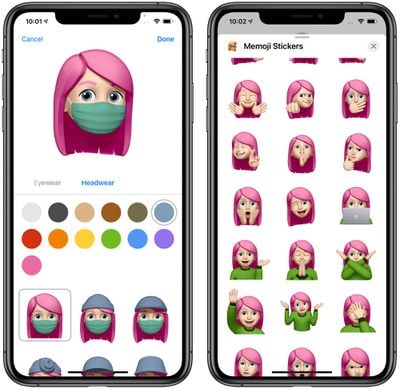
There are also masks so your Memoji can wear a mask as many of us are doing these days, and there are new Memoji stickers available to represent hugs, fist bumps, and blushing.
- How to Create and Use Memoji
- How to Use Animoji and Memoji Stickers
- How to Save Files Received in Messages on iPhone and iPad
Emoji Search
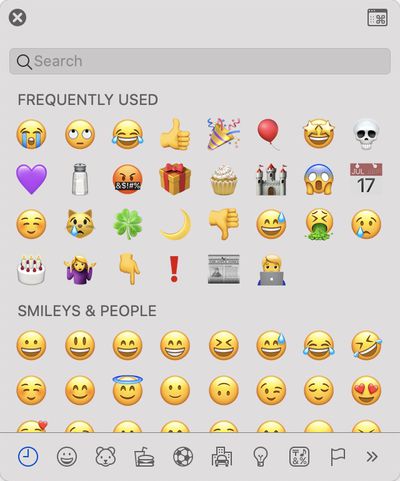
Macs have long had an emoji interface that includes a search option, and now iOS devices do too. When you tap on the Emoji or Globe button to bring up the emoji interface, there's now a search bar available where you can search through emoji by keyword to find exactly what you're looking for.
Group Chat Customizations
iOS 14 allows icons to be picked in a group chat in addition to a name, allowing for greater customization of your group conversations so you can tell them apart. Just open the info tab of any group conversation to customize it.
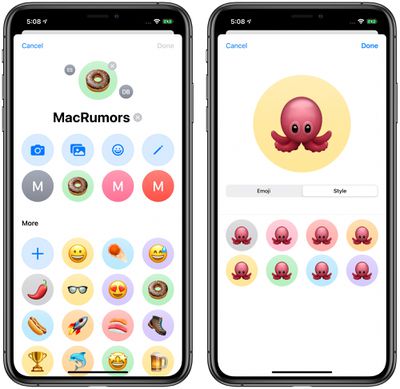
You can choose a custom photo, letter, Memoji, Animoji, or emoji to serve as an icon for a group chat, as well as customizing the background color for the icon.
- How to Set a Photo and Name for a Group Chat in the iOS Messages App
- How to Mute Conversations in Messages on iPhone and iPad
- How to Leave a Group Chat in Messages on iPhone and iPad
Guide Feedback
Have questions about Messages, know of an iOS 14 feature we left out, or or want to offer feedback on this guide? Send us an email here.