How to Change Your FaceTime Email Address - MacRumors
Skip to Content

How to Change Your FaceTime Email Address

by

ios12 facetime iconWhen you have an active FaceTime account, there may be certain circumstances when you don't want a particular email address to be registered with it.

For example, you may not want family and friends to contact you on ‌FaceTime‌ using your work email address, or you may want to keep your personal email separate from your work contacts.

That's why Apple has made it possible for you to change the email addresses that are registered with your ‌FaceTime‌ account. The following steps show you how it's done.

  1. Launch the Settings app on your iPhone or iPad.
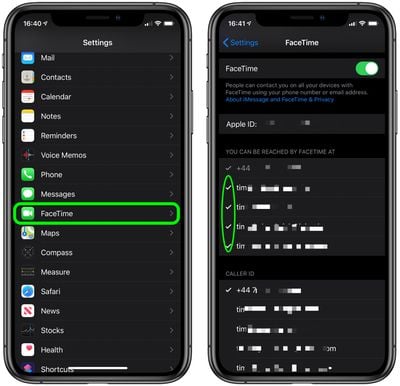
  2. Scroll down and tap FaceTime.
  3. If you're not signed into ‌FaceTime‌ with your Apple ID, tap Use your Apple ID for FaceTime, then tap Sign In, or tap Use Other Apple ID and enter the credentials that you want to use.

  4. Tap on the checkmark to the left of the email address(es) that you want to de-register with ‌FaceTime‌.
  5. Conversely, tap the email address(es) that you do want to register with ‌FaceTime‌ so that a checkmark appears.

FaceTime
Note that ‌FaceTime‌ allows you to register different emails on different devices, so you could register your work email on your iPhone and your personal email with your ‌iPad‌, for example. You can also add multiple email addresses so that you can be contacted from any one of them.


Popular Stories

Apple Event Logo

Apple Just Released a New Accessory

Monday May 4, 2026 8:13 am PDT by
Apple today released a new Pride Edition Sport Loop for the Apple Watch. The band features a rainbow design with 11 colors of woven nylon yarns. The new Pride Edition Sport Loop is available to order now on Apple.com and in the Apple Store app in 40mm, 42mm, and 46mm sizes, and it will be available at Apple Store locations starting later this week. In the U.S., the band costs $49. There...

iOS 27 on iPhone 17 1

iOS 27 Will Add These New Features to Your iPhone

Saturday May 2, 2026 8:43 am PDT by
Apple is expected to unveil iOS 27 during its WWDC 2026 keynote on June 8, and there are already many rumored features and changes for iPhones. The first developer beta of iOS 27 will likely be available immediately following the keynote, and a public beta typically follows in July. Following beta testing, the software update should be released to all users with a compatible iPhone in...
Apple Announces 2026 Pride Band Watch Face and iPhone Wallpaper Article 2

iOS 26.5 Coming Soon With These New Features

Monday May 4, 2026 8:40 am PDT by
iOS 26.5 is expected to be released next week, following more than a month of beta testing. The update is relatively minor, but there are a couple of new features and changes across the operating system that we have recapped below. iOS 26.5 lays the groundwork for end-to-end encryption for RCS in the Messages app and ads in the Apple Maps app, and it will include a new Pride wallpaper and a...