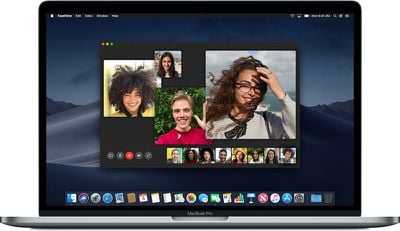
If you use FaceTime on Mac to keep in touch with friends and family when you can't be with them, don't forget that you can use the Screen Recording feature in macOS to preserve those special moments. The following steps show you how it's done.
macosmojavegroupfacetime

How to Record a FaceTime Call in macOS

  1. Launch ‌FaceTime‌ on your Mac and initiate a ‌FaceTime‌ call.
    apps

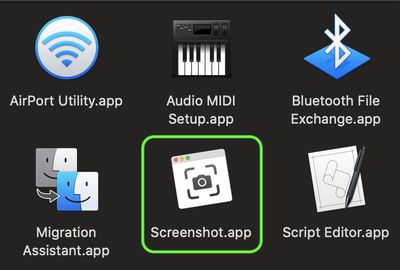
  2. Let the person on the other end of the call know you're going to be recording some of it, then launch the macOS Screenshot app in the Applications/Utilities folder or by pressing the keys Command + Shift + 5.
    screen capture

  3. Click Record Entire Screen or Record Selected Portion to select the ‌FaceTime‌ video window.
    screen capture

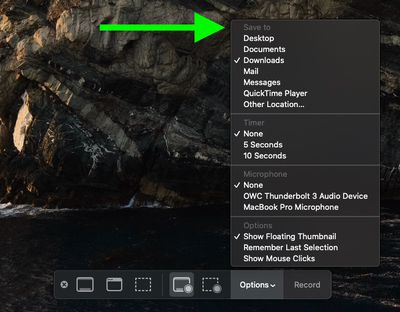
  4. Click Options on the Screen Capture panel, and choose a Save to location.
    screen capture

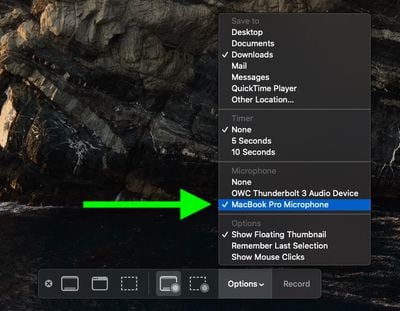
  5. Select your Mac's built-in microphone under Microphone.
    screen capture

  6. Click Record to start recording the screen.screen capture

When you've finished recording what you want of the call, click the Stop Recording button in the menu bar. The recording will be saved to your chosen location.

Popular Stories

Apple Logo Spotlight

Apple Expected to Unveil Five All-New Products This Year

Wednesday January 21, 2026 10:54 am PST by
In addition to updating many of its existing products, Apple is expected to unveil five all-new products this year, including a smart home hub, a Face ID doorbell, a MacBook with an A18 Pro chip, a foldable iPhone, and augmented reality glasses. Below, we have recapped rumored features for each product. Smart Home Hub Apple home hub (concept) Apple's long-rumored smart home hub should...
airpods pro 3 purple

New, Higher End AirPods Pro Coming This Year

Tuesday January 20, 2026 9:05 am PST by
Apple is planning to debut a high-end secondary version of AirPods Pro 3 this year, sitting in the lineup alongside the current model, reports suggest. Back in September 2025, supply chain analyst Ming-Chi Kuo reported that Apple is planning to introduce a successor to the AirPods Pro 3 in 2026. This would be somewhat unusual since Apple normally waits around three years to make major...


airtag prime day 2

Apple Developing AirTag-Sized AI Pin With Dual Cameras

Wednesday January 21, 2026 12:31 pm PST by
Apple is working on a small, wearable AI pin equipped with multiple cameras, a speaker, and microphones, reports The Information. If it actually launches, the AI pin will likely run the new Siri chatbot that Apple plans to unveil in iOS 27. The pin is said to be similar in size to an AirTag, with a thin, flat, circular disc shape. It has an aluminum and glass shell, and two cameras at the...
smaller dynamic island iphone 18 pro Filip Vabrous%CC%8Cek

iPhone 18 Pro Leak: Smaller Dynamic Island, No Top-Left Camera Cutout

Tuesday January 20, 2026 2:34 am PST by
Over the last few months, rumors around the iPhone 18 Pro's front-panel design have been conflicted, with some supply-chain leaks pointing to under-display Face ID, reports suggesting a top-left hole-punch camera, and debate over whether the familiar Dynamic Island will shrink, shift, or disappear entirely. Today, Weibo-based leaker Instant Digital shared new details that appear to clarify the ...
M5 MacBook Pro

MacBook Pro to Receive Up to Six New Features by Next Year

Thursday January 22, 2026 9:31 am PST by
Apple is expected to release MacBook Pro models with M5 Pro and M5 Max chips soon, but you might want to pass on them, as bigger changes are around the corner. It has been reported that the MacBook Pro will be receiving a major redesign in late 2026 or in 2027. Six new features have been rumored so far, including an OLED display, touch capabilities, a Dynamic Island, M6 Pro and M6 Max chips...