In iOS 16, Apple has brought some welcome feature additions to its stock Messages app. One of these features is the ability to mark a message as unread. Keep reading to learn how it works.
iOS 16 Messages Guide Feature
Email programs have long given users the ability to mark messages as unread. The feature is considered useful because it means if you get a message and don't have time to read it or address its contents, you can mark it as unread so that it appears as a new message again.

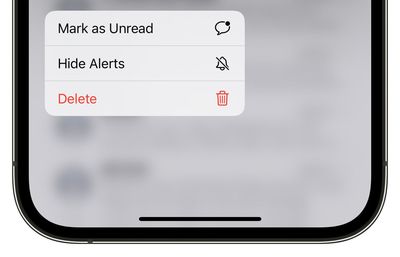
In iOS 16, Apple is finally bringing the same feature to its Messages app, so you can mark an SMS message or iMessage as new, thereby returning the blue dot to the message to remind you to return to it.

Here's how you mark a Message as unread on an iPhone or iPad running iOS 16 or iPadOS 16.

  1. Open the Messages app, and find the message in the conversations list that you want to mark as unread.
  2. Long press on the message in the conversations list.
  3. Tap Mark as Unread from the pop-over menu.
    ios 16 mark as unread messages

That's all there is to it. Did you know that you can also edit iMessages in iOS 16? Check out our dedicated how-to to learn how.


Popular Stories

Verizon New

Verizon is Down: iPhones Show 'SOS' Mode Due to Network Outage [Resolved]

Wednesday January 14, 2026 10:18 am PST by
Verizon is experiencing a major outage across the U.S. today, with hundreds of thousands of customers reporting issues with the network on the website Downdetector. There are also complaints across Reddit and other social media platforms. iPhone users and others with Verizon service are generally unable to make phone calls, send text messages, or use data over 5G or LTE due to the outage....

iPhone Top Left Hole Punch Face ID Feature Purple

New Leak Reveals iPhone 18 Pro Display Sizes, Under-Screen Face ID, and More

Wednesday January 14, 2026 7:09 am PST by
While the iPhone 18 Pro models are still around eight months away, a leaker has shared some alleged details about the devices. In a post on Chinese social media platform Weibo this week, the account Digital Chat Station said the iPhone 18 Pro and iPhone 18 Pro Max will have the same 6.3-inch and 6.9-inch display sizes as the iPhone 17 Pro and iPhone 17 Pro Max. Consistent with previous...
iPhone Top Left Hole Punch Face ID Feature Purple

iPhone 18 Pro Launching Later This Year With These 12 New Features

Thursday January 15, 2026 10:56 am PST by
While the iPhone 18 Pro and iPhone 18 Pro Max are not expected to launch for another eight months, there are already plenty of rumors about the devices. Below, we have recapped 12 features rumored for the iPhone 18 Pro models, as of January 2026: The same overall design is expected, with 6.3-inch and 6.9-inch display sizes, and a "plateau" housing three rear cameras Under-screen Face ID...
2024 iPhone Boxes Feature

Apple Adjusts Trade-In Values for iPhones, Macs, and More

Thursday January 15, 2026 11:19 am PST by
Apple today updated its trade-in values for select iPhone, iPad, Mac, and Apple Watch models. Trade-ins can be completed on Apple's website, or at an Apple Store. The charts below provide an overview of Apple's current and previous trade-in values in the United States, according to the company's website. Most of the values declined slightly, but some of the Mac values increased. iPhone ...
maxresdefault

Google Gemini-Powered Siri Will Reportedly Have These 7 New Features

Tuesday January 13, 2026 7:52 pm PST by
Apple and Google this week announced that Gemini will help power a more personalized Siri, and The Information has provided more details. Subscribe to the MacRumors YouTube channel for more videos. As soon as this spring, the report said the revamped version of Siri will be able to… Answer more factual/world knowledge questions in a conversational manner Tell more stories Provide...