

Apple has introduced a significant update to its messaging capabilities with a new "Send Later" feature in iOS 18. This addition to the Messages app now allows users to schedule text messages for future delivery, enhancing the chat platform's flexibility and convenience.

Available exclusively for iMessage conversations, the Send Later function enables users to compose messages in advance and set a specific time or date for them to be sent. This feature is particularly useful for remembering important dates or managing communication across different time zones.
Apple's implementation seamlessly integrates with the existing iMessage framework. The feature works for both individual and group chats, provided all participants are using Apple devices with iMessage enabled. However, it's important to note that this functionality is not available when messaging Android users or in standard SMS conversations.
Here's how to schedule a message in iOS 18 and iPadOS 18:
- Open a conversation in the Messages app.
- Tap the "+" button on the left side of the text box.
- Tap More.
- Choose Send Later.

- Type in your message.
- To change the send time, tap on the blue bubble that defaults to Tomorrow 9:00 am. From there, you will have a slider that lets you input a date and a time.
- With your time selected and your message typed in, tap on the blue arrow to schedule it.
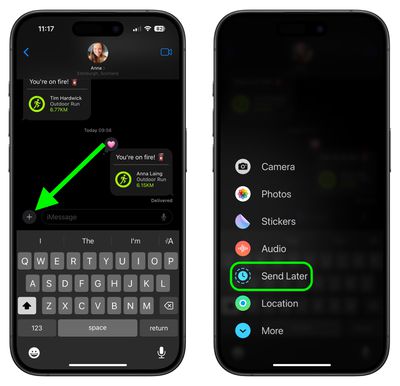
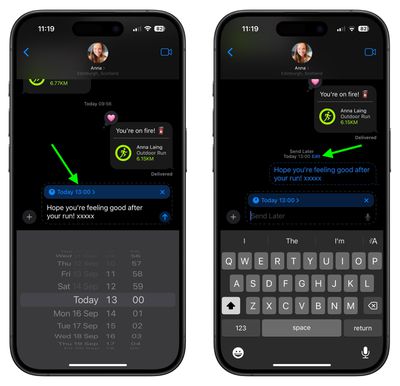
Scheduled messages are displayed at the bottom of a conversation. If you want to change the time of a message or cancel it, tap the Edit button. You will have options to edit the time, delete the message, or send it immediately.
Note that messages can be scheduled up to 14 days in advance, so if it's August 1, for example, you can schedule up to August 15. Messages are sent even if your iPhone is offline without a Wi-Fi or cellular connection.

























![Apple Watch Ultra 3 Hits New Low Price With Amazon's $299 Discount [Updated]](https://images.macrumors.com/t/BXKI27vT0hWfumJQpYzf41rH3Mw=/112x112/article-new/2026/10/apple-watch-ultra-3-milanese.jpeg)

















