With iOS 18.2, Apple introduced ChatGPT integration with Apple Intelligence to expand the range of AI capabilities accessible to users on supported iPhone models. One skill in particular that you may not be aware of is the ability to generate images in the Messages app, ready for sharing. ChatGPT leverages DALL·E to generate the images, and the results are almost invariably better than Apple's Image Playground. Keep reading to learn how it's done.
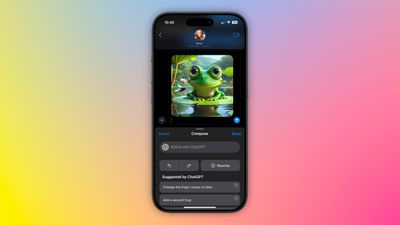
chatgpt image messages

Set Up ChatGPT on Your iPhone

If you have Apple Intelligence enabled on an iPhone 15 Pro or iPhone 16, setting up ChatGPT integration requires just a few steps, and you can begin without even having a ChatGPT account. You can always start with the basic setup and upgrade to a connected account later if needed, although in our tests there isn't too much difference between them when used within the context of daily iPhone usage.

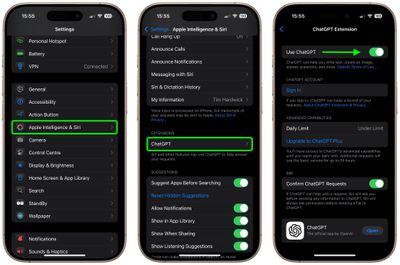
  1. Open Settings.
  2. Tap Apple Intelligence & Siri.
  3. Under "Extensions," tap ChatGPT.
  4. Toggle on the switch next to Use ChatGPT.
settings

If you have a ChatGPT account (free or paid), you can optionally Sign In from this last screen using your account credentials.

Generate Images in Messages

When ChatGPT integration is enabled, whenever you invoke Siri, the voice assistant analyzes your request to see if it's something that needs to be answered by ChatGPT. However, you can specify that you want to use ChatGPT simply by starting a Siri query with "ChatGPT."

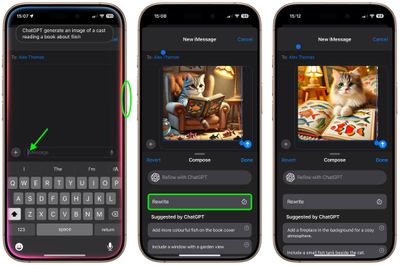
So the next time you're in a Messages conversation and want to express something with an image, tap inside the input field, hold down the Side button on your device to rouse Siri, then say something like, "ChatGPT, generate an image of a cat reading a book about fish." Give it a few seconds to think, and ChatGPT will drop the image into the text field, ready for it to be shared in the conversation.
messages
If you're happy with the output, just tap the Send button to send it on its way. If the image doesn't turn out quite how you hoped, you have a few options. You can tap Rewrite, and ChatGPT will re-generate from scratch a new image based on your prompt.

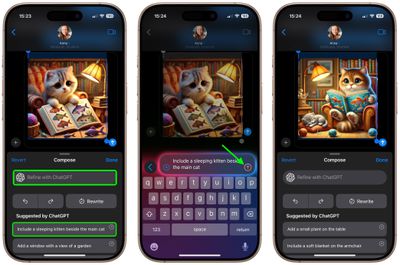
Alternatively, you can tap one of the provided suggestions from ChatGPT to add specific details to the image, or you can tap Refine with ChatGPT and type your own description for more exact detail requests. Simply hit the colored arrow button to send the prompt to ChatGPT, and it will work its magic.
messages
As you can see, the combination of Siri and ChatGPT easily enhances the voice assistant's capabilities compared to what most iPhone users will be used to. The integration works well even for complex queries involving problem solving, writing assistance, detailed explanations, and step-by-step instructions. For everything you can do with ChatGPT in iOS 18.2 and later, be sure to check out our dedicated guide.


Top Rated Comments

turbineseaplane Avatar
11 months ago
What does one even do with this output?

Is this just sort of a fun bauble?
Score: 17 Votes (Like | Disagree)
Dwalls90 Avatar
11 months ago
It's wild to me that Image Playground still can't do this
Score: 7 Votes (Like | Disagree)
seanmcbay Avatar
11 months ago
Why is generative AI only able to render chubby faced cats? I haven’t seen one that was able to generate a photo of a more narrow faced cat.
Score: 6 Votes (Like | Disagree)
9081094 Avatar
11 months ago
So Apple could better have used their programmers for solving bugs in iOS 18 than writing code for image playgrounds which aren’t as good as with ChatGPT and dall.e?

What a world we live in ??‍♂️
Score: 6 Votes (Like | Disagree)
Gix1k Avatar
11 months ago
Serious question....people actually use this feature? There's no situation in my life where I need a pic of a cat reading a book or a frog in a space suit.
Score: 5 Votes (Like | Disagree)
sw1tcher Avatar
11 months ago
I hope this isn't the sort of innovation Tim Cook talked about ('https://forums.macrumors.com/threads/apple-ceo-tim-cook-theres-a-lot-of-innovation-left-for-future-iphone-development.2448438/') during yesterday's earnings call.
Score: 5 Votes (Like | Disagree)

Popular Stories

iOS 26

iOS 26.2 Coming Soon With These 8 New Features on Your iPhone

Thursday December 11, 2025 8:49 am PST by
Apple seeded the second iOS 26.2 Release Candidate to developers earlier this week, meaning the update will be released to the general public very soon. Apple confirmed iOS 26.2 would be released in December, but it did not provide a specific date. We expect the update to be released by early next week. iOS 26.2 includes a handful of new features and changes on the iPhone, such as a new...
Google maps feaure

Google Maps Quietly Added This Long-Overdue Feature for Drivers

Wednesday December 10, 2025 2:52 am PST by
Google Maps on iOS quietly gained a new feature recently that automatically recognizes where you've parked your vehicle and saves the location for you. Announced on LinkedIn by Rio Akasaka, Google Maps' senior product manager, the new feature auto-detects your parked location even if you don't use the parking pin function, saves it for up to 48 hours, and then automatically removes it once...
AirPods Pro Firmware Feature

Apple Releases New Firmware for AirPods Pro 2 and AirPods Pro 3

Thursday December 11, 2025 11:28 am PST by
Apple today released new firmware designed for the AirPods Pro 3 and the prior-generation AirPods Pro 2. The AirPods Pro 3 firmware is 8B30, up from 8B25, while the AirPods Pro 2 firmware is 8B28, up from 8B21. There's no word on what's include in the updated firmware, but the AirPods Pro 2 and AirPods Pro 3 are getting expanded support for Live Translation in the European Union in iOS...
iOS 26

iOS 26.4 and iOS 27 Features Revealed in New Leak

Friday December 12, 2025 10:56 am PST by
Macworld's Filipe Espósito today revealed a handful of features that Apple is allegedly planning for iOS 26.4, iOS 27, and even iOS 28. The report said the features are referenced within the code for a leaked internal build of iOS 26 that is not meant to be seen by the public. However, it appears that Espósito and/or his sources managed to gain access to it, providing us with a sneak peek...
Foldable iPhone 2023 Feature 1

Apple to Make More Foldable iPhones Than Expected [Updated]

Tuesday December 9, 2025 9:59 am PST by
Apple has ordered 22 million OLED panels from Samsung Display for the first foldable iPhone, signaling a significantly larger production target than the display industry had previously anticipated, ET News reports. In the now-seemingly deleted report, ET News claimed that Samsung plans to mass-produce 11 million inward-folding OLED displays for Apple next year, as well as 11 million...
AirTag 2 Mock Feature

Apple AirTag 2: Four New Features Found in iOS 26 Code

Thursday December 11, 2025 10:31 am PST by
The AirTag 2 will include a handful of new features that will improve tracking capabilities, according to a new report from Macworld. The site says that it was able to access an internal build of iOS 26, which includes references to multiple unreleased products. Here's what's supposedly coming: An improved pairing process, though no details were provided. AirTag pairing is already...
iOS 26

Apple Releases iOS 26.2 With Alarms for Reminders, Lock Screen Changes, Enhanced Safety Alerts and More

Friday December 12, 2025 10:10 am PST by
Apple today released iOS 26.2, the second major update to the iOS 26 operating system that came out in September, iOS 26.2 comes a little over a month after iOS 26.1 launched. ‌iOS 26‌.2 is compatible with the ‌iPhone‌ 11 series and later, as well as the second-generation ‌iPhone‌ SE. The new software can be downloaded on eligible iPhones over-the-air by going to Settings >...
iOS 26

15 New Things Your iPhone Can Do in iOS 26.2

Friday December 5, 2025 9:40 am PST by
Apple is about to release iOS 26.2, the second major point update for iPhones since iOS 26 was rolled out in September, and there are at least 15 notable changes and improvements worth checking out. We've rounded them up below. Apple is expected to roll out iOS 26.2 to compatible devices sometime between December 8 and December 16. When the update drops, you can check Apple's servers for the ...
maxresdefault

iOS 26 Code Leak Reveals Apple Smart Home Hub Details

Thursday December 11, 2025 4:02 pm PST by
Apple is working on a smart home hub that will rely heavily on the more capable version of Siri that's coming next year. We've heard quite a bit about the hub over the last two years, but a recent iOS 26 code leak provides additional insight into what we can expect and confirms rumored features. Subscribe to the MacRumors YouTube channel for more videos. Macworld claims to have access to an ...