How to Check the FaceTime Numbers you Have Blocked - MacRumors
Skip to Content

How to Check the FaceTime Numbers you Have Blocked

by

ios12 facetime iconFaceTime is great for when you want to stay in touch with friends and family using your Apple devices, but it's also pretty good at dealing with contacts that you don't want to hear from.

If you've blocked people from calling you on FaceTime and you want to see a list of their numbers, you can do so by following the steps below. The first set of steps are for iOS devices, while the second relate to ‌FaceTime‌ on Mac.

How to Check Blocked FaceTime Numbers on iPhone and iPad

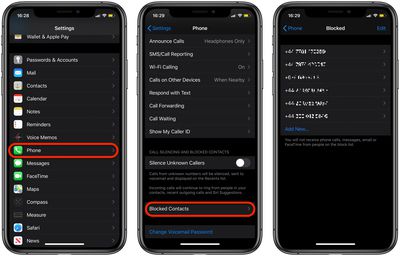
  1. Launch the Settings app on your iOS device.
  2. Scroll down and tap Phone.
    blocked contacts ios

  3. Tap Blocked Contacts.
  4. You should see the numbers you blocked in the Blocked list.
How to Check Blocked FaceTime Numbers on Mac

  1. Launch the FaceTime app from your Mac's Applications folder.
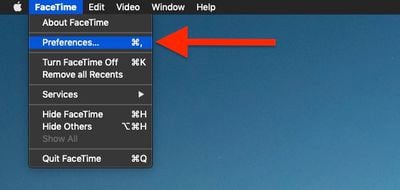
  2. Select FaceTime -> Preferences from the menu bar at the top of the screen.FaceTime

  3. Click the Blocked tab.

You'll be able to review a list of all blocked numbers.

Popular Stories

Aston Martin CarPlay Ultra Screen

Apple Says CarPlay Ultra is Coming to These Vehicle Brands

Thursday May 21, 2026 11:53 am PDT by
Last year, Apple launched CarPlay Ultra, the long-awaited next-generation version of its CarPlay software system for vehicles. Nearly a year later, CarPlay Ultra is still limited to Aston Martin's latest luxury vehicles, but that should change fairly soon. In May 2025, Apple said many other vehicle brands planned to offer CarPlay Ultra, including Hyundai, Kia, and Genesis. CarPlay Ultra...
iOS 27 on iPhone 17 1

iOS 27 Beta Available Tomorrow With These 12 New Features

Sunday June 7, 2026 8:39 am PDT by
Apple is set to unveil iOS 27 during its WWDC 2026 keynote this Monday, and there are many rumored features and changes for iPhones. The first developer beta of iOS 27 will likely be available immediately following the keynote, and a public beta typically follows in July. Following beta testing, the software update should be released to all users with a compatible iPhone in September....
ios 26 iphone 16 pro lock screen notifications feature 1

iOS 27 Notifications Will Slide in From Left Side of Your iPhone's Screen


Friday June 5, 2026 7:24 am PDT by

Bloomberg's Mark Gurman today revealed another iOS 27 change: notifications will slide in from the left side of the screen instead of from the top. In addition, accessing Notification Center on iOS 27 will require swiping down on the top-left corner of the screen. If you swipe down on the Dynamic Island area, a new "Search or Ask" interface tied to the revamped Siri will appear, instead of...