Got a tip for us? Share it...

Google Adds Gmail and Calendar Push Notifications to iPhone App


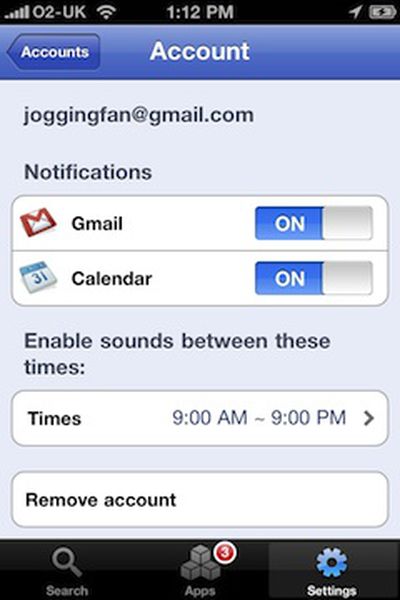
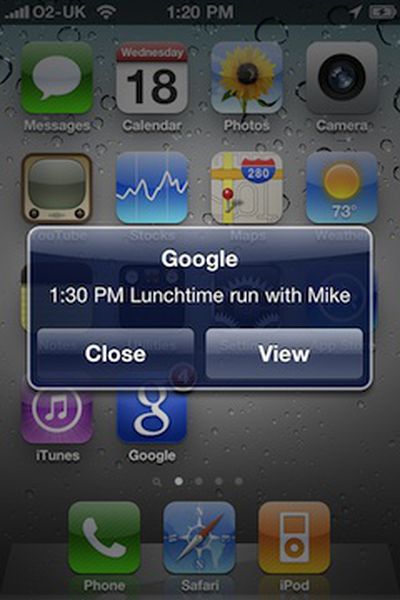
Google today announced an update to its Google Mobile App for the iPad, iPhone, and iPod touch, bringing push notifications for Gmail and Google Calendar.

Ever missed an appointment or important email because you were away from your desk? Now Google Mobile App can help with push notifications from your Google account to your iPhone -- an icon badge shows you've got new mail in Gmail, and Google Calendar event reminders appear right on your home screen.

Also included in the update is as-you-type results for searches on flight info, weather, stock quotes and currency conversions.

The update appears to just be going live now, and may not yet be appearing for all users.

Top Rated Comments

(View all)

Posted: 23 months ago
SWEET! Love this
Rating: 0 Positives / 0 Negatives
Posted: 23 months ago
Interesting. I'll stick with Boxcar for now, but this is a nice option for the future.

If all the Twitter apps add their own push notices than Boxcar might stop being needed altogether.
Rating: 0 Positives / 0 Negatives
Posted: 23 months ago
Gmail/GCal already use push when using the Exchange setup with Gmail anyway. The above Gmail/Exchange setup also allows 2-way sync with Google Contacts. My calendar items have been 2-way synced with GCal for like a year and half now, and pop-ups work just like with the native iPhone calendar, because it IS the native iPhone calendar.

So how is this better or even necessary?

iOS lacks a good Android/WebOS notification system, so having that pop up for EACH new email would actually be a pretty terrible IMO.
Rating: 0 Positives / 0 Negatives
Posted: 23 months ago


iOS lacks a good Android/WebOS notification system, so having that pop up for EACH new email would actually be a pretty terrible IMO.


How is that terrible? I use boxcar, but the result is the same and I love it.

When I hear the e-mail sound I look at my screen and I know whether or not I want to pick up the phone, unlock it, launch mail, and wait for the message to load in the inbox.

Why would I want to do that every single time a message comes in? Most of the time they're not messages I care to look at right now. I have five "2 second glances" per hour. You'd suggest I turn them each into 20 second "mess with the phone" moments?

I'm not understanding how that's better.
Rating: 0 Positives / 0 Negatives
Posted: 23 months ago
How is this Gmail push different from the regular exchange-based Gmail push?

Similarly, why can't Google just sync the notification settings for calendar events and let the phone provide the notification locally?
Rating: 0 Positives / 0 Negatives
Posted: 23 months ago
Has anyone got notifications working yet? I've got a Google Apps account and I'm not getting any notifications.
Rating: 0 Positives / 0 Negatives
Posted: 23 months ago
Wake me up when the native mail.app can push Gmail :mad:
Rating: 0 Positives / 0 Negatives
Posted: 23 months ago

Wake me up when the native mail.app can push Gmail :mad:


You can get push Gmail in the native app by setting up using the exchange option as mentioned above. Server is m.google.com with your Gmail credentials.
Rating: 0 Positives / 0 Negatives
Posted: 23 months ago
Cool, it doesn't work.
Rating: 0 Positives / 0 Negatives
Posted: 23 months ago

Wake me up when the native mail.app can push Gmail :mad:


Wake up.
Rating: 0 Positives / 0 Negatives

[ Read All Comments ]