Got a tip for us? Share it...

'Photoshop Express' Comes to the iPad [Updated x2]


Adobe yesterday released an update to its popular Photoshop application for the iPhone, renaming it Adobe Photoshop Express and bringing iPad compatibility to the application. First released for the iPhone last October, the application offers a number of simple image editing options, including cropping, rotating, color adjustment, and filters.
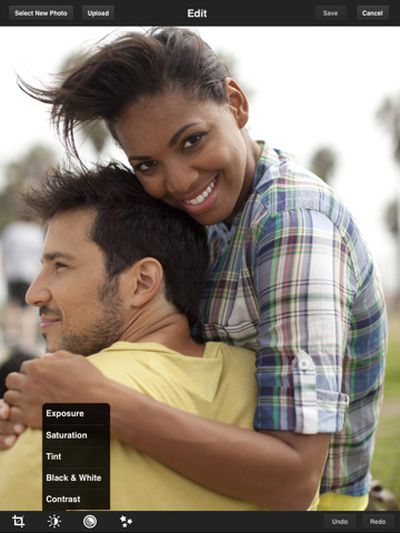

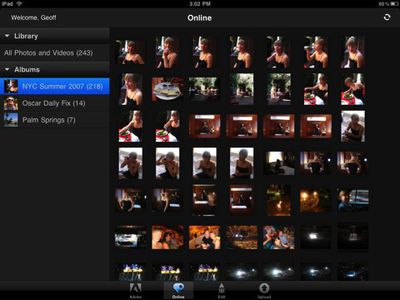
With the increased screen real estate available on the iPad, Photoshop Express can now offer streamlined gallery views with workflows that allow users to easily work on multiple photos in succession.

Features specific to iPad:
- Support for portrait and landscape orientations
- Redesigned Online, Edit, and Upload workflows
- Ability to work on multiple photos in sequence from within a single workflow
- Redesigned Organizer view with simplified album sharing
- Updated icons and visuals that make it easier to navigate and use the Editor
- Ability to upload to Photoshop.com and Facebook simultaneously

Adobe has expressed interest in finding out from users of the company's desktop version of Photoshop how they might be interested in viewing and working with Photoshop files on the iPad, and while Photoshop Express obviously does not offer anywhere near the functionality of desktop Photoshop, it does demonstrate Adobe's commitment to the platform as it begins testing out functionalities that could eventually be expanded into a more full-featured iPad application.

Update: As noted by Gizmodo and TUAW, this initial version Photoshop Express appears to suffer from some major stability problems, which are causing numerous crashes and other quirky behavior. Consequently, it is recommended that users hold off from downloading or updating to the new version until Adobe fixes the issues.

Update 2: Adobe has already fixed the crashing bugs and Apple has pushed the update to the App Store, so it should be safe to download now.


Top Rated Comments

(View all)

20 months ago
Well I hope it works better then Flash does on my Mac.
Rating: 0 Positives / 0 Negatives
20 months ago
Really this doesn't make front page when the kind of rechargeable batteries apple uses does?
Rating: 0 Positives / 0 Negatives
20 months ago
What is the point of this w/o raw support? The best I can get is opening raw files, but only allowing for editing on the low res JPEG sidecar file attached to the raw image. One raw file on my iPad is ~30 MB, which is well within the ram amount of the iPad (at 256 MB), even after factoring overhead for the OS.
Rating: 0 Positives / 0 Negatives
20 months ago
why no levels or curves adjustments?
the best thing for any bad photo is a quick midtone adjustment of curves and adobe didn't bring it to the mobile platform, sad
so much better to curve it than throw contrast at it
Rating: 0 Positives / 0 Negatives
20 months ago
As a regular user of Photoshop for Mac I'd like to see Photoshop Express include more features. I've used it on my iPhone but it's really too small a screen to do much image editing. The iPad version will be much more useful to me.

Adobe just needs to keep the interface from getting too complicated for routine uses. They've updated the user interface so I think they are moving in the right direction.
Rating: 0 Positives / 0 Negatives
20 months ago

why no levels or curves adjustments?
the best thing for any bad photo is a quick midtone adjustment of curves and adobe didn't bring it to the mobile platform, sad
so much better to curve it than throw contrast at it


I agree. They should call it Elements™ Express.

I am surprised this isn't on front page - considering the stories that are FP.
Rating: 0 Positives / 0 Negatives
20 months ago
Free and still very underwhelming. None of the features distinguish it from any other p.o.c. image editor on the iPad. Would love to see a paid version that allows you to manipulate layers in a PSD -- in other words, something a Photoshop user would actually use to do real work.
Rating: 0 Positives / 0 Negatives
20 months ago

-- in other words, something a Photoshop user would actually use to do real work.


But then why wouldn't you do this real work on your "real" computer then? In my opinion, photoshop on the iPad is silly. Why would you want Layers & Curves on the iPad? Instead on downloading to the iPad, just download to your Mac.

A simplistic version of Photoshop seems to be more logical as an iPhone App. At least the iPhone actually take photos. So you can tweak them there then upload or e-mail them out. But once again, who wants a more powerful version Photoshop to use on the iPhone? I think what they gave us is fine.

Just my personal opinion. I'd rather have a nice portfolio app to use on the iPad.
Rating: 0 Positives / 0 Negatives
20 months ago

I agree. They should call it Elements™ Express.

I am surprised this isn't on front page - considering the stories that are FP.


I agree-- This is a pretty big step in using the ipad as more of a portable graphic design tool than a portable media player/application player.
Rating: 0 Positives / 0 Negatives
20 months ago
Why isn't this on the front page???
Rating: 0 Positives / 0 Negatives

[ Read All Comments ]