Got a tip for us? Share it...

Zinio Magazine Reader App Released


Zinio, a digital publisher of magazines and books, announced the launch of its new magazine reader iPhone app today. The app [App Store link] offers Zinio subscribers the ability to read select magazines on an iPhone or iPod touch, featuring zoom capabilities and a special enhanced text reading mode as well as other multiimedia features.

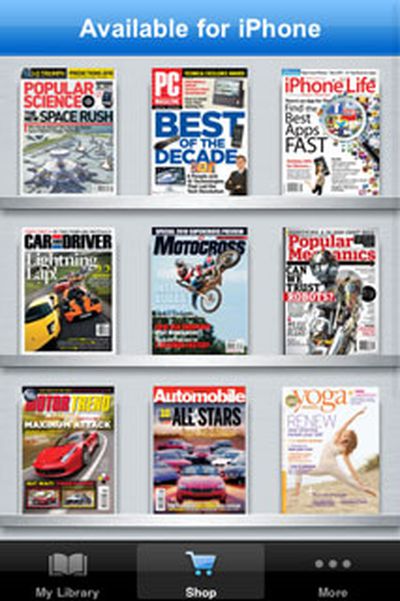
Only a handful of magazines in Zinio's portfolio are currently available for reading through the iPhone app though more will be available in the future:

Zinios highly anticipated free application for the iPhone and iPod touch initially launches with access to titles including: Automobile Magazine, Car and Driver, Chicago magazine, iPhone Life, Marie Claire, Motor Trend, PC Magazine, Popular Mechanics, Popular Science, Redbook, The Independent Guide to the iPhone 3GS, Transworld Motocross, Transworld Skateboarding, Vegetarian Times, VIVmag, Yoga Journal and many more. Subsequently, the rest of its global catalog of thousands of books and magazines will be released.
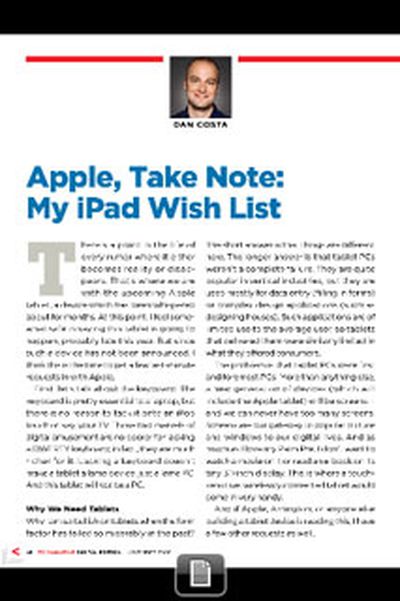
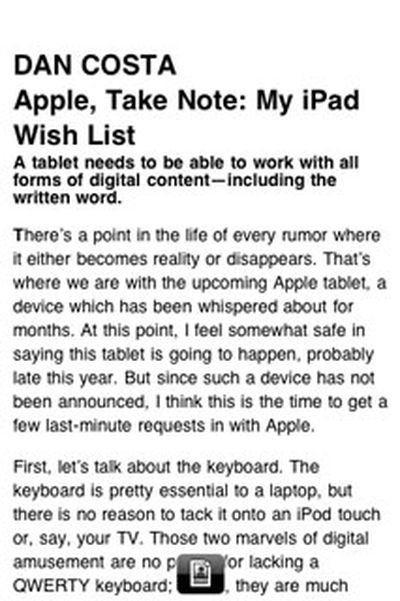

The normal view (left) and the optimized text view (right)


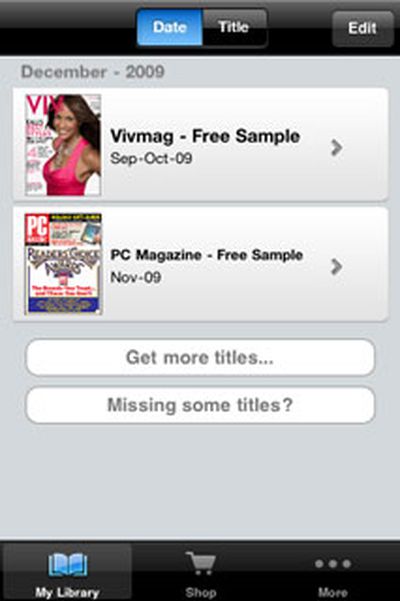
Users can purchase magazine subscriptions directly on their iPhone or iPod touch - tapping on a magazine in the Shop tab opens a page in Safari where the purchase options are available. Magazines can also be purchased from Zinio's web site, though only those compatible with the new app will be visible on an iPhone or iPod touch.

Magazines can only be downloaded when connected to a Wi-Fi network. Once downloaded, content can be read even when no internet connection is available.

Zinio also offers a reader application for the Mac. This application will display all other digital content in a Zinio user's library beyond those subscriptions that are currently compatible with the iPhone app.


Top Rated Comments

(View all)

Posted: 31 months ago
Can't see this taking of on a small screen but it could be just a precursor to Apples really bringing out a real iTablet for sure this time. :rolleyes:
Rating: 0 Positives / 0 Negatives
Posted: 31 months ago

Can't see this taking off on a small screen but it could be just a precursor to Apples really bringing out a real iTablet for sure this time. :rolleyes:

I agree with your first thought -- the iPhone/iPod Touch are just too small for reading. I've got tons of books on my iPhone and although I've played around with them and read a few short stories, it's just too small.
Rating: 0 Positives / 0 Negatives
Posted: 31 months ago
Bout time.
Rating: 0 Positives / 0 Negatives
Posted: 31 months ago

Can't see this taking of on a small screen but it could be just a precursor to Apples really bringing out a real iTablet for sure this time. :rolleyes:


I already installed the App, yes hard to read on the small screen. A 10.1" "tablet" would be the perfect device for this.
Rating: 0 Positives / 0 Negatives
Posted: 31 months ago
not sure if i get forcing content intended for magazine to an electronic device.

i just think i'd rather get whatever information they have to offer some other way.
Rating: 0 Positives / 0 Negatives
Posted: 31 months ago
Did y'all actually download the app? I wasn't sure about it at first...

Yes, the iPhone screen seems too small to read a magazine on. But it's not too small to read a text on. And that's the sweetness of this little app. It takes the articles in the magazine and turns them basically a more functional text message. You can resize and rewrap the text (can't do that with the pinch, eh) in the "optimized text view".

Here's the best way to do it: Download the PC Magazine entirely; the app doesn't do much until you get the whole magazine downloaded. Then, turn the thing on it's side and use landscape mode to swipe through the pages. The text is big enough to see the pictures and read the titles, so what more do you want for something that fits in your pocket? When you get to the article that you want to read, tap the magic button at the bottom.

The magic button turns the image into pure text. If more than one story is on the page, it'll even ask you which one you want to read. When it comes up, you're in business. Tap for font size selection. Go as big as you like, because it'll rewrap the text. It's even got links in the story that will open up safari and take you right to a website. It'll even send the whole article as an email (complete with any of the above mentioned links).

When you're done, you hit the magic button again and go back to swipe mode for more magazine-like reading. Spend 10 minutes with it and you'll start to wish that you could use this thing to check your gmail. Spend 20 minutes with it and you'll wish they had more magazines available for it.

Fantastic.
Rating: 0 Positives / 0 Negatives
Posted: 31 months ago
This is to be expected right about now. I wonder if other Apps will be enhanced in other ways when they hit the iSlate.
Rating: 0 Positives / 0 Negatives
Posted: 31 months ago

Did y'all actually download the app? I wasn't sure about it at first...

Yes, the iPhone screen seems too small to read a magazine on. But it's not too small to read a text on. And that's the sweetness of this little app. It takes the articles in the magazine and turns them basically a more functional text message. You can resize and rewrap the text (can't do that with the pinch, eh) in the "optimized text view".

Here's the best way to do it: Download the PC Magazine entirely; the app doesn't do much until you get the whole magazine downloaded. Then, turn the thing on it's side and use landscape mode to swipe through the pages. The text is big enough to see the pictures and read the titles, so what more do you want for something that fits in your pocket? When you get to the article that you want to read, tap the magic button at the bottom.

The magic button turns the image into pure text. If more than one story is on the page, it'll even ask you which one you want to read. When it comes up, you're in business. Tap for font size selection. Go as big as you like, because it'll rewrap the text. It's even got links in the story that will open up safari and take you right to a website. It'll even send the whole article as an email (complete with any of the above mentioned links).

When you're done, you hit the magic button again and go back to swipe mode for more magazine-like reading. Spend 10 minutes with it and you'll start to wish that you could use this thing to check your gmail. Spend 20 minutes with it and you'll wish they had more magazines available for it.

Fantastic.


Thanks for the good review of this. It's easily enough to get me to trial it properly.

One thing I think they might want to reconsider is the restriction on getting it only over wi-fi. Crippling apps like this because we might spend too much on our mobile data, is patronising and treats us like children that need to be protected for our own safety. The very time you might often want to read a magazine is not necessarily when sitting cozily at home with a home wi-fi signal, but at other times when people love to read; like on the train or in a waiting room somewhere or when there's a bit of time between meetings.

Magazines are sold on the street as that is where people want them enroute to where they're going. By limiting it to wi-fi only, your magazines won't be able to be bought on the street through this app right?

Unlock the 3G functionality in this please app makers.
Rating: 0 Positives / 0 Negatives
Posted: 31 months ago
Oh and now I find its not even available in my App store. :mad:
Rating: 0 Positives / 0 Negatives
Posted: 31 months ago
damnit. I was excited for a second. I get high times through zinio, but of course it's not available to read on the iPhone yet. oh well, hopefully soon.
Rating: 0 Positives / 0 Negatives

[ Read All Comments ]