'Airfoil Speakers Touch' Now Available in App Store
Rogue Amoeba is well-known in the Mac community for Airfoil, the $25 Mac and PC application that allows any audio to be streamed from a host computer to an AirPort Express or Apple TV. The original concept was expanded by the addition of free Airfoil Speakers applications for Mac, Windows, and Linux, allowing other computers to be recipients of audio streamed from the primary computer.
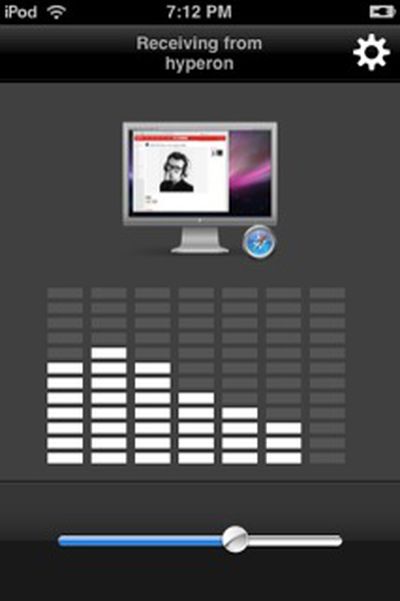
Rogue Amoeba has taken things one step further with the release of Airfoil Speakers Touch [App Store, Free], which allows audio to be streamed from a host computer directly to an iPhone or iPod touch. While Airfoil Speakers Touch is a free application, it does still of course require the full version of Airfoil running on the host computer in order to function.
With Airfoil Speakers Touch, you can send any audio from your Mac or PC, straight to your iPhone or iPod Touch! Just connect your device to your local Wifi network, then open up Airfoil on your Mac or Windows machine, and start transmitting. You'll be able to send audio from iTunes, RealPlayer, and even web-based sources like Pandora and Last.fm. Now, if your Mac or Windows machine can play it, you can hear it on your iPhone or iPod Touch!
Popular Stories
Apple has announced it will be holding a special event on Tuesday, May 7 at 7 a.m. Pacific Time (10 a.m. Eastern Time), with a live stream to be available on Apple.com and on YouTube as usual. The event invitation has a tagline of "Let Loose" and shows an artistic render of an Apple Pencil, suggesting that iPads will be a focus of the event. Subscribe to the MacRumors YouTube channel for more ...
Apple has dropped the number of Vision Pro units that it plans to ship in 2024, going from an expected 700 to 800k units to just 400k to 450k units, according to Apple analyst Ming-Chi Kuo. Orders have been scaled back before the Vision Pro has launched in markets outside of the United States, which Kuo says is a sign that demand in the U.S. has "fallen sharply beyond expectations." As a...
Apple is finally planning a Calculator app for the iPad, over 14 years after launching the device, according to a source familiar with the matter. iPadOS 18 will include a built-in Calculator app for all iPad models that are compatible with the software update, which is expected to be unveiled during the opening keynote of Apple's annual developers conference WWDC on June 10. AppleInsider...
The upcoming iOS 17.5 update for the iPhone includes only a few new user-facing features, but hidden code changes reveal some additional possibilities. Below, we have recapped everything new in the iOS 17.5 and iPadOS 17.5 beta so far. Web Distribution Starting with the second beta of iOS 17.5, eligible developers are able to distribute their iOS apps to iPhone users located in the EU...
Apple today released several open source large language models (LLMs) that are designed to run on-device rather than through cloud servers. Called OpenELM (Open-source Efficient Language Models), the LLMs are available on the Hugging Face Hub, a community for sharing AI code. As outlined in a white paper [PDF], there are eight total OpenELM models, four of which were pre-trained using the...
Apple has stopped production of FineWoven accessories, according to the Apple leaker and prototype collector known as "Kosutami." In a post on X (formerly Twitter), Kosutami explained that Apple has stopped production of FineWoven accessories due to its poor durability. The company may move to another non-leather material for its premium accessories in the future. Kosutami has revealed...