Got a tip for us? Share it...

iPhone Controller App for the Sonos Multi-Room Music System

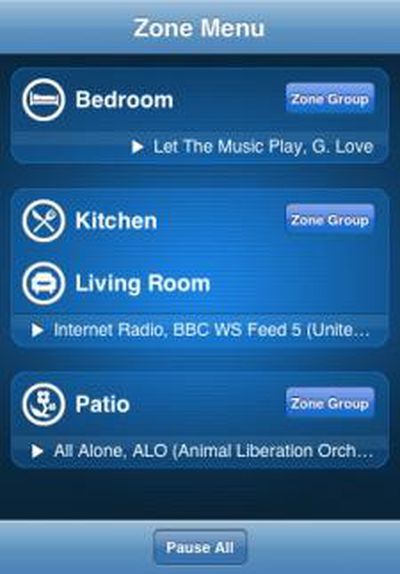
This one's only useful for those with Sonos hardware that provides music to multiple rooms in your house. Though, the iPhone app seems cool enough that you might actually consider buy the required hardware after seeing it.

With Sonos and an iPhone you can instantly access all the music in your personal collection, including your iTunes playlists, plus thousands of free Internet radio stations. And Sonos works seamlessly with the most popular online music services, including Last.fm, Napster, Pandora, Rhapsody and SIRIUS, so you can listen to millions of songs in every room. Play the same song all over the house in perfect synchronization. Or let everyone in the house listen to exactly what they want rock in the kitchen, local news in the bedroom and jazz in the living room. Simply grab the iPhone and pick a room, point and flick to pick a song, and then hit play.

The video demo gives you an overview of the functionality. Essentially you can control the music to your entire house from your iPhone or iPod touch.

App Store Link: Sonos Controller, Free

Top Rated Comments

(View all)

Posted: 49 months ago
If you are a Sonos owner (and you really should be, it's an AMAZING device), you probably share my enthusiasm for this apps arrival. Controlling sonos from the iPhone is a natural extension of the system. I just downloaded it and it's currently building my library (it takes some time the first time out, especially with large libraries). so I can't comment on the app itself yet, but I'm thrilled that we have something official to play with.

Here is a link to the developers page:
http://kupuk.com/zones
Rating: 0 Positives / 0 Negatives
Posted: 49 months ago
I've always wondered. How is a Sonos and this app better than an Airport Express, iTunes and the Remote app?
Rating: 0 Positives / 0 Negatives
Posted: 49 months ago

I've always wondered. How is a Sonos and this app better than an Airport Express, iTunes and the Remote app?

you don't need the computer on the whole time, and can have the same music in several rooms played simultaneously, for a party for example
Rating: 0 Positives / 0 Negatives
Posted: 49 months ago
There are dozens of reasons why Sonos is a vastly different beast than the setup you described. Not the least of which is easy of use and quality of audio. Sonos can play most anything you throw at it (including FLAC which many people who care about audio quality tend to use). I have my Sonos setup with a NAS so my computer is completely out of the equation. I also have a fairly large collection and Sonos makes it a breeze to navigate and easily access music and play multiple streams in different rooms, or easily link them to play together. You can also access Rhapsody over the air (no computer required) which is a fantastic all you can eat program, as well as Sirius, Pandora, Internet Radio, etc... It's by far the best addition to my home media environment in years.

As for this app, well, I still haven't had much of a chance to test drive it but it is VERY limited in functionality. It took an hour or so to index my library.

You can basically select a zone and then select either an album or track to play. You cannot access anything other than your actual library (nothing from the services menu such as sirius or pandora), you cannot link zones, and most importantly to me, you cannot see the "artist" level of your music library. As someone with a fairly large library, that is my typical browsing path as I have too many albums to easily navigate just at that level.

It's a welcome first effort but I sincerely hope the developer is up for refining and improving this with future releases.
Rating: 0 Positives / 0 Negatives
Posted: 49 months ago
Thanks for the replies. So the biggest difference is that you can play multiple streams to multiple zones. And after researching a bit it seems that some Sonos boxes can act like a receiver as well.

Here's why:
Internet radio/other streams or FLAC is a wash because AirFoil can stream any audio from OS X or Windows to an Airport Express/AppleTV (FLAC can be played back via VLC). Although the biggest flaw with using AirFoil is that Remote app can't control what's playing if it's not playable through iTunes.

I guess I just don't see justifying paying around $1000 to get started with a Sonos system when I can add an Airport Express (already have one) to my current setup as desired for $100 each, just to enjoy multiple streams to multiple zones and having remote convenience to streams that won't play in iTunes (Sirius, etc). Obviously this figure is assuming that with both the Sonos system and Airport Express setup you already have 1) a mac 2) an iPhone and 3) some sort of receiver in each zone with speakers attached.

If there's more to it please let me know because I am very interested in having in a centralized home audio through in wall/ceiling speakers by either "the box" as people call it, or some other system such as Sonos.
Rating: 0 Positives / 0 Negatives
Posted: 49 months ago
I think those are good points and that is why there are different solutions out there for different needs. Personally, the ease of use and quality of the audio for me is HUGE and not having to be tethered to a PC is also a big deal, especially when running off a NAS for your library. If you really want to understand the benefits of Sonos, I would strongly suggest you check out the Sonos Forums as they are true experts over there and could probably give you a far better answer than I could. Sonos also has (by far) the best tech support I've ever encountered and has a 30 day money back guarantee so it might be worth picking up a system for a test drive to see for yourself.

The best analogy I can come up with is VCRs and Tivo/DVRs. When they first came out, a lot of people said "I know how to use a VCR, I can program it to record shows, play back, etc... why do I need this" Now most of us can't imagine life without a DVR. They just perfectly integrate into the daily fabric of your media usage.

Rating: 0 Positives / 0 Negatives
Posted: 49 months ago
I really hope a similar thing comes out for the Squeezebox.
EDIT: Cool, iPeng already does it! Don't know why I didn't think of just trying to access through the web interface.
Rating: 0 Positives / 0 Negatives
Posted: 49 months ago
I have been a sonos user for some time and have been waiting for an iphone app interface. The sonos controller is very outdated and could really use a touch screen to help with the online searches. I tried out the itunes iphone app and would be ready to switch if it just included a sonos-like queue feature and access to online music. I know many prefer to own rather than rent from online services like napster and rhapsody, but I can't even access the itunes store in a convenient way. All that is missing is the right software, so I will continue to wait and see who comes out with it first. Also, I do not believe that sonos has the avantage when it comes to sound quality. With the right speakers and decent amplifier, quality is sure to be limited by the amount of compression typical with downloaded content.
Rating: 0 Positives / 0 Negatives
Posted: 48 months ago
This app has come a long way. Zones 1.2 was released in the App Store today. It's a major upgrade and improved the UIs significantly. It also adds support for Playlists, Internet Radio, Queue Management, LineIn, etc... There is still no support for Zone Management or Services (including Sirius, Pandora, Rhapsody, etc...). There is still no search function either.

That all being said, this is now a must have in my opinion if you have a Sonos and an iPhone/Touch and it's nice to see the developer cranking out such frequent updates.
Rating: 0 Positives / 0 Negatives
Posted: 47 months ago
Bump. Sonos just launched a free iPhone and iPod Touch application.

http://sonos.com/whattobuy/controllers/iphone/default.aspx

Anybody know if a Drobo will work with Sonos? Also, how will that setup work with the netshare hardware from Drobo and the new Firefly music application for it?
Rating: 0 Positives / 0 Negatives

[ Read All Comments ]