A new tool called iPhone Backgrounder is now available for jailbroken phones which allows you to run official App Store apps in the background. The timely release comes just as Apple's missed the September deadline for background push notifications.
Backgrounder is a Mobile Substrate-based extension to Apple's SpringBoard application launcher that allows applications to run in the background (applications are normally terminated upon suspension).
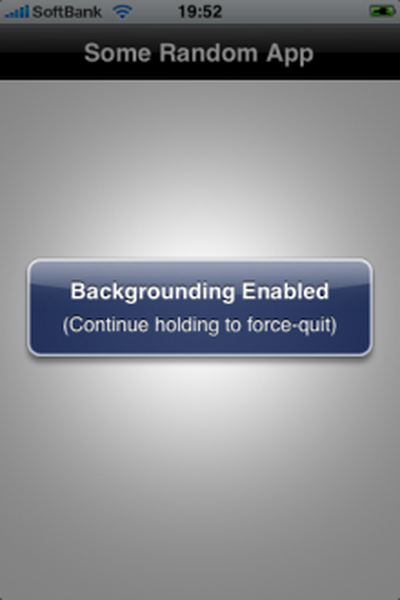
To enable backgrounding for the app you are currently running, you simply press and hold the home button until a message pops up telling you that "Backgrounding Enabled".
Users can also set up an XML file that will enable backgrounding on specific applications by default. Detailed instructions are provided. Users must have a jailbroken iPhone to take advantage of this application.
Apple has restricted the use of background applications due to concerns about memory and battery life, so your experience could vary.
Apple has announced it will be holding a special event on Tuesday, May 7 at 7 a.m. Pacific Time (10 a.m. Eastern Time), with a live stream to be available on Apple.com and on YouTube as usual. The event invitation has a tagline of "Let Loose" and shows an artistic render of an Apple Pencil, suggesting that iPads will be a focus of the event. Subscribe to the MacRumors YouTube channel for more ...
Apple has stopped production of FineWoven accessories, according to the Apple leaker and prototype collector known as "Kosutami." In a post on X (formerly Twitter), Kosutami explained that Apple has stopped production of FineWoven accessories due to its poor durability. The company may move to another non-leather material for its premium accessories in the future. Kosutami has revealed...
Apple has dropped the number of Vision Pro units that it plans to ship in 2024, going from an expected 700 to 800k units to just 400k to 450k units, according to Apple analyst Ming-Chi Kuo. Orders have been scaled back before the Vision Pro has launched in markets outside of the United States, which Kuo says is a sign that demand in the U.S. has "fallen sharply beyond expectations." As a...
The upcoming iOS 17.5 update for the iPhone includes only a few new user-facing features, but hidden code changes reveal some additional possibilities. Below, we have recapped everything new in the iOS 17.5 and iPadOS 17.5 beta so far. Web Distribution Starting with the second beta of iOS 17.5, eligible developers are able to distribute their iOS apps to iPhone users located in the EU...
Apple is finally planning a Calculator app for the iPad, over 14 years after launching the device, according to a source familiar with the matter. iPadOS 18 will include a built-in Calculator app for all iPad models that are compatible with the software update, which is expected to be unveiled during the opening keynote of Apple's annual developers conference WWDC on June 10. AppleInsider...
The lead developer of the multi-emulator app Provenance has told iMore that his team is working towards releasing the app on the App Store, but he did not provide a timeframe. Provenance is a frontend for many existing emulators, and it would allow iPhone and Apple TV users to emulate games released for a wide variety of classic game consoles, including the original PlayStation, SEGA Genesis,...