Got a tip for us? Share it...

TouchTerm: Simple SSH Client for iPhone


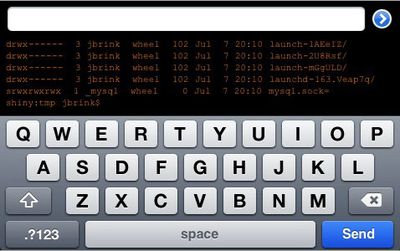
JBrink.net has released TouchTerm [$2.99, App Store], the first SSH client for the iPhone. Features include:

- Wi-Fi and EDGE/3G support: access and administer your servers from anywhere
- Control over font size and color
- Landscape mode support
- The ability to scroll over terminal output
- Saved connection parameters and passwords (if desired)
- A cross-session command history for quickly re-executing or editing previously entered commands
- No terminal emulation

Power users may want to wait until TouchTerm Pro is released which promises "a powerful, easy-to-use remote administration tool over SSH."

Terminal emulation, however, appears to be lacking in the current version of TouchTerm which makes it only useful for the simplest of tasks. Anything requiring any screen formatting (top, vi, emacs, pico) will fail. While the developer promises Terminal emulation to be available in a future free update, it's hard to recommend this app without it.

If you are willing to wait a little longer, Zinger-Soft is planning on releasing a more full featured SSH client for $4.99 called iSSH:

That being said, zinger-soft's app is complete and is simply awaiting government approval. It includes VT100, VT102, VT220, ANSI, xterm, and xterm-color emulation. It supports dynamically resizable terminals, fonts, and portrait and landscape mode (and, depending on the font, anywhere from 40x21 to 80x40). All the exotic key combinations (Ctrl-Shift-Up, for instance) are there. It has support for multiple simultaneous connections and maintains a list of open connections (as well as a default connection configuration list) that one will be able to reference and reconnect to on reopening the application. There is a scroll back buffer implemented in the standard iPhone scroll view interface, along with gesture arrow keys. Finally, it contains an X Server so one can switch between graphical and console input as necessary (and possible). Of course, for all the open sessions, the X Server is the same, so multiple machines will send their X clients to the same X Server.

Top Rated Comments

(View all)

Posted: 46 months ago
This is great news. I have been waiting for this for awhile. I might wait until the Pro version comes out, but regardless, I am happy to see something out. I'll be interested in hearing how people like it.
Rating: 0 Positives / 0 Negatives
Posted: 46 months ago
Wow Apple let this slide too. Crazy. Either they don't care or aren't paying any attention to what they are allowing hehe.
Rating: 0 Positives / 0 Negatives
Posted: 46 months ago
Why would Apple care? It's an SSH client, not a terminal for the the phone's OS.
Rating: 0 Positives / 0 Negatives
Posted: 46 months ago
An SSH client with good terminal support...and an X server! I'll gladly wait for that, especially at $4.99. It'll be interesting to see how well different X clients handle the strange display dimension. I also wonder if iSSH will have a way to do click and drag or if you just have to work around not having it.
Rating: 0 Positives / 0 Negatives
Posted: 46 months ago

Wow Apple let this slide too. Crazy. Either they don't care or aren't paying any attention to what they are allowing hehe.


Why would they care? An SSH Client will do no harm.
Rating: 0 Positives / 0 Negatives
Posted: 46 months ago
Looks like it's in the file system to me.. but okay hehe.
Rating: 0 Positives / 0 Negatives
Posted: 46 months ago

Looks like it's in the file system to me.. but okay hehe.


It is in *a* filesystem, that's what an SSH client does. :D
Rating: 0 Positives / 0 Negatives
Posted: 46 months ago
I know it's probably a terribly stupid question, but these sorts of things interest me and I enjoy learning about them.

What is this SSH stuff, and what does this app do?
Rating: 0 Positives / 0 Negatives
Posted: 46 months ago
SSH is an abbreviation for "secure shell" ... It's a protocol similar to "telnet" in many ways, which basically lets you remotely control the command prompt of another computer.

Traditionally, you'd use this with a Unix based computer of some sort (operating systems like Linux, or even remote controlling the command line prompt in OS X that you'd normally get by clicking on the "Terminal" icon in the Utilities folder).

SSH is superior to using "telnet" to accomplish the same task though, because it creates a secure, encrypted connection. (Someone can't "sniff" the packets of data and see a copy of what you type and what comes back to your iPhone's screen by intercepting the traffic in the middle.)


I know it's probably a terribly stupid question, but these sorts of things interest me and I enjoy learning about them.

What is this SSH stuff, and what does this app do?

Rating: 0 Positives / 0 Negatives
Posted: 46 months ago
Awesome! And it's about time. I can't believe apple didn't include ssh access out of the box. It makes the iphone the killer sysadmin app.
Rating: 0 Positives / 0 Negatives

[ Read All Comments ]