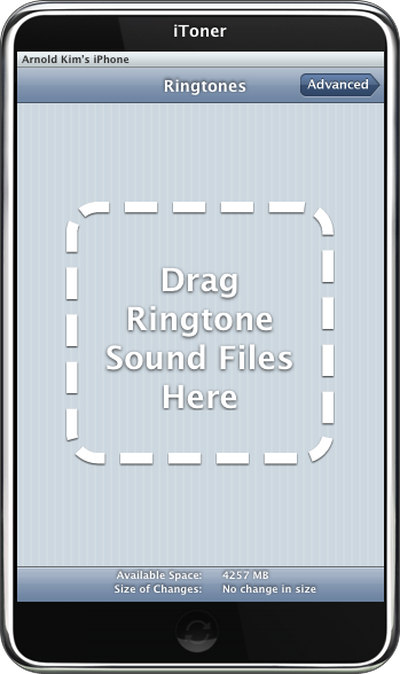
Mac software developer Ambrosia is poised to release their own iPhone Ringtone tool for the Mac (Intel and PPC). The shareware tool is called "iToner" and will allow you to easily sync audio files (MP3, AAC) to your iPhone for use as custom ringtones.
The shareware application is wrapping up beta testing and I've been able to test out a copy and it works quite well.You simply drag your audio files into the window and hit the "Sync" button on iToner and you're done. No resetting of the iPhone necessary. "Advanced Settings" brings up a list of your iTunes playlists and lets you sync an playlist at once. From the iPhone, the synced files appear on your ringtone list in both Contacts and Settings.
One thing to note is that the first version lacks a cropping/clipping tool, but I have heard that clipping and other advanced features will be coming in future versions of iToner.
Meanwhile, for the hacking-averse amongst us, Ambrosia tells us that they are installing ringtones "the proper way, without any hacks" and assures us that this should not affect future iPhone updates.
iToner should be available at Ambrosia's site within the next week.
Apple has announced it will be holding a special event on Tuesday, May 7 at 7 a.m. Pacific Time (10 a.m. Eastern Time), with a live stream to be available on Apple.com and on YouTube as usual. The event invitation has a tagline of "Let Loose" and shows an artistic render of an Apple Pencil, suggesting that iPads will be a focus of the event. Subscribe to the MacRumors YouTube channel for more ...
Apple has dropped the number of Vision Pro units that it plans to ship in 2024, going from an expected 700 to 800k units to just 400k to 450k units, according to Apple analyst Ming-Chi Kuo. Orders have been scaled back before the Vision Pro has launched in markets outside of the United States, which Kuo says is a sign that demand in the U.S. has "fallen sharply beyond expectations." As a...
Apple has stopped production of FineWoven accessories, according to the Apple leaker and prototype collector known as "Kosutami." In a post on X (formerly Twitter), Kosutami explained that Apple has stopped production of FineWoven accessories due to its poor durability. The company may move to another non-leather material for its premium accessories in the future. Kosutami has revealed...
The upcoming iOS 17.5 update for the iPhone includes only a few new user-facing features, but hidden code changes reveal some additional possibilities. Below, we have recapped everything new in the iOS 17.5 and iPadOS 17.5 beta so far. Web Distribution Starting with the second beta of iOS 17.5, eligible developers are able to distribute their iOS apps to iPhone users located in the EU...
Apple is finally planning a Calculator app for the iPad, over 14 years after launching the device, according to a source familiar with the matter. iPadOS 18 will include a built-in Calculator app for all iPad models that are compatible with the software update, which is expected to be unveiled during the opening keynote of Apple's annual developers conference WWDC on June 10. AppleInsider...